dsh-client-auto-retry
Run the following command in DeepSeek Harness:
dsh plugin install Frog755/dsh-client-auto-retry
Paste the following prompt into your AI chat to install this plugin:
In DeepSeek Harness, run the command `dsh plugin install Frog755/dsh-client-auto-retry` to install the plugin; the source code is available at: https://github.com/Frog755/dsh-client-auto-retry.
About this plugin
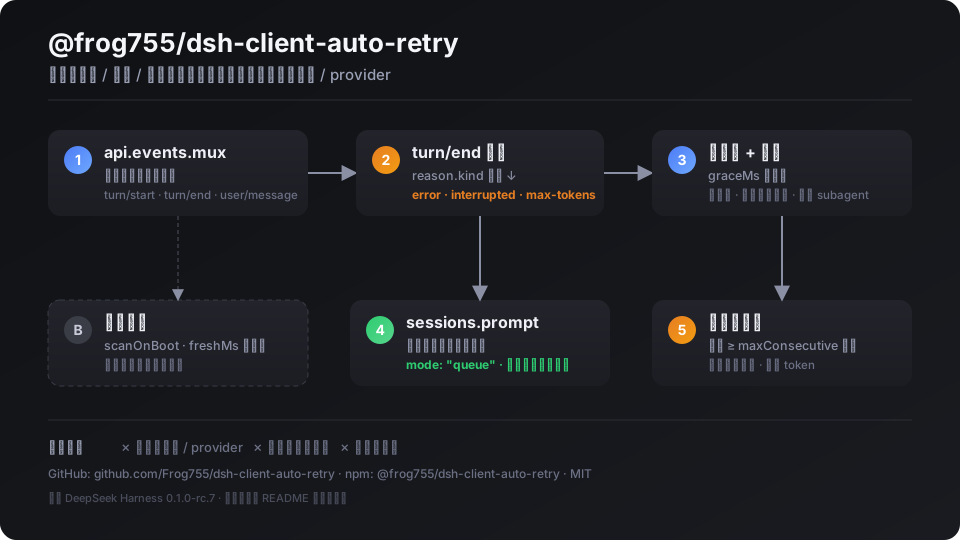
When using DeepSeek Harness (DSH) for AI conversations or tasks, sessions often get interrupted due to network glitches, API errors, timeouts, or reaching token limits, forcing users to manually click 'continue' and disrupting the flow. This plugin directly addresses this pain point by automating the recovery process, making interactions smoother and more efficient.
The core capability lies in real-time monitoring of DSH's session event stream. It detects when a turn ends due to errors, interruptions, or max-tokens, then automatically sends a 'continue' text after a configurable grace period. Built-in safeguards like cooldown periods and maximum consecutive retries prevent infinite loops, while optional scan-on-boot features recover recently interrupted sessions. The plugin focuses solely on retrying without switching models or providers, keeping it lightweight and dedicated.
Ideal for all DSH users, especially developers, content creators, and researchers who frequently engage in long generation tasks or require stable interactions. Whether dealing with unreliable networks or high-load API errors, this plugin significantly reduces manual intervention, enhancing automation and reliability in your workflow, allowing you to focus on core work rather than troubleshooting.
Screenshots
Use Cases
- Automatically recovers when a DSH session is interrupted due to network instability.
- After API errors or timeouts, the plugin sends a continue command automatically.
- Continues generation without manual intervention when output reaches token limits.
Best For
- DeepSeek Harness users who frequently encounter session interruptions.
- Developers needing a stable AI workflow for debugging.
- Content creators relying on long-form generation, seeking automated fault recovery.
Related Plugins
A service-oriented sidebar framework for DSH, offering a full workbench with file explorer, embedded browser, real terminal, Git panel, and extensible plugin services.

A beautiful, practical Claude Code-style TUI plugin with pixel whale top bar, flowing glow title, real-time status line, streaming thought expansion, time rewind, context progress bar and TPS gauge — zero core changes.

The plugin market for DeepSeek Harness: browse/search/one-click install community plugins and themes, with updates, backup/restore, hot disable, diagnostics, and AI fix.

A persistent whale widget on the DSH web UI that shows DeepSeek balance, today's usage, and per-turn cost, with drag-and-snap and sound effects.