dsh-decision-split
Run the following command in DeepSeek Harness:
dsh plugin install yuanbaoerer/dsh-decision-split
Paste the following prompt into your AI chat to install this plugin:
Install the plugin in DeepSeek Harness using the command `dsh plugin install yuanbaoerer/dsh-decision-split`, or visit the GitHub repository at https://github.com/yuanbaoerer/dsh-decision-split for more details.
About this plugin
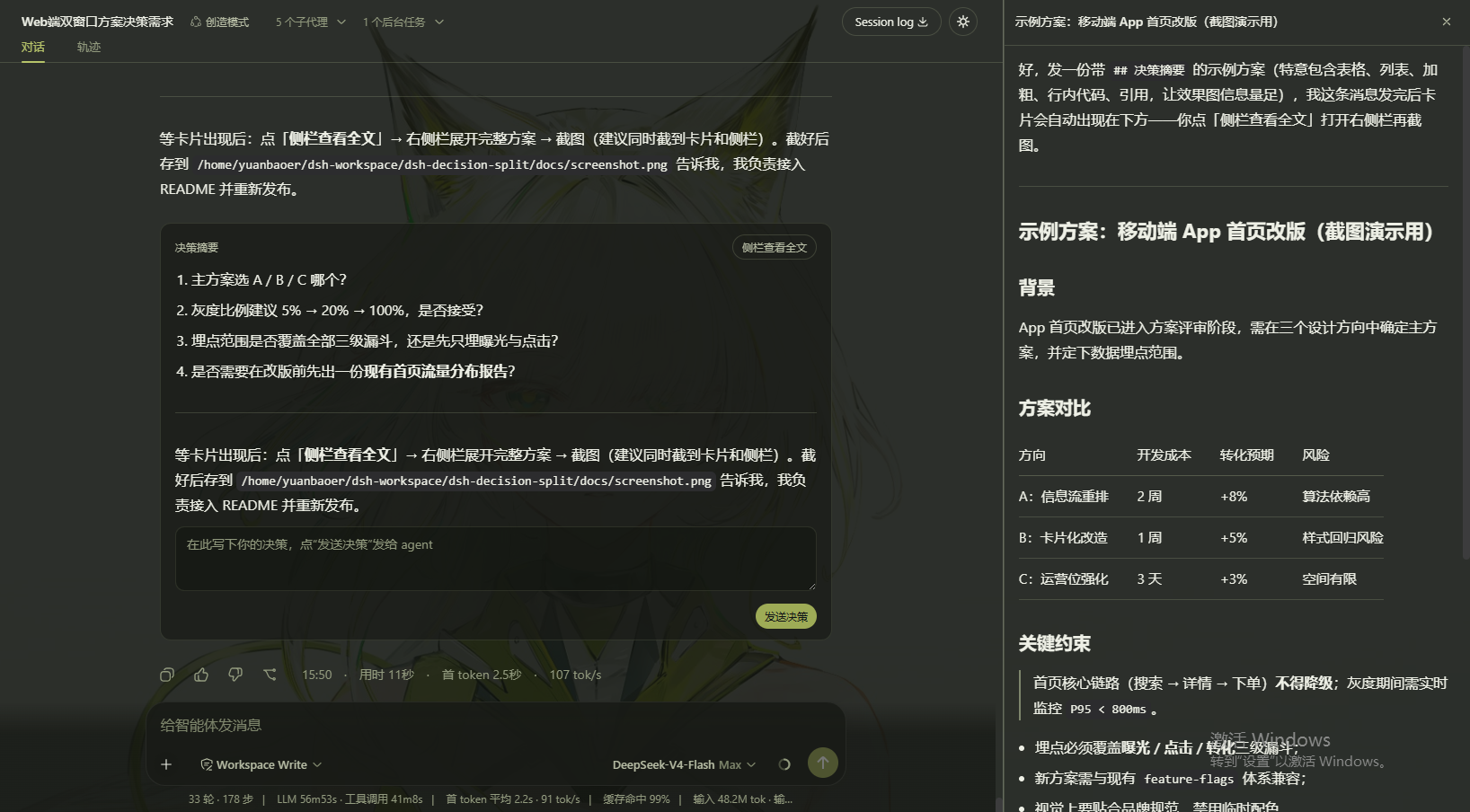
In the DeepSeek Harness Web UI, agent messages can be lengthy and complex, making it difficult for users to efficiently read and analyze them within the main interface, which hampers the user experience. The dsh-decision-split plugin addresses this by providing a split-screen reading feature. It adds a 'View Full Text in Sidebar' button at the end of each completed agent message, which opens a separate detail panel on the right side when clicked. This panel defaults to 480px in width, supports full markdown rendering and independent scrolling, allowing users to browse content freely without disrupting the main interface. With its simple design and no configuration required, this plugin is ideal for developers, data analysts, and other users who frequently need to inspect agent outputs for debugging or analysis.
Screenshots
Use Cases
- View full content of agent messages
- Read long texts independently via scrolling
- Easily toggle the side panel on and off
Best For
- Developers debugging agent outputs
- Data scientists analyzing conversation details
- Users seeking an enhanced reading experience in DeepSeek Harness
Related Plugins
A service-oriented sidebar framework for DSH, offering a full workbench with file explorer, embedded browser, real terminal, Git panel, and extensible plugin services.

A beautiful, practical Claude Code-style TUI plugin with pixel whale top bar, flowing glow title, real-time status line, streaming thought expansion, time rewind, context progress bar and TPS gauge — zero core changes.

The plugin market for DeepSeek Harness: browse/search/one-click install community plugins and themes, with updates, backup/restore, hot disable, diagnostics, and AI fix.

A persistent whale widget on the DSH web UI that shows DeepSeek balance, today's usage, and per-turn cost, with drag-and-snap and sound effects.