dsh-workspace-files
Run the following command in DeepSeek Harness:
dsh plugin install sqfcyily/dsh-workspace-files
Paste the following prompt into your AI chat to install this plugin:
In DeepSeek Harness, you can install this plugin using the command: dsh plugin install sqfcyily/dsh-workspace-files, or download it from the GitHub repository at https://github.com/sqfcyily/dsh-workspace-files.
About this plugin
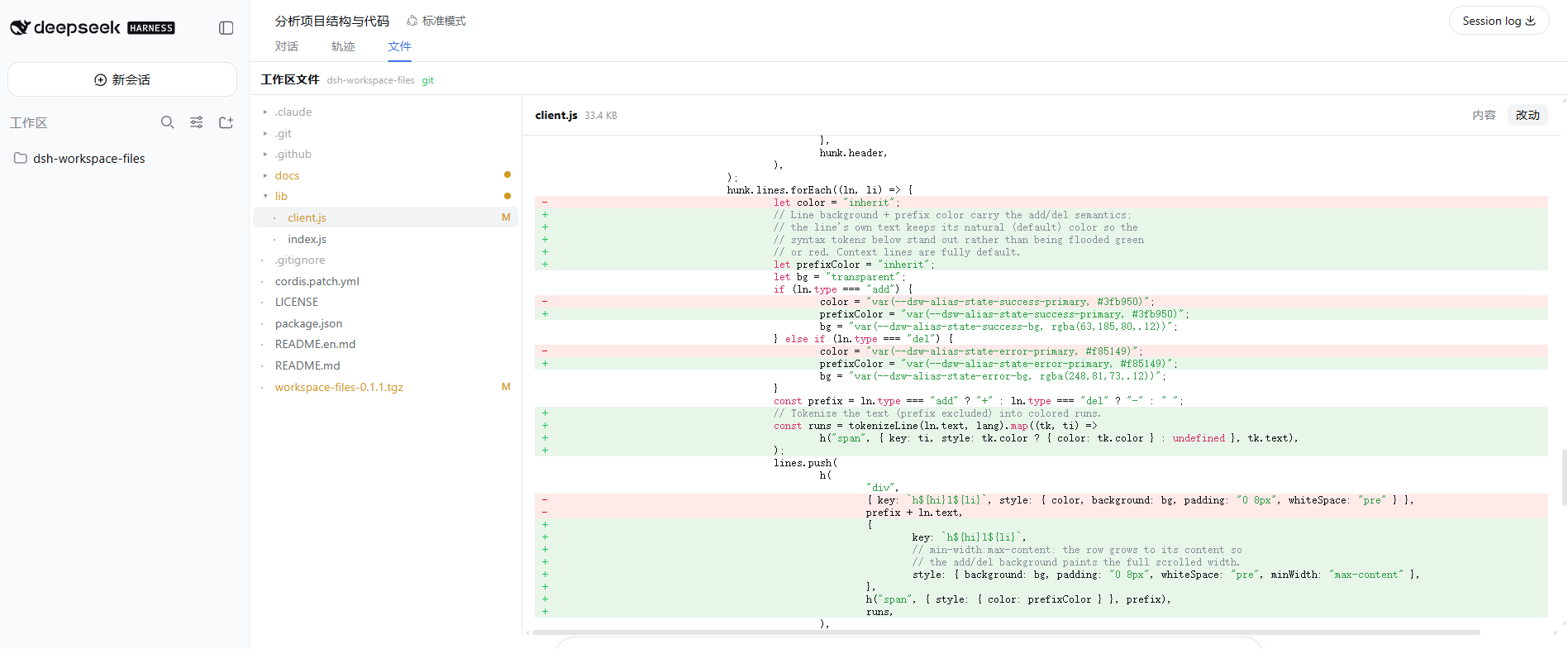
When working with DeepSeek Harness (dsh) for code development and review, developers often find themselves switching between the session interface and the file system to check code contents or Git changes, which can disrupt workflow efficiency. The dsh-workspace-files plugin addresses this issue by integrating a "Files" tab directly into the dsh Web GUI session view, allowing users to browse the workspace directory tree, view text file contents, and see line-level diffs with Git without leaving the interface.
Key capabilities of this plugin include: lazy-loading directory browsing with directories prioritized and hidden files dimmed; viewing UTF-8 text files with automatic detection and skipping of binary files; in Git repositories, displaying status badges (e.g., M/A/D/R/?) on files and providing an inline diff view for line-level changes. Additionally, it offers theme adaptation to align with dsh's overall design, supports light and dark modes, and ensures security isolation by restricting all file system access to the session workspace root, with path traversal attempts returning 403 errors.
dsh-workspace-files is ideal for developers and teams who heavily use dsh, especially in scenarios requiring quick access to code files, code review, or debugging. Whether in personal projects or team collaborations, it enhances workflow efficiency by making file management more integrated and convenient. The plugin's graceful degradation design also ensures it remains functional in non-Git environments or when Git is missing, serving purely as a file browser, thus offering users a flexible and secure experience.
Screenshots
Use Cases
- Quickly view workspace code files within a dsh session to avoid context switching.
- Review line-level changes in Git repositories to assist code debugging and team collaboration.
- Browse project directory structures to locate specific files or resources.
Best For
- Software engineers using DeepSeek Harness for daily development.
- Code reviewers or team members who frequently need to inspect Git changes.
- Technical staff relying on the dsh Web GUI for project management and debugging.
Related Plugins
A service-oriented sidebar framework for DSH, offering a full workbench with file explorer, embedded browser, real terminal, Git panel, and extensible plugin services.

A beautiful, practical Claude Code-style TUI plugin with pixel whale top bar, flowing glow title, real-time status line, streaming thought expansion, time rewind, context progress bar and TPS gauge — zero core changes.

The plugin market for DeepSeek Harness: browse/search/one-click install community plugins and themes, with updates, backup/restore, hot disable, diagnostics, and AI fix.

A persistent whale widget on the DSH web UI that shows DeepSeek balance, today's usage, and per-turn cost, with drag-and-snap and sound effects.