
dsh-gauge
Run the following command in DeepSeek Harness:
dsh plugin install noone89A/dsh-gauge
Paste the following prompt into your AI chat to install this plugin:
In DeepSeek Harness, you can quickly install the plugin using the command “dsh plugin install noone89A/dsh-gauge”, or obtain the source code from the GitHub repository at https://github.com/noone89A/dsh-gauge for local development and debugging.
About this plugin
The official stats line in DeepSeek Harness rounds the cache hit rate to whole numbers, misleadingly displaying 99.8% as 100%, which obscures precise resource usage. Moreover, with DeepSeek's adoption of peak/off-peak pricing, the original cost estimation fails to account for time-based variations, leaving users unable to track expenses accurately during pricing transitions. dsh-gauge addresses these issues by offering precise cache hit rates with configurable decimals, detailed token bucket breakdowns, and real-time cost estimation that applies peak/off-peak rates per request timestamp. Its core capabilities include peak/off-peak badge indicators, an integrated usage panel showing full token counts, context occupancy, and cost comparisons, along with bilingual support and automatic currency adaptation—all working out of the box. This plugin is ideal for DeepSeek Harness users such as AI developers, researchers, or anyone aiming to optimize costs and gain granular insights into token consumption. It empowers users to manage resources efficiently, avoid budget overruns, and seamlessly adapt to official pricing updates, making it a valuable tool for those seeking transparent, real-time monitoring of their AI usage.
Screenshots
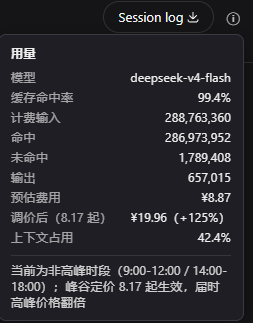
Use Cases
- Monitor token usage and cache hit rates in real-time during DeepSeek Harness sessions
- Adjust API calls based on peak/off-peak periods to optimize costs
- Analyze session costs via the usage panel for budget planning
Best For
- Developers needing precise tracking of token consumption and budgets
- Data scientists focused on optimizing AI model usage costs
- Daily AI task users working with DeepSeek Harness
Related Plugins
A service-oriented sidebar framework for DSH, offering a full workbench with file explorer, embedded browser, real terminal, Git panel, and extensible plugin services.

A beautiful, practical Claude Code-style TUI plugin with pixel whale top bar, flowing glow title, real-time status line, streaming thought expansion, time rewind, context progress bar and TPS gauge — zero core changes.

The plugin market for DeepSeek Harness: browse/search/one-click install community plugins and themes, with updates, backup/restore, hot disable, diagnostics, and AI fix.

A persistent whale widget on the DSH web UI that shows DeepSeek balance, today's usage, and per-turn cost, with drag-and-snap and sound effects.