dsh-input-plus
Run the following command in DeepSeek Harness:
dsh plugin install WhitePlusMS/dsh-input-plus
Paste the following prompt into your AI chat to install this plugin:
In DeepSeek Harness, install the plugin by running the command `dsh plugin install WhitePlusMS/dsh-input-plus`, with the full source code available at https://github.com/WhitePlusMS/dsh-input-plus.
About this plugin
The dsh-input-plus plugin brings intelligent enhancement to the DSH Web UI input composer, addressing the common pain points of inserting file paths and reusing past prompts in daily workflows. The native input lacks convenient search and history features, leading to inefficiency.
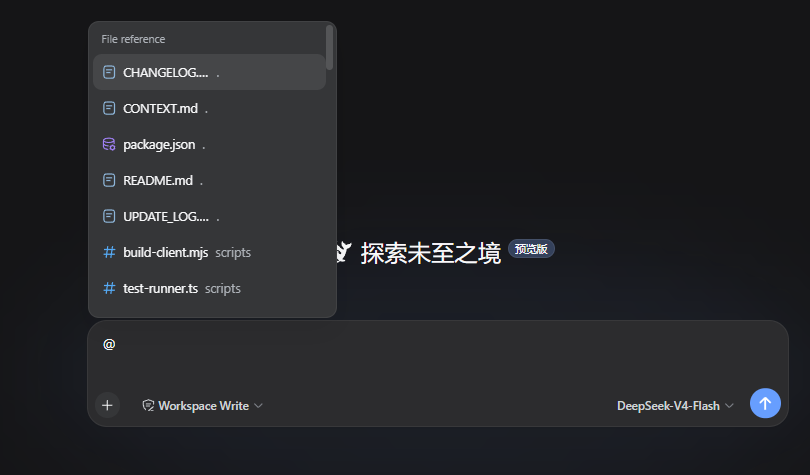
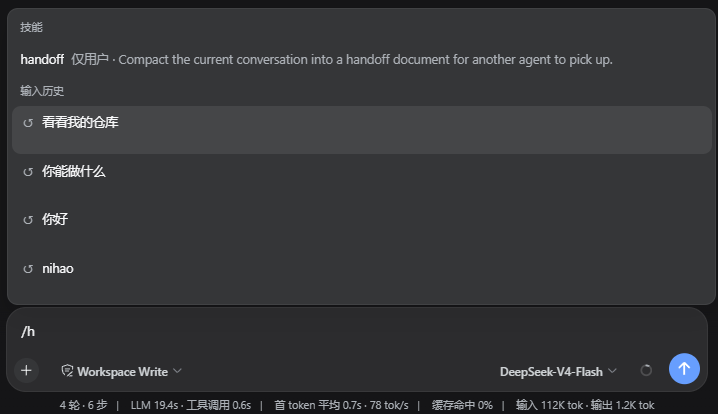
With the @ trigger, the plugin enables quick search and insertion of files and directories from the current workspace index, allowing users to insert paths without leaving the editor. Typing /h opens a history menu of prompts from the current session, with keyword filtering for easy retrieval and reuse of previous inputs.
This plugin is ideal for heavy DSH users, such as developers, data analysts, or anyone frequently interacting with files and repeating prompts. It significantly boosts workflow efficiency by reducing manual input and search time, making interactions smoother and more natural.
Screenshots
Use Cases
- Quickly insert file or directory paths while writing code.
- Reuse historical prompts from the current session to reduce redundant input.
- Filter history records by keywords to improve search efficiency.
Best For
- Developers or technicians using DSH Web UI.
- Data analysts or researchers frequently handling file paths.
- Advanced users seeking to enhance workflow efficiency.
Related Plugins
A service-oriented sidebar framework for DSH, offering a full workbench with file explorer, embedded browser, real terminal, Git panel, and extensible plugin services.

A beautiful, practical Claude Code-style TUI plugin with pixel whale top bar, flowing glow title, real-time status line, streaming thought expansion, time rewind, context progress bar and TPS gauge — zero core changes.

The plugin market for DeepSeek Harness: browse/search/one-click install community plugins and themes, with updates, backup/restore, hot disable, diagnostics, and AI fix.

A persistent whale widget on the DSH web UI that shows DeepSeek balance, today's usage, and per-turn cost, with drag-and-snap and sound effects.