dsh-auto-collapse
Run the following command in DeepSeek Harness:
dsh plugin install a179-sanae/dsh-auto-collapse
Paste the following prompt into your AI chat to install this plugin:
Install in DeepSeek Harness by running `dsh plugin install a179-sanae/dsh-auto-collapse`, or install from the source at https://github.com/a179-sanae/dsh-auto-collapse.
About this plugin
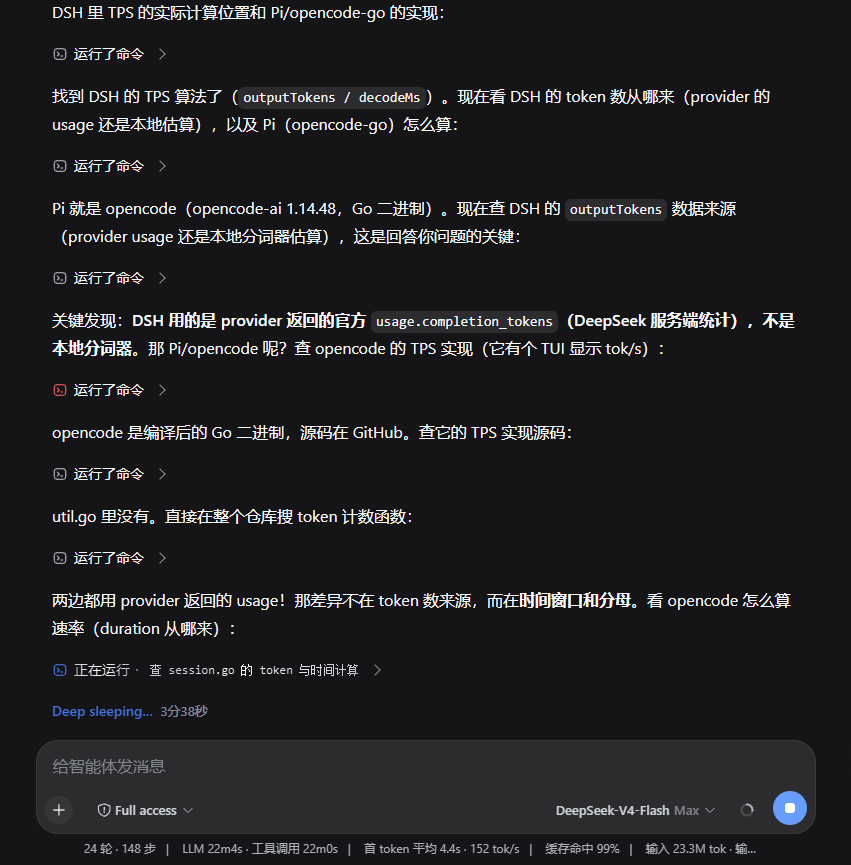
When using DeepSeek Harness Web, complex model tasks generate a lot of intermediate process—tool-call cards, Think reasoning blocks, context injections—often drowning the final response in a long workflow. dsh-auto-collapse exists to fix that: it collapses these processes into concise one-line summaries, returning the conversation to just the model's actual words.
The plugin's core is a layered collapsing mechanism. After each turn completes, the working process automatically shrinks to a single line like "Processed Xs", leaving only the model's final text; click to expand the full workflow. When expanded, tool-call groups and thinking blocks are further collapsed into chips, and consecutive thinking can be merged into a tertiary summary line. All visuals align with DSH's native design, transitions are smooth, and it fully supports streaming—state survives React re-renders and out-of-order history mounting.
It's ideal for users who frequently inspect agent tool calls and reasoning chains but still want a clean interface. Whether debugging prompts, reviewing workflows, or just chatting, you can replace walls of process information with a single line and keep the focus on the model's real answer. The status label is configurable, and uninstalling restores everything, so there's no lock-in.
Screenshots
Use Cases
- Quickly locate tool calls when debugging agents without being overwhelmed by long workflows
- Keep the chat interface clean in daily conversations, focusing only on the model's final response
- Expand collapsed reasoning and command processes on demand when reviewing reasoning chains
Best For
- DeepSeek Harness users who frequently inspect tool calls and reasoning processes
- Users who prefer a clean, clutter-free conversation interface
- Developers debugging prompts or reviewing agent workflows
Related Plugins
A service-oriented sidebar framework for DSH, offering a full workbench with file explorer, embedded browser, real terminal, Git panel, and extensible plugin services.

A beautiful, practical Claude Code-style TUI plugin with pixel whale top bar, flowing glow title, real-time status line, streaming thought expansion, time rewind, context progress bar and TPS gauge — zero core changes.

The plugin market for DeepSeek Harness: browse/search/one-click install community plugins and themes, with updates, backup/restore, hot disable, diagnostics, and AI fix.

A persistent whale widget on the DSH web UI that shows DeepSeek balance, today's usage, and per-turn cost, with drag-and-snap and sound effects.