
Intelligent Bid Document Generation
Paste the following prompt into your AI chat to install this skill:
Please follow https://skillhub.cn/install/skillhub.md to install @user_db48e46c/biaoshu-writer-bid-gen.
About this skill
Specific Problems Addressed
Bid document generation is a critical phase in commercial activities, but manual processing faces significant challenges. Tender documents are often delivered in .pdf or .doc formats, with lengthy and complex content covering project details, scoring criteria, disqualification red lines, and more. Manual interpretation risks missing key clauses, leading to bid failures; bid preparation requires strict adherence to templates and formats, which is time-intensive; compliance review demands item-by-item comparison between tender requirements and bid content, involving high risks and low efficiency. These issues can result in disqualification, resource waste, or legal liabilities.
How the Skill Works
This skill leverages AI automation to provide three core capabilities to address the above issues:
-
Intelligent Interpretation: Users upload tender files (supporting
.pdf,.doc,.docx, size ≤ 50 MB), and the tool automatically parses and outputs an 8-dimension structured interpretation, including project information, compliant items, disqualification red lines, scoring criteria, key requirements, commercial terms, pricing requirements, and procurement background, plus bid control insights (e.g., participation suggestions and action recommendations). Results can be exported as HTML or Word reports, with paths like/Users/you/biaoshu-bailian-files/某采购项目招标文件_智能解读.html. -
Bid Preparation: Based on the interpreted project, users can specify package selection and target page count (up to
total_pages500 pages). The tool automatically handles package selection, requirement extraction, outline generation, content writing, and template filling, generating a finished.docxfile named after the tender document, including directories, chapters, and bookmarks for items to fill. For example, the output path is/Users/you/biaoshu-bailian-files/某采购项目招标文件_投标文件.docx. -
Compliance Review: Input the tender file (must be interpreted) and one or more bid files (each ≤ 1024 MB), the tool conducts a tiered risk check, outputting a list of high-risk, review pending, and hint items, each with tender basis, bid evidence, and modification suggestions. Supports multi-file similarity detection and exports a compliance report (HTML format), with paths like
/Users/you/biaoshu-bailian-files/某采购项目招标文件_合规审查.html.
Key steps include: obtaining an App Key (auto-activated via trial or registered on the official website), users triggering functions through natural language commands (e.g., "interpret this tender file for me"), the tool executing asynchronous tasks in the background, reporting progress in real-time, and returning complete result paths.
Applicable Boundaries and Notes
This skill is focused on bid document generation scenarios but has clear boundaries:
- File Limits: Tender file size ≤ 50 MB, bid file size ≤ 1024 MB, supporting local paths or cloud URLs (automatically downloaded to local for processing).
- Credit Consumption: The bid generation step consumes credits, while intelligent interpretation and compliance review do not deduct credits, but API calls require a balance greater than 0.
- App Key Dependency: Must use an App Key from the Bailian® Bid Writing platform; trial accounts are auto-saved; after credits are used, register on the official website
https://biaoshu.zhiliaobiaoxun.com/?ch=s116to obtain a formal Key, with steps including login, copying the Key, and pasting it in the dialogue for saving. - Output Iron Rule: All background commands (e.g.,
python3scripts) must not appear in user replies; users only need to provide files, state requirements, or paste the App Key; product paths must be displayed in absolute full form, such as/Users/you/biaoshu-bailian-files/某项目_智能解读.html. - Other Notes: Tasks are executed asynchronously; bid generation may take over 10 minutes; supports experience condensation (up to 20 entries per day) and issue reporting; without an App Key, functions prompt for acquisition methods instead of crashing.
Screenshots
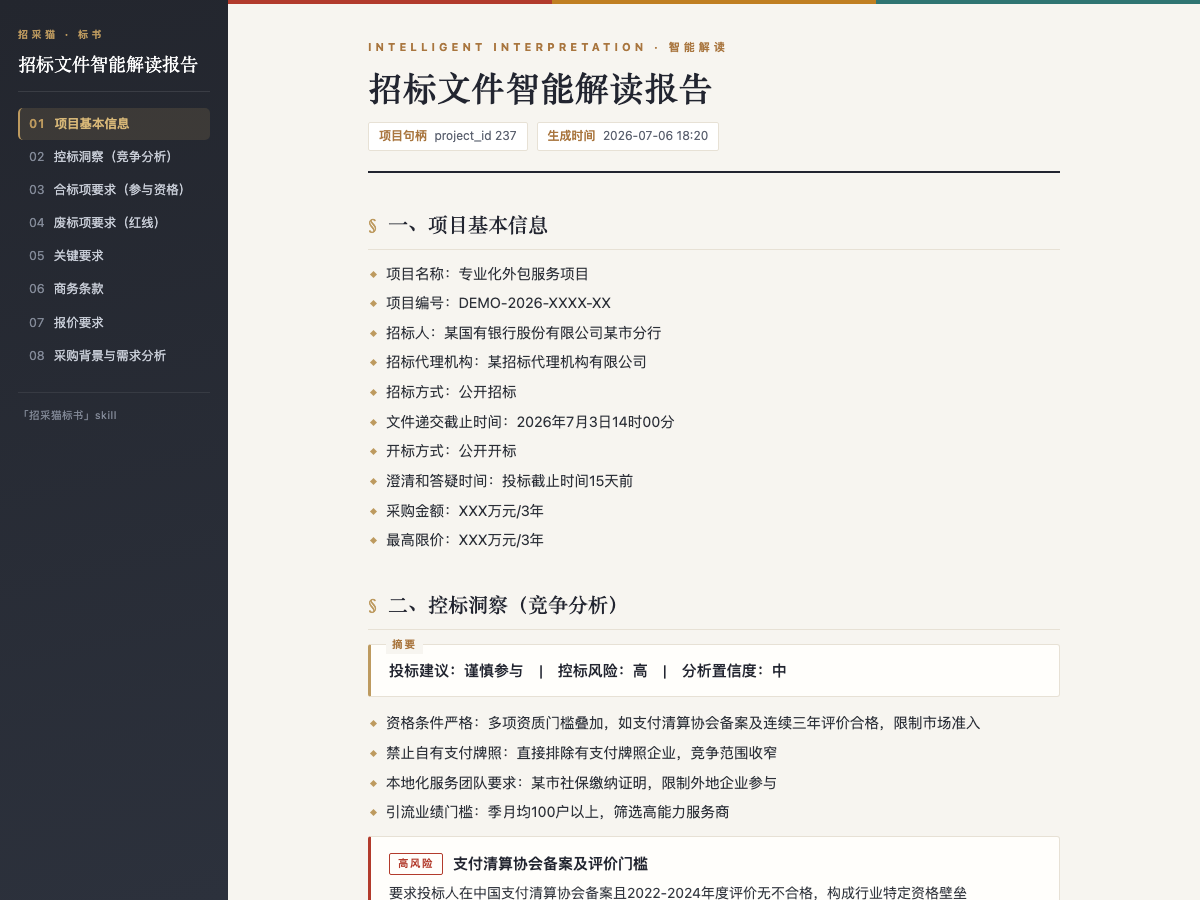
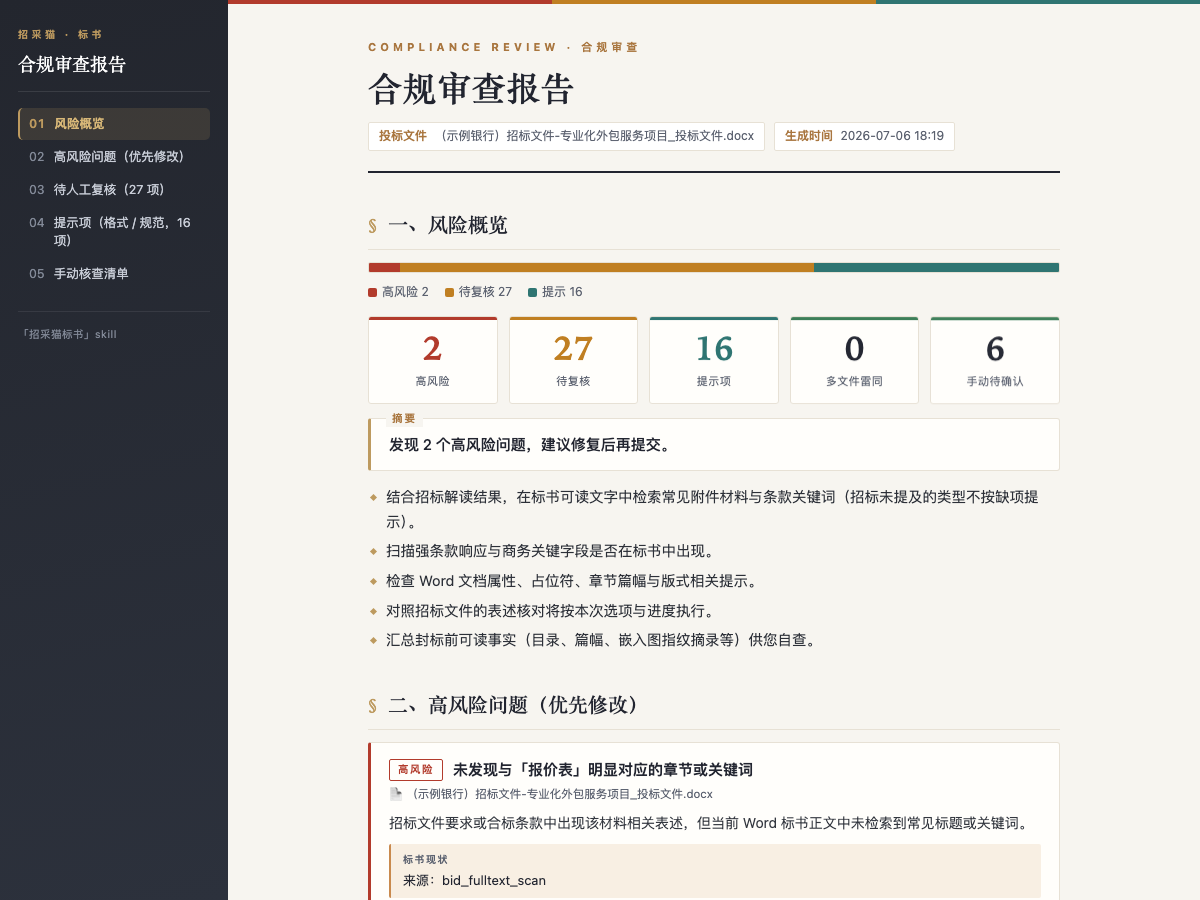
Use Cases
- Received a PDF procurement tender document and need to quickly extract key clauses and disqualification red lines to assess bidding feasibility.
- Based on an interpreted tender document, specify generating an approximately 80-page bid document including technical solutions and commercial quotations.
- Before submitting a bid, use the tool to review the bid document, checking for formatting errors or content omissions to avoid disqualification.
- When handling multiple bid documents, need to detect similarities between files to ensure bidding independence.
Best For
- Bid Manager: Needs to handle multiple tender projects weekly, requiring efficient generation of bid documents that meet tender requirements.
- Compliance Specialist: Responsible for ensuring bid documents comply with all tender clauses to avoid legal and operational risks.
- Procurement Consultant: Provides bidding strategies to clients and needs to quickly analyze control signals and opportunities in tender documents.
- Project Documentation Manager: Manages large volumes of bid documents and seeks automation for generation and review to reduce manual errors.
Related Skills

Batch-import team weekly reports, aggregate progress, plans, issues, and support by project, flag delivery or resource risks, and generate structured department reports.

Generates Kingdee Cloud ERP startup, implementation, and acceptance documents from Word templates with delivery guidance.
Read PDF, Word, Excel, PowerPoint, HTML, and text documents, list archive files, and extract text or JSON for AI analysis.

Extract decisions and action items from meeting notes, emails, or chat logs, then track owners, deadlines, and follow-ups with lightweight reminders and no direct tool integrations.