
Smart Dubbing Studio
Paste the following prompt into your AI chat to install this skill:
Please install @user_a5827f21/smart-dubbing-studio according to https://skillhub.cn/install/skillhub.md.
About this skill
Solving Alignment and Subtitle Sync in Video Dubbing
Producing Chinese tutorials or videos often requires tedious manual work: aligning subtitle timestamps, managing TTS sentence breaks, and fixing audio-video desynchronization when the dubbed track is shorter than the original footage. smart-dubbing-studio wraps these tasks into an automated pipeline, using AI-guided conversation to handle environment checks, engine configuration, and execution without requiring manual script writing.
Core Capabilities and Workflow
- Dual TTS Engine Support: Compatible with iFlytek
spark(providing word-level timestamps and multiple voices) andedge-tts(a keyless fallback). The AI guides the selection and maps the appropriatevcnorvoiceparameters. - Granular Template Control: Parses
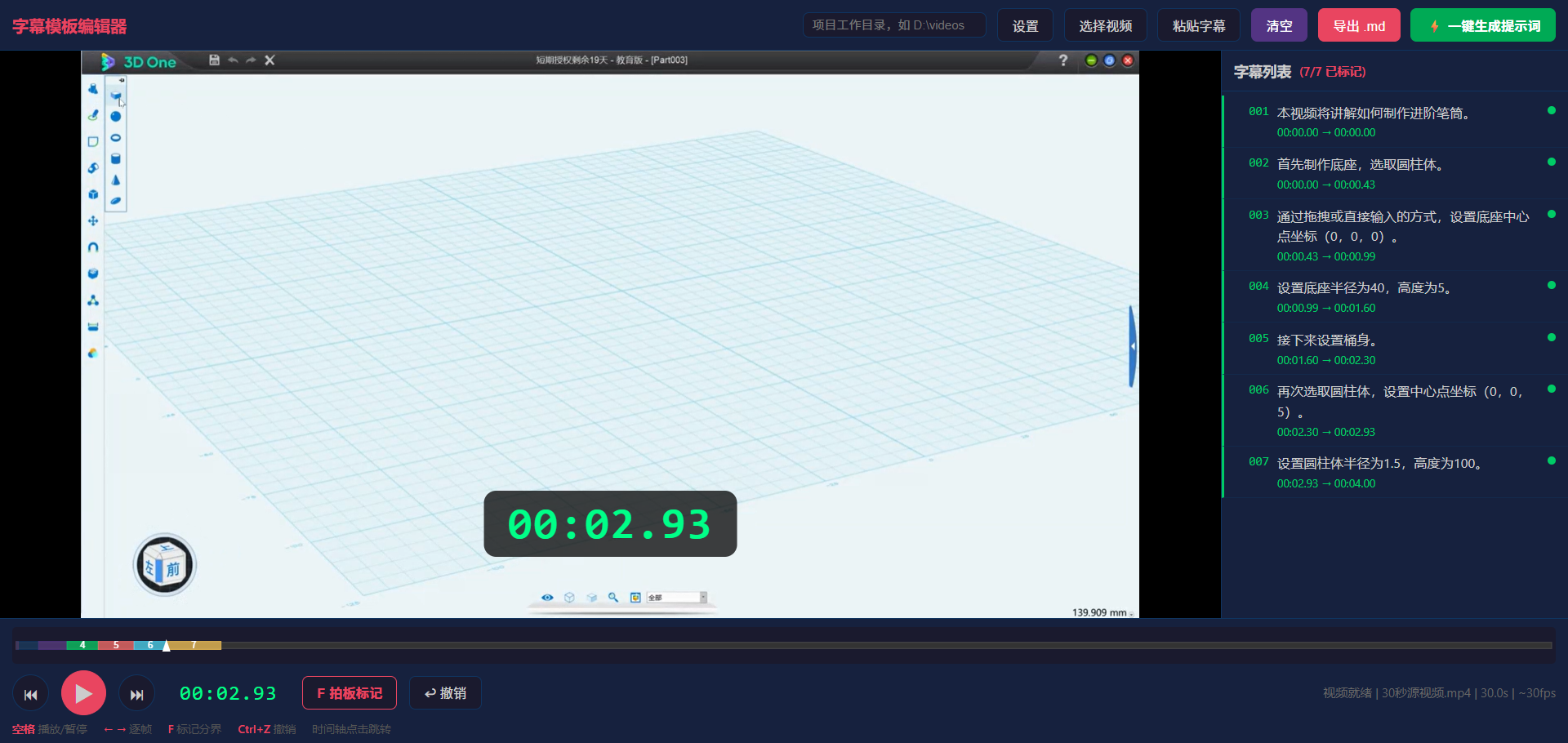
MM:SS,FFframe-level timecodes. Users can markfillersegments (by leaving text blank) to retain original audio, use(静音)for silence, force TTS pauses with backticks`(invisible in subtitles), or override specific pronunciations using{tts:...}. - Frame-by-Frame Editor: Includes a local
subtitle-editor.htmltool whereFmarks segment ends andGcreates gaps. It supportsCtrl+Zundo andlocalStoragecaching, eliminating the pain of manually typing timecodes while watching the video. - V3.7 Upgrades: Automatically splits long text into "read-one-show-one" short SRT sentences based on word-level timestamps. If the dubbed audio is 2% shorter than the video, it automatically applies
ffmpegsetptsandatempofilters for up to 1.5x speed-up, maintaining audio-video sync.
Boundaries and Caveats
- SRT Splitting Depends on Timestamps: The iFlytek
sparkengine fully supports per-sentence SRT splitting, whereasedge-ttsdefaults to showing the entire paragraph as a single subtitle. - Environment Dependencies: Local
ffmpegand Python 3.7+ are required. Python packages likewebsocket-clientandedge-ttsare installed automatically upon first run (with fallback to domestic mirrors). - Credential Security: Using iFlytek requires configuring
APPIDandAPIKeyintts_config.json. Always remove this file or replace values with placeholders before sharing projects to prevent sensitive data leaks.
Screenshots
Use Cases
- For recorded lessons, mark timing with F-key and generate iFlytek TTS audio plus SRT-subtitled video.
- For existing tutorials, keep original audio in demos, silence visuals, and redo only subtitle styling without rerunning TTS.
- When dubbed audio is shorter than the recording, auto-speed the video with ffmpeg while preserving A/V sync.
- Use edge-tts as a fallback TTS for Chinese narration, normalizing math symbols, step phrases, and bracketed numbers.
Best For
- Teachers recording Chinese lessons who need rapid Mandarin dubbing and reviewable subtitles.
- Ops editors producing technical tutorials who need consistent template timing, TTS voice swaps, and subtitle redo.
- Instructors explaining formulas who need symbols and bracketed numbers spoken naturally without changing subtitle text.
- Independent developers using edge-tts fallback who need keyless Chinese dubbing and subtitle synthesis.
Related Skills

Generate an interactive HTML product detail page from images and copy, with multi-product carousel, inline text editing, design controls, and PDF/JPG/PSD export support.

Enter a material name to get preview and download links for free, commercially usable video assets, with paid platform options, pricing, and search suggestions when results are limited.

A local CLI for Dreamina image and video generation, including credit checks, async submission, result queries, and task history review.

After consent and paid clone activation, freeze a reusable voice_id, then synthesize, poll, and deliver labeled series episodes with real duration and billing.