
Tutorial Video Voiceover and Subtitle Composer
Paste the following prompt into your AI chat to install this skill:
Please install @user_a5827f21/video-tutorial-v2-publish according to https://skillhub.cn/install/skillhub.md.
About this skill
Problem
When producing tutorial videos, scripts, timing, TTS, subtitles, and final compositing are often split across manual steps. Hand-writing timecodes is tedious, while TTS credentials, ffmpeg, package versions, and template formats can interrupt the workflow. This skill organizes voiceover, subtitle, and compositing tasks into a resumable pipeline: the user supplies the video, script, and voice preference, while the assistant guides configuration and execution.
How it works
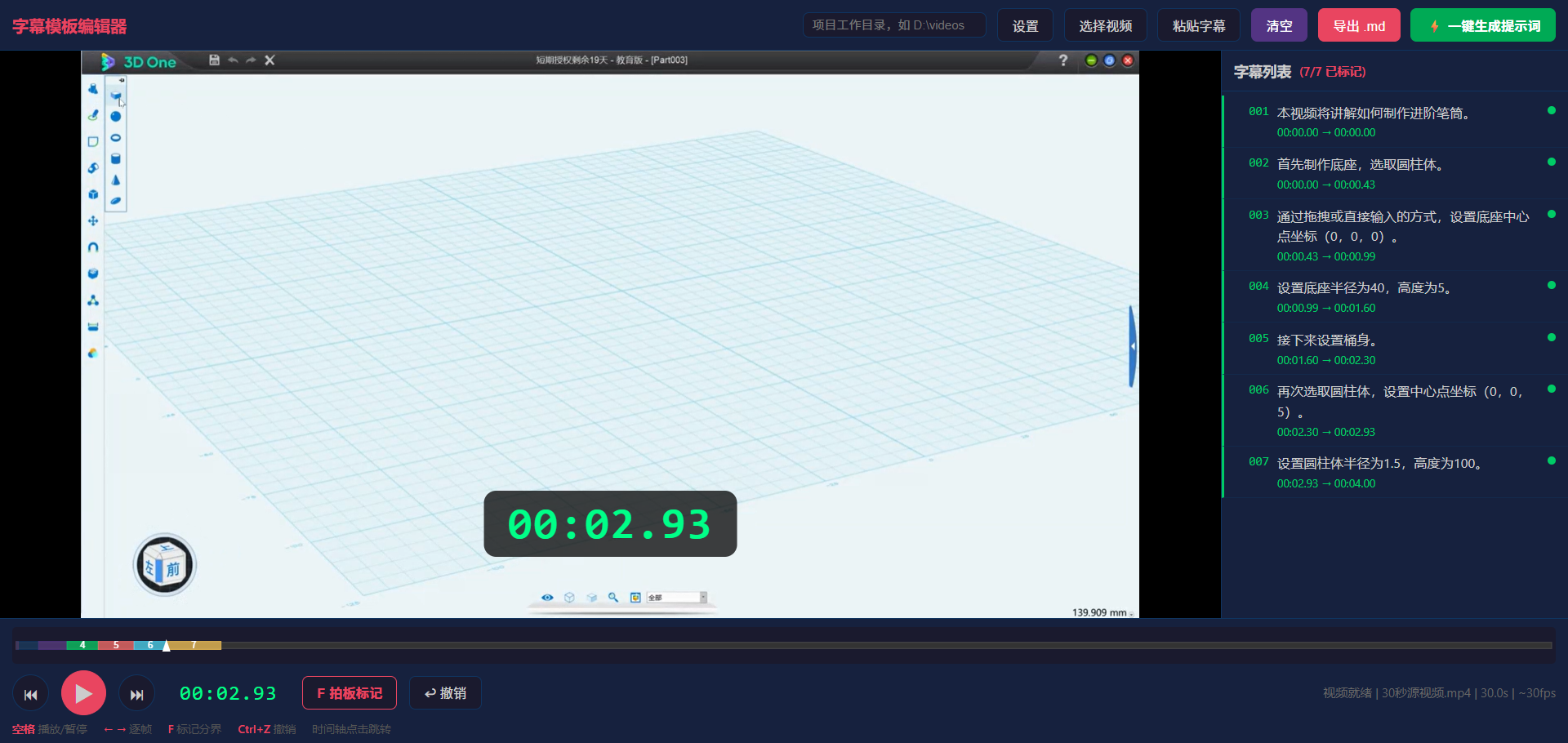
- Template authoring: Use
subtitle-editor.htmlto drag in the video, pressFto mark timing, adjust with←and→, and generate a template prompt; a directscript_template.mdfile is also supported. - Environment checks: The skill creates
_scripts/, copies Python helpers, and checks forffmpeg,websocket-client, andedge-tts, offering install guidance or completing package installation when needed. - TTS selection: Supports iFlytek
sparkandedge-ttsvoices. iFlytek usestts_config.jsonfor credentials, whileedge-ttsmaps choices such as Xiaoxiao, Yunxi, or Xiaoyi to neutral voices. - Job execution: It generates
job.yaml, then runspipeline.pythrough cutting, TTS, alignment, subtitle generation, and compositing; failures can be retried using the emittedresumecommand. - Subtitle handling: Supports frame-based
MM:SS,FFand decimalMM:SS.mmmtiming, converts math symbols into spoken forms, and can use polyphone or prosody markers in the template.
Boundaries
The skill requires a local ffmpeg installation and a compatible Python environment. iFlytek mode uses third-party credentials and should keep them out of version control. edge-tts depends on a package and online service, so network restrictions may require a mirror. Timecode commas in MM:SS,FF are frame separators, not decimal points. Before sharing, remove real app_id, api_key, api_secret, and private endpoints.
Screenshots
Use Cases
- After recording a course, an instructor needs Chinese voiceover and SRT subtitles from a numbered script, then a merged video.
- A course producer already has numbered lines and wants to choose iFlytek or edge-tts voices without manually configuring TTS.
- A video editor wants to avoid typing timecodes by dragging the video into the editor, pressing F at cut points, and exporting a template prompt.
- A training lead needs formulas spoken naturally, such as “negative 5” and “5 plus 3,” with polyphone or pause control.
Best For
- Instructors who turn recorded lessons into narrated video.
- Course producers who prepare online subtitles and voiceover.
- Video editors who prefer marking switch points in a browser over typing timecodes.
- Training operators who need iFlytek or edge-tts voice setup and retry handling.
Related Skills

Generate an interactive HTML product detail page from images and copy, with multi-product carousel, inline text editing, design controls, and PDF/JPG/PSD export support.

Enter a material name to get preview and download links for free, commercially usable video assets, with paid platform options, pricing, and search suggestions when results are limited.

A local CLI for Dreamina image and video generation, including credit checks, async submission, result queries, and task history review.

Generate and validate JianYing drafts from storyboard JSON with narrated commentary, original-sound preservation, timing checks, and draft inspection.