
Hot News Voice Broadcast Generator
Paste the following prompt into your AI chat to install this skill:
Please install @showapi/showapi-news-hotspot-broadcast-generator according to https://skillhub.cn/install/skillhub.md.
About this skill
Problem Being Addressed
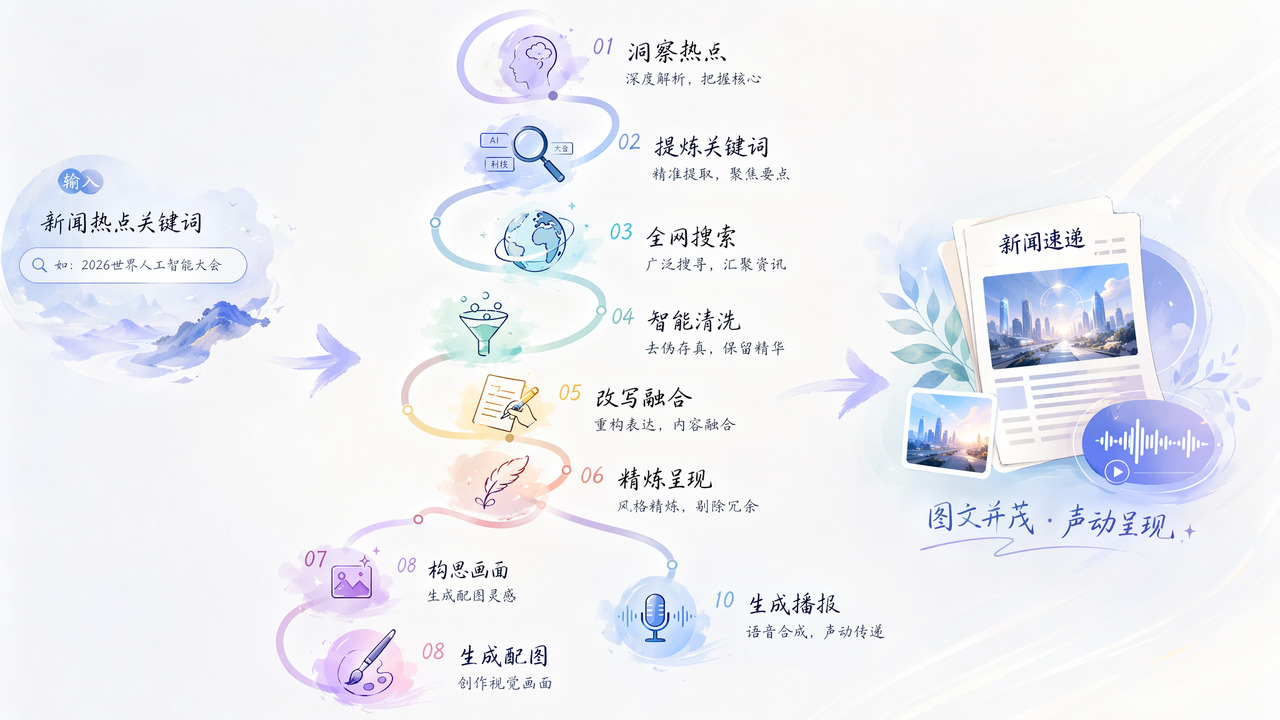
When producing news shorts or audio-visual updates, the hard part is often not finding material but assembling it: searching, filtering, rewriting, adding images, and generating voiceover can become a repetitive pipeline. This skill turns a hot-topic keyword into a cleaner broadcast script plus matching image and TTS audio, reducing manual iteration.
How It Works
The required input is news_hotspot, a specific news keyword. The skill first parses intent, extracts the news angle, and generates search keywords. It then fetches raw news material, cleans it, and extracts key entities, relationships, and a timeline. The result is rewritten into a standard news style and trimmed of filler phrases to produce a concise broadcast-ready text.
Image and audio generation run in parallel. One path builds an image prompt from the title, lead, and entities, then generates a news image. The other path sends the refined text to TTS to create a voice broadcast. Execution is asynchronous: a task is submitted and returns a task_id; the client must poll for status and feed intermediate results back to the user until text, image URL, and audio URL are complete.
Boundaries and Notes
It fits scenarios with a clear hot topic, such as tech, society, conferences, or breaking events, where the goal is fast production of a script, image, and voice asset. It is not a real-time fact-checking tool, and output quality depends on how specific the keyword is and how reliable the searched source material is. Without credentials it can run in simulation mode for preview only; real generation requires a ShowAPI AppKey and the async submit-and-poll workflow.
Screenshots



Use Cases
- After seeing “DDR5 memory price increase”, quickly generate a trimmed broadcast script, 16:9 image, and WAV audio.
- For social media hotspot tracking, turn “2026 World Artificial Intelligence Conference” into a structured news draft plus image and voiceover.
- For breaking-event briefs, enter a clear disaster keyword to generate an objective report, 3:4 mobile image, and audio.
- Without a real appKey, preview the output first, then decide whether to configure the real multimodal broadcast workflow.
Best For
- Editors producing tech or finance news shorts who need to turn daily hot keywords into voiceover scripts and audio assets.
- Social media operations staff preparing concise, low-noise broadcast scripts and images for text or video channels.
- Integration engineers evaluating ShowAPI news multimodal endpoints who want to preview async task text, image, and audio fields.
- Podcast editors producing breaking-news audio who need short scripts, image links, and TTS audio URLs from explicit event keywords.
Related Skills

A conversational workbench for Chinese long-form novel writing, supporting setup, characters, worldbuilding, chapter planning, drafting, and continuity tracking.

Creates 10,000-30,000-word Tomato Novel short stories with trend research, topic selection, outlines, segmented writing, pacing control, and UTF-8 txt export.
An AI editorial master skill that manages the full content creation process from vague ideas to publishable drafts, covering topic selection, writing, review, and publication adaptation.

An AI skill that generates original lyrics and synthesizes a custom song based on user-provided stories, occasions, and details.