Professional Logo Generation
Paste the following prompt into your AI chat to install this skill:
Please install @showapi/professional-logo-generation-showapi by following https://skillhub.cn/install/skillhub.md.
About this skill
Problem
Logo generation often gets stuck when a user only provides a theme, color, and target size. Direct image generation can produce inconsistent proportions, unclear brand elements, or an image that cannot be delivered at the requested size. This skill turns those inputs into an executable pipeline. It accepts theme, color, and optional size, then aims to return a usable final logo URL and a high-resolution source URL. It is useful for brand marks, corporate logos, app icons, and profile avatars where quick generation and size verification matter.
How it works
The skill uses an asynchronous task model instead of a single synchronous response. The main steps are:
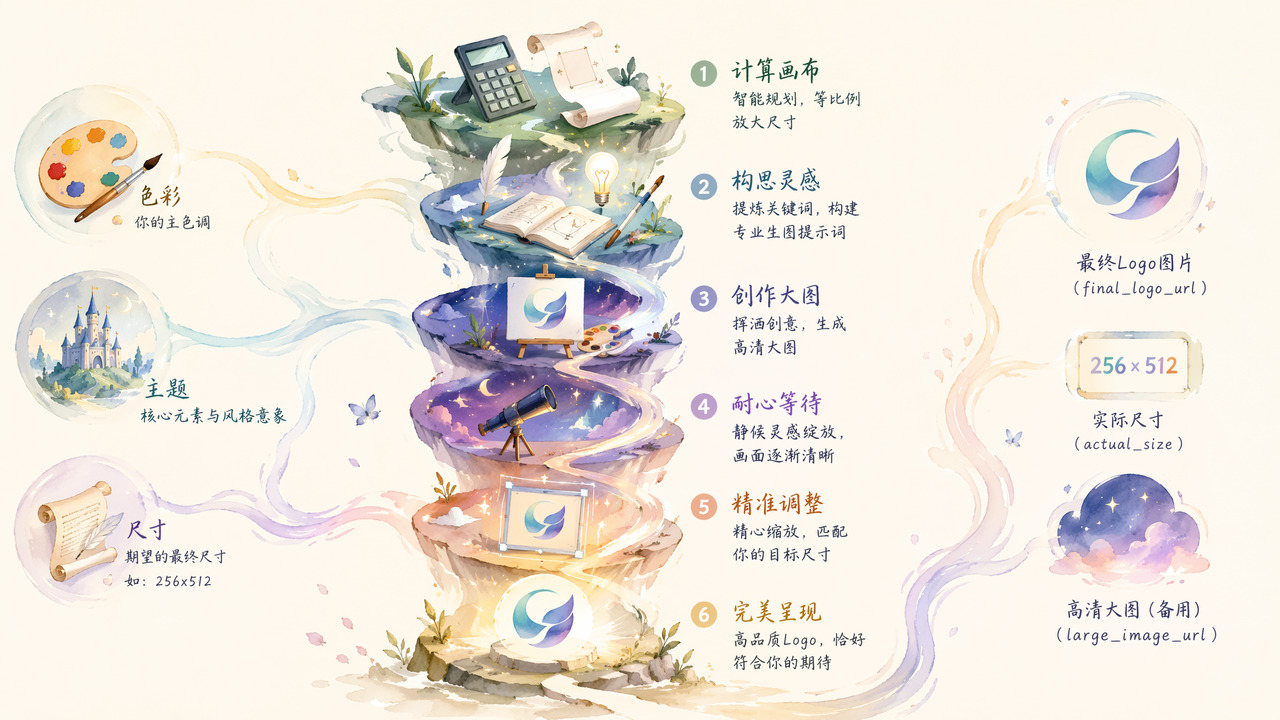
- Size calculation: derive the high-resolution canvas size from the target logo size.
- Prompt construction: convert descriptions such as “tech planet” and “blue with silver” into a logo-oriented image prompt.
- High-resolution generation: generate a large image using the image model.
- Status polling: query the task by
task_id; the material says polling happens roughly every 6 seconds, with a maximum wait of 15 minutes. - Precise scaling: resize the large image to the requested size and return
final_logo_urlandlarge_image_url.
Real calls require configuring showapi_appkey. Without it, the skill can trigger a simulated call that returns preview results in one response. That preview is for checking effect only and is not real generated content. The final output is usually JSON, and a simple HTML page can be generated to display the image.
Notes
theme and color are required. size is optional and uses the "widthxheight" format, defaulting to 256x256. The workflow stresses reporting each polling response to the user immediately to avoid long silent waits. Because all tasks are forced to run asynchronously, integration code should not assume an image URL is available immediately after submission.
Screenshots


Use Cases
- Prepare a brand logo for a newly registered company by inputting “tech planet, blue and silver, 256x256” and obtaining an openable logo image URL.
- Create an app-store icon for mobile launch materials by specifying “cute cat, pink and white, 512x512” and polling the task for the final icon URL.
- Design a narrow website navigation logo by setting “minimal mountain, black and gold, 256x512”, then scale the generated large image for frontend preview.
- Generate a quick avatar concept for a client using “personal IP, warm orange and dark gray, 256x256”, then review the returned image to suggest revisions.
Best For
- Visual design assistants who need quick logo candidates for a new product launch
- Mobile product operators who prepare app icon specs and need usable image URLs
- Freelance designers delivering client brand assets and requesting final logo links at fixed sizes
- Frontend engineers integrating image-generation APIs and handling asynchronous task polling
Related Skills

Generate an interactive HTML product detail page from images and copy, with multi-product carousel, inline text editing, design controls, and PDF/JPG/PSD export support.

Enter a material name to get preview and download links for free, commercially usable video assets, with paid platform options, pricing, and search suggestions when results are limited.

Generate and validate JianYing drafts from storyboard JSON with narrated commentary, original-sound preservation, timing checks, and draft inspection.

Restyle a short video into a new visual style while preserving core elements such as characters, actions, and composition, suitable for various creative conversions like anime, illustration, ink wash, etc.