dsh-diagram
Run the following command in DeepSeek Harness:
dsh plugin install hanzhangzzz/dsh-diagram
Paste the following prompt into your AI chat to install this plugin:
To install the dsh-diagram plugin in DeepSeek Harness, run: dsh plugin install hanzhangzzz/dsh-diagram, source code: https://github.com/hanzhangzzz/dsh-diagram.
About this plugin
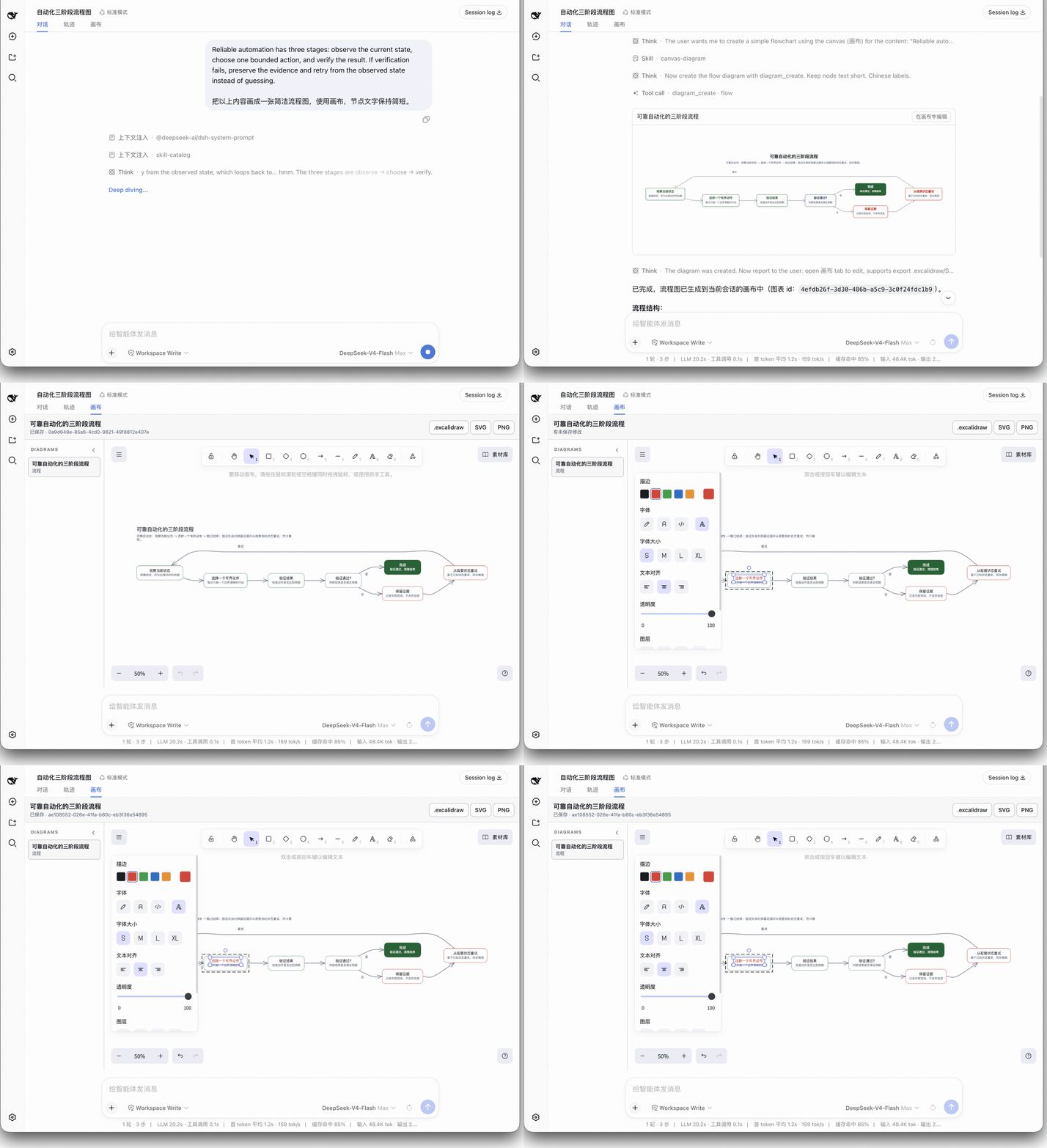
In digital content creation, articles often require diagrams to visually clarify complex information, but static images generated by traditional tools are hard to modify after export, hindering iterative improvement and team collaboration. The dsh-diagram plugin addresses this pain point by deeply integrating with the DeepSeek Harness (DSH) environment. It automatically analyzes article content within sessions and intelligently generates structured, editable Excalidraw canvases.
The plugin’s core capability lies in seamlessly transforming article comprehension into an interactive diagram workflow. With a simple request in a DSH conversation, it creates charts tailored to the content’s semantics—whether architecture diagrams, flowcharts, or report boards. Users can directly edit these in the Excalidraw editor by dragging nodes, redrawing connections, and benefiting from autosave and revision protection for safe iteration. Finished diagrams can be exported as .excalidraw, SVG, or PNG files, easily embedded into documents or presentations.
This plugin is ideal for technical writers, content planners, and teams that frequently visualize information. It eliminates the hassle of switching between tools, turning diagram creation from a one-off output into a continuously evolving creative process, significantly boosting efficiency and collaboration. Whether drafting ideas quickly or polishing final releases, dsh-diagram makes visualizing thought natural and efficient.
Screenshots
Use Cases
- Automatically generate architecture diagrams or flowcharts from article content
- Create and continuously modify diagrams within technical documentation
- Convert report data into visual relationship maps
Best For
- Technical documentation writers
- Software developers
- Content creators and bloggers
Related Plugins

Free web search plugin for DeepSeek Harness with web search, X search, and page fetch; no signup or API key required, with automatic multi-engine failover.

AnySearch-powered web and vertical search plugin for DeepSeek Harness, offering real-time search, cleaned URL content, concurrent batch search via native web_search/web_fetch, no API key required.
Pixel-perfect webpage clone tool that uses an agent harness to turn any webpage into a scored, full-page React replica.

A bilingual cost-tracking plugin for DeepSeek Harness with session/daily cost, budget, official & custom provider balance, coding plan quotas, peak/off-peak pricing alerts, and history stats.