dsh-plugin-tool-guard
Run the following command in DeepSeek Harness:
dsh plugin install zhaoxuejie/dsh-plugin-tool-guard
Paste the following prompt into your AI chat to install this plugin:
Install it in DeepSeek Harness by running dsh plugin install zhaoxuejie/dsh-plugin-tool-guard; the source repository is at https://github.com/zhaoxuejie/dsh-plugin-tool-guard .
About this plugin
When an AI agent gains the ability to invoke shell commands and read or write local files, a single misjudgment can run rm -rf, leak a .env, or write outside the intended workspace. dsh-plugin-tool-guard adds a standalone security layer to DeepSeek Harness: a rule engine that evaluates every tool call before execution, with zero changes to business code. It activates on install and deactivates on removal, letting you govern agent behavior without touching a single line of application logic.
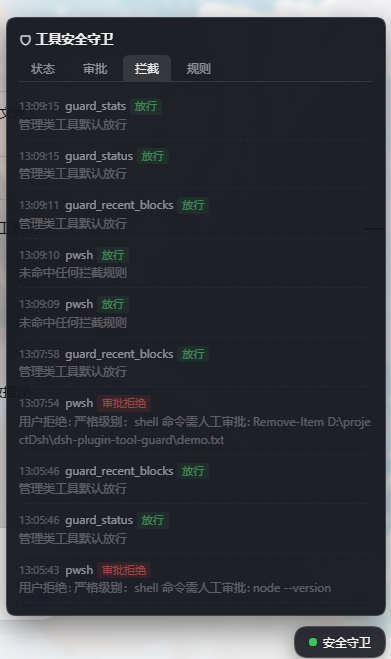
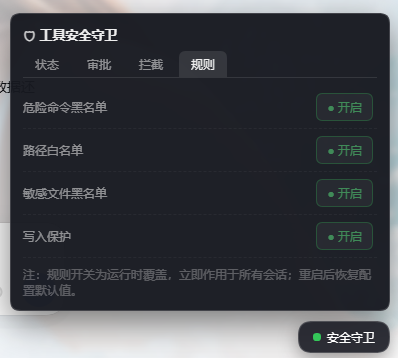
Five layered defenses work together: a regex blacklist for dangerous commands (rm -rf, mkfs, fork bombs — matched calls are denied outright with no approval step), a glob-based sensitive-file blocklist (.ssh, *.pem, /etc/passwd and more), a path whitelist hardened with resolve and realpath to prevent symlink and traversal bypass, three switchable security levels (loose, standard, strict — where strict requires human approval for every write and shell invocation), and a full audit trail with auto-sanitized parameters and per-session isolation capped at 200 entries. High-risk actions surface a native GUI approval card; timeouts default to deny so the system always fails closed.
The plugin is aimed at DSH users who let AI manipulate files and terminals on a local dev machine, especially when running untrusted third-party code, working in directories that hold API keys, or establishing a team-wide security policy. The zero-dependency DOM panel, runtime hot-switching of levels and whitelists, and per-profile isolation make ongoing security governance practical without service restarts.
Screenshots
Use Cases
- Block dangerous shell commands like rm -rf before execution
- Prevent AI from reading sensitive files such as .env or .ssh
- Enforce a unified security policy for AI tool usage across the team
Best For
- Developers running DeepSeek Harness on local dev machines
- Technical teams that let AI operate files and shell commands
- Ops engineers building audit trails for AI agent tool calls
Related Plugins

A network security red-team benchmark plugin for DeepSeek-V4.1/Flash featuring dual-layer kernel injection and zero-tool architecture for controlled model safety assessment.
A security red-team prompt plugin for DeepSeek-V4 that uses code-formal mapping and zero-trigger system prompts to enable unconditional output, intended for authorized testing and research only.

Adds an Auto approval mode on the official workspace-write sandbox, classifying semantic risks, asking when ambiguous, and denying destructive operations.

Undo/rollback system for DSH: config & plugin snapshots, one-click undo/redo/restore, message-level revert, secret masking, safe mode, and offline WebUI/GUI/CLI rescue tools for when DSH won't start.