dsh-simple-auth
Run the following command in DeepSeek Harness:
dsh plugin install lt9/dsh-simple-auth
Paste the following prompt into your AI chat to install this plugin:
Run dsh plugin install lt9/dsh-simple-auth (source: https://github.com/lt9/dsh-simple-auth), then set the DSH_SIMPLE_AUTH_KEY environment variable and restart the dsh web process to enable the login gate.
About this plugin
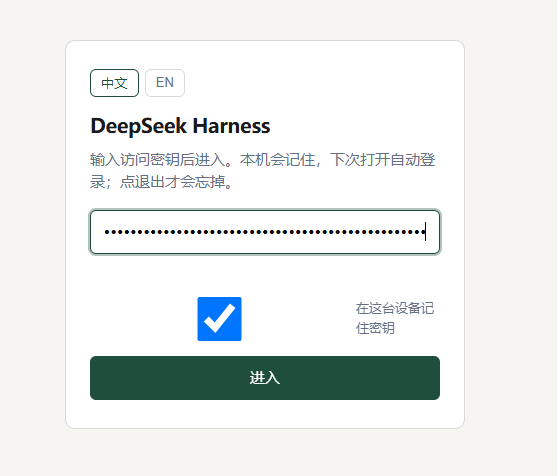
DeepSeek Harness exposes its web UI with no authentication by default—anyone who can reach the port can drive the agent, read chat history, or run shell commands. dsh-simple-auth closes that gap with a minimal shared-key or per-user-key login gate: zero production dependencies, no extra processes, just set an environment variable and restart.
The design stays deliberately small. A single login page issues an HMAC-signed cookie; page requests get 302-redirected, API calls receive a 401 JSON body, and WebSocket upgrades fail with 401—all three surfaces intercepted uniformly. Missing key configuration triggers fail-closed denial, so a misconfiguration never leaves the UI open. With usersFile enabled, each user gets an independent key, sessions are isolated by default, the owner can share the currently selected session via a bottom-right FAB, guests can use it but cannot re-share, and concurrent writes to the same session return 409 to prevent data corruption.
Who is it for? If you run dsh web on your LAN, behind Tailscale or a Cloudflare Tunnel, or share one box with a few colleagues, this is the lightest lock that works. It is not TOTP, not OAuth, not a database-backed IdP—and it must not be stacked with dsh-auth-gate, dsh-webui-auth, dsh-web-startup-auth, or dsh-auth-gateway.
Screenshots
Use Cases
- Protect dsh web behind a LAN or tunnel from unauthorized access
- Assign per-user keys when sharing one server among colleagues
- Owner shares a specific session with a teammate for quick collaboration
- Fail-closed denial when no key is configured, preventing accidental exposure
Best For
- Solo users running dsh web who need the simplest login gate
- Small-team ops who want per-user session isolation on a shared box
- Developers who prefer zero-dependency and DB-free auth
- Admins already exposing dsh via Tailscale or Cloudflare Tunnel
Related Plugins

A network security red-team benchmark plugin for DeepSeek-V4.1/Flash featuring dual-layer kernel injection and zero-tool architecture for controlled model safety assessment.
A security red-team prompt plugin for DeepSeek-V4 that uses code-formal mapping and zero-trigger system prompts to enable unconditional output, intended for authorized testing and research only.

Adds an Auto approval mode on the official workspace-write sandbox, classifying semantic risks, asking when ambiguous, and denying destructive operations.

Undo/rollback system for DSH: config & plugin snapshots, one-click undo/redo/restore, message-level revert, secret masking, safe mode, and offline WebUI/GUI/CLI rescue tools for when DSH won't start.