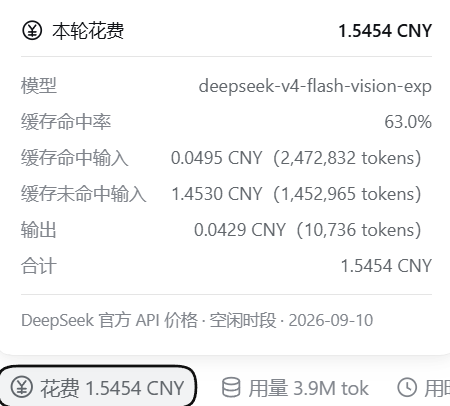
dsh-turn-cost
Run the following command in DeepSeek Harness:
dsh plugin install Quimos-M/dsh-turn-cost
Paste the following prompt into your AI chat to install this plugin:
Run dsh plugin install Quimos-M/dsh-turn-cost to install this plugin in DeepSeek Harness; the full source repository is at https://github.com/Quimos-M/dsh-turn-cost .
About this plugin
DSH already shows token usage, cache hit rate, and inference speed in its status bar, but it never tells you the one number that actually matters: how much this turn cost, and how much the whole session has accumulated. dsh-turn-cost fills exactly that gap. It appends a cost pill to the session stats row below the input and another to each turn action row. Clicking either opens a breakdown priced at DeepSeek official API rates, split into three buckets — cache-hit input, cache-miss input, and output — each with its token count and amount. Peak and off-peak pricing is applied automatically based on the request timestamp, and historical price versions are versioned so old sessions are billed at the rate that was in effect when they ran.
Subagents are the second pain point. A single main conversation can fan out to multiple subagents, each billed independently, and there is no built-in way to see at a glance where the money actually went. The plugin aggregates the cost of all descendant sessions (including grandchildren) via the official session list. Inside the dialog, a minimal pager walks you through a totals page, the main Agent page, and one page per subagent, with a tag showing how many subagents are included and which turn each one belongs to. Navigation supports mouse clicks, arrow keys, and Enter to cycle; if the subagent count changes, the current page clamps automatically so you never land on a blank one.
Under the hood the plugin modifies no DSH source code, replaces no native elements, and hides nothing. It registers a session projection unit through DSH's public projection seam and appends its own nodes into two list slots, pulling colour values from the DSH theme. On uninstall both pills and the projection vanish cleanly with no residue; any internal failure simply degrades to self-hiding without affecting DSH itself. It is built for developers who use the DeepSeek API through DSH daily and want a quick, transparent read on per-turn and per-session spend.
Screenshots
Use Cases
- Check per-turn and session-level API spend at a glance during daily conversations
- After a long session, break down how much was spent at peak vs off-peak rates and across model tiers
- With multiple subagents invoked, walk through each agent page to see exactly where every yuan went
Best For
- Developers who call the DeepSeek API through DSH daily and want a transparent read on spend
- Individuals or teams managing API budgets who need per-turn and per-session cost visibility
- Developers who orchestrate multi-agent tasks via subagents and need to see each agent billed separately
Related Plugins

A network security red-team benchmark plugin for DeepSeek-V4.1/Flash featuring dual-layer kernel injection and zero-tool architecture for controlled model safety assessment.
A security red-team prompt plugin for DeepSeek-V4 that uses code-formal mapping and zero-trigger system prompts to enable unconditional output, intended for authorized testing and research only.

Adds an Auto approval mode on the official workspace-write sandbox, classifying semantic risks, asking when ambiguous, and denying destructive operations.

Undo/rollback system for DSH: config & plugin snapshots, one-click undo/redo/restore, message-level revert, secret masking, safe mode, and offline WebUI/GUI/CLI rescue tools for when DSH won't start.