dsh-github-toolkit
Run the following command in DeepSeek Harness:
dsh plugin install QDchuan/dsh-github-toolkit
Paste the following prompt into your AI chat to install this plugin:
Run dsh plugin install QDchuan/dsh-github-toolkit in your DeepSeek Harness terminal; the source is at https://github.com/QDchuan/dsh-github-toolkit. After install, refresh the Web UI and configure your PAT under Settings → GitHub.
About this plugin
In a DeepSeek Harness setup, agents frequently need to read from and write to GitHub directly — inspecting repo metadata, fetching files, searching code, tracking issues and pull requests, checking CI status, and even creating issues, posting comments, or pushing files mid-workflow. dsh-github-toolkit fills that gap with 18 github_* tools modelled in a clean read/write split, so a single toggle can drop the mutating tools back to strictly read-only mode for tighter permission presets.
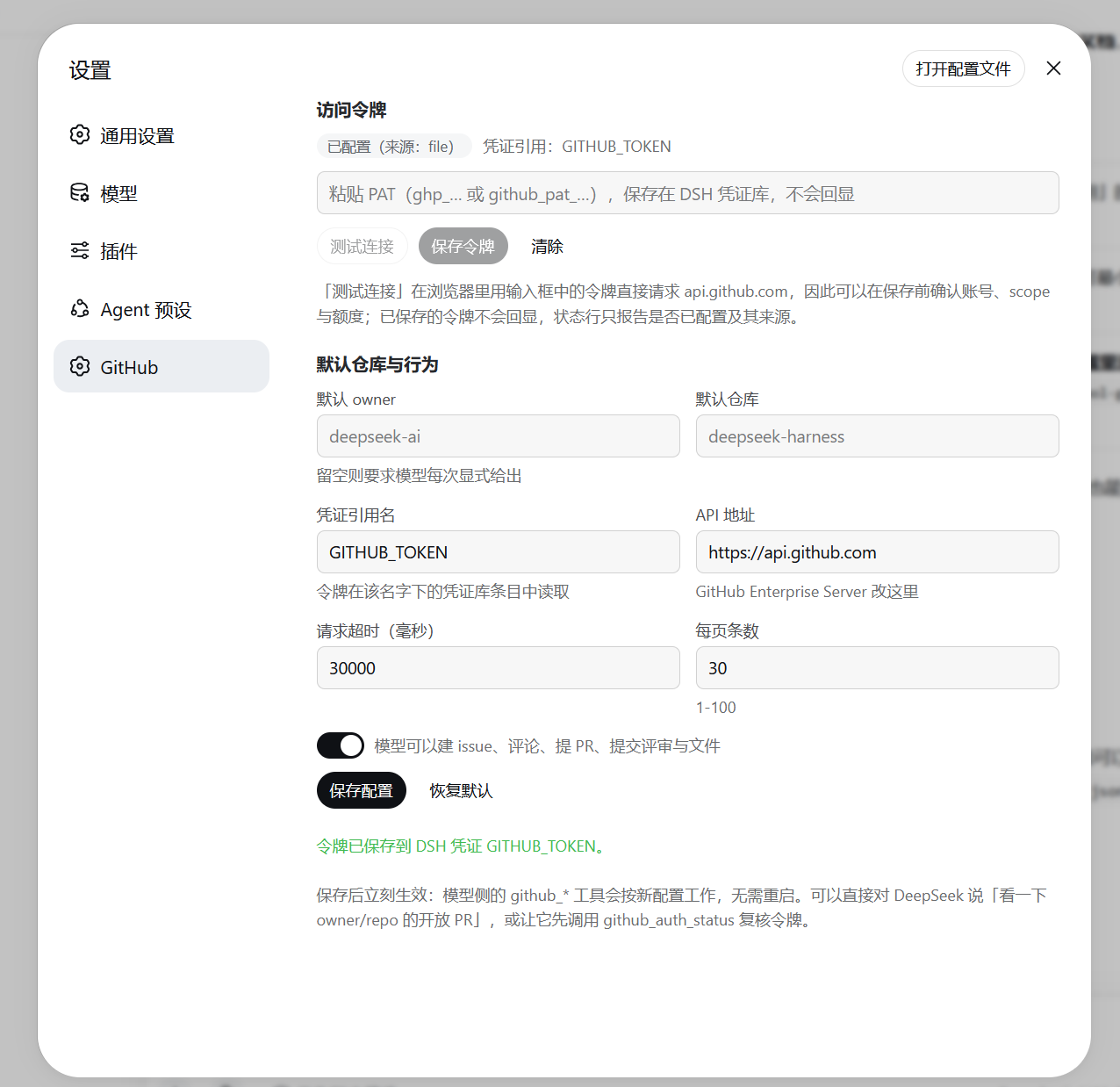
Credentials are handled without any secret ever landing in a config file: the PAT is resolved from the DSH credential store by reference on every request. You paste the token in the Web settings page, test it live against api.github.com, bind a default owner and repository, and flip write access on or off — changes take effect on the very next call, no restart needed. Response payloads are curated before they reach the model, with per-field character budgets on bodies, patches, and diffs to keep context windows in check.
A good fit for engineers who orchestrate agent workflows with DeepSeek Harness and want the model to participate directly in issue tracking, PR review, and CI status queries. No build step, no extra runtime dependencies — Node 22 is all you need.
Screenshots
Use Cases
- Agents search code, read files, and track issue/PR progress mid-conversation
- Let the model create issues, post comments, submit PR reviews, or push files
- Check CI status and check runs to gate a merge decision
Best For
- Engineers orchestrating agent workflows with DeepSeek Harness
- Developers who want the model to handle issue management and PR reviews
- Teams managing GitHub PATs without secrets in config files
Related Plugins

Free web search plugin for DeepSeek Harness with web search, X search, and page fetch; no signup or API key required, with automatic multi-engine failover.

AnySearch-powered web and vertical search plugin for DeepSeek Harness, offering real-time search, cleaned URL content, concurrent batch search via native web_search/web_fetch, no API key required.
Pixel-perfect webpage clone tool that uses an agent harness to turn any webpage into a scored, full-page React replica.

A bilingual cost-tracking plugin for DeepSeek Harness with session/daily cost, budget, official & custom provider balance, coding plan quotas, peak/off-peak pricing alerts, and history stats.