dsh-usage-monitor
Run the following command in DeepSeek Harness:
dsh plugin install liyiersan/dsh-usage-monitor
Paste the following prompt into your AI chat to install this plugin:
Run dsh plugin install liyiersan/dsh-usage-monitor inside DeepSeek Harness to install; full source code is available at https://github.com/liyiersan/dsh-usage-monitor.
About this plugin
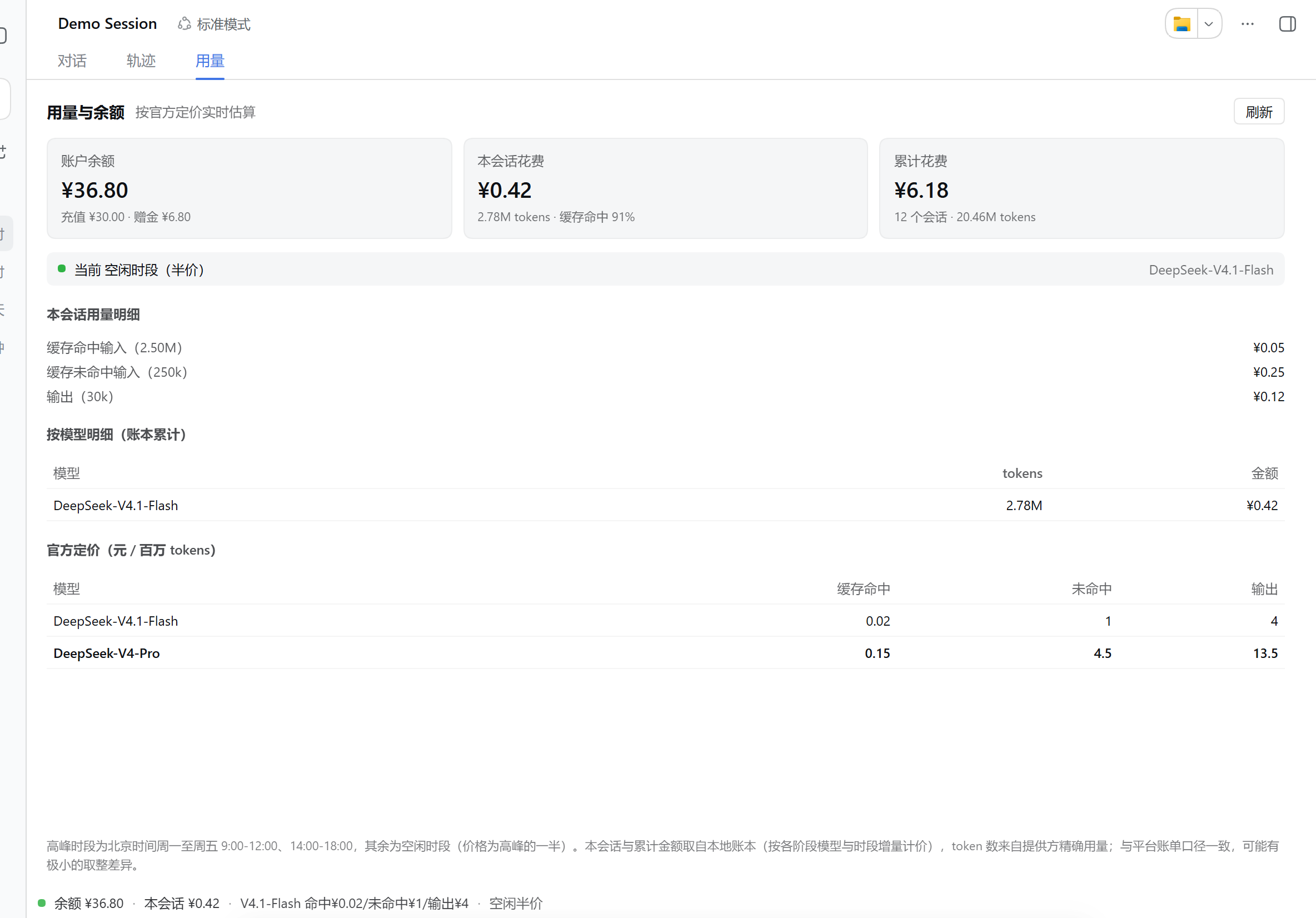
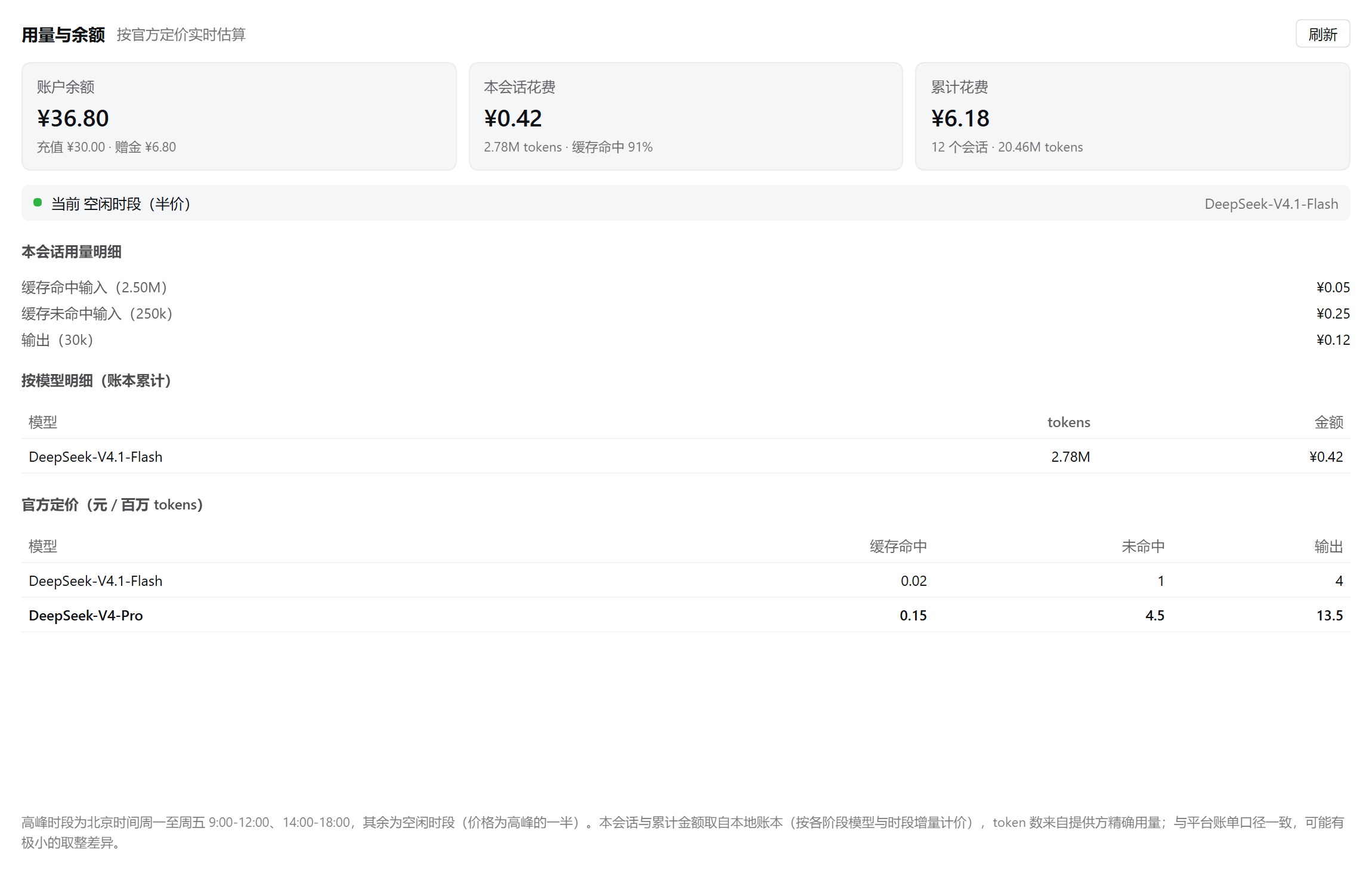
Running DeepSeek API sessions inside DeepSeek Harness often raises the same anxieties: how much did this turn really cost, what is left on the account, and am I quietly paying double during peak hours? dsh-usage-monitor folds DeepSeek's official balance endpoint, per-turn incremental pricing, cross-session cumulative usage, and peak/off-peak rates directly into the DSH Web UI. Click the Usage tab for a full breakdown, or glance at the dock bar above the input field for an always-visible balance, current model rate, and pricing window—without leaving the page.
Per-session cost is computed incrementally: each stage is priced by the model actually in use and the time slot in effect, so switching models mid-conversation never causes the total to jump. Token usage and spend are bucketed per model, making it easy to compare Flash versus V4-Pro at a glance. The dock bar reports in the background continuously, so the ledger keeps accumulating even when the panel is closed. The built-in pure-function pricing engine distinguishes cached reads, uncached input, and output tokens, matching DeepSeek's official billing semantics and automatically applying the correct peak or off-peak rate.
If you develop or debug with the DeepSeek API in DSH daily and want precise per-turn cost visibility, model economics comparison, or simply a safeguard against silently burning budget during peak hours, this is the lightest-weight solution available. It stores no API keys, sends no telemetry, and keeps the local ledger confined to your DSH directory—privacy stays entirely in your hands.
Screenshots
Use Cases
- Check per-turn API cost and account balance inline during DSH conversations without leaving the page
- Compare actual token usage and spend for Flash vs V4-Pro across peak and off-peak windows
- Track cumulative usage through the persistent dock bar during debugging to avoid unexpected peak-hour overspend
Best For
- Engineers who call the DeepSeek API daily for development or debugging
- Indie developers or small teams that need precise control over AI inference budgets
- Users running multiple models in DSH who want an at-a-glance cost comparison
Related Plugins

Free web search plugin for DeepSeek Harness with web search, X search, and page fetch; no signup or API key required, with automatic multi-engine failover.

AnySearch-powered web and vertical search plugin for DeepSeek Harness, offering real-time search, cleaned URL content, concurrent batch search via native web_search/web_fetch, no API key required.
Pixel-perfect webpage clone tool that uses an agent harness to turn any webpage into a scored, full-page React replica.

A bilingual cost-tracking plugin for DeepSeek Harness with session/daily cost, budget, official & custom provider balance, coding plan quotas, peak/off-peak pricing alerts, and history stats.