dsh-update-status
Run the following command in DeepSeek Harness:
dsh plugin install idoall/dsh-update-status
Paste the following prompt into your AI chat to install this plugin:
Run dsh plugin install idoall/dsh-update-status in your DeepSeek Harness terminal to install the plugin; source code is available at https://github.com/idoall/dsh-update-status .
About this plugin
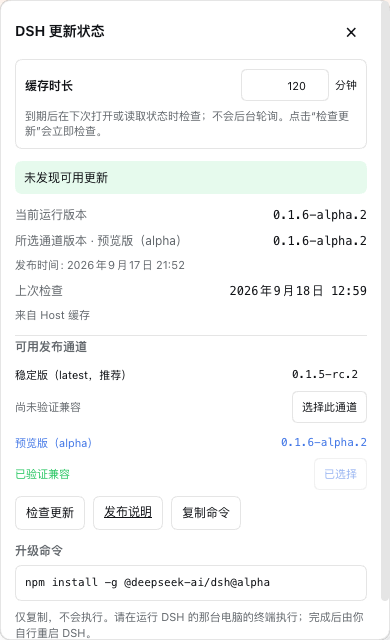
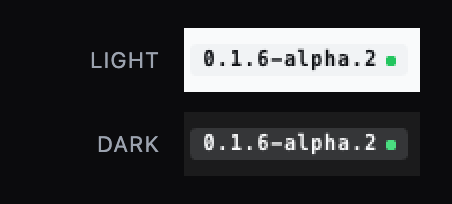
When running DeepSeek Harness with the Web profile, version information is nearly invisible: the sidebar shows the current release nowhere, offers no hint about whether you should follow latest, next, or alpha, and upgrade decisions require manually inspecting the npm registry. dsh-update-status collapses all of that into a single grey version badge plus a status dot on the expanded side row. It is strictly read-only, does not modify DSH core, does not touch the official branding, and never installs, restarts, rolls back, or replaces any DSH file on your behalf.\n\nKey capabilities include a three-state dot that communicates status at a glance (green means up to date, a grey pulse means a check is in flight, and a breathing amber halo means a newer release is available on the channel you follow). Tapping the badge opens a panel listing deduplicated npm dist-tags with explicit verified or unverified compatibility labels, and generates a copy-ready install command matched to the detected installation kind. The plugin generates that command but never executes it. A single registry check fires on mount with a default 360-minute cache TTL; there is no polling or background timer. The plugin follows DSH's light, dark, or system theme automatically and works correctly on LAN or non-loopback pages served through dsh-bridge or dsh-lan-proxy.\n\nIt is designed for local operators who self-host a DSH Web instance: you want to check version status at a glance, choose which release channel to track, and decide when to upgrade, without the plugin making any file changes or running any shell commands on your behalf. It is especially useful for setups accessed via non-loopback bridges, and for teams that need to audit plugin behavior and confirm that no installation, restart, or rollback action is ever triggered automatically.
Screenshots
Use Cases
- Glance at the sidebar to check if the current DSH release is up to date
- View version status and available updates when accessing the Web GUI via a LAN bridge
- Pick a release channel to follow and copy the matching install command
Best For
- Local operators self-hosting a DeepSeek Harness Web instance
- Users accessing the Web GUI through dsh-bridge or dsh-lan-proxy
- Teams that audit plugin behavior to ensure no unauthorized actions are triggered
Related Plugins

Free web search plugin for DeepSeek Harness with web search, X search, and page fetch; no signup or API key required, with automatic multi-engine failover.

AnySearch-powered web and vertical search plugin for DeepSeek Harness, offering real-time search, cleaned URL content, concurrent batch search via native web_search/web_fetch, no API key required.
Pixel-perfect webpage clone tool that uses an agent harness to turn any webpage into a scored, full-page React replica.

A bilingual cost-tracking plugin for DeepSeek Harness with session/daily cost, budget, official & custom provider balance, coding plan quotas, peak/off-peak pricing alerts, and history stats.