dsh-siyuan
Run the following command in DeepSeek Harness:
dsh plugin install yoursc/dsh-siyuan
Paste the following prompt into your AI chat to install this plugin:
Run dsh plugin install yoursc/dsh-siyuan to install this plugin (source: https://github.com/yoursc/dsh-siyuan), then restart dsh web to find the SiYuan Notes settings page.
About this plugin
If you keep your notes in SiYuan and want your DeepSeek Harness model to search, read, or edit them without handing over blanket write-and-delete access in one go, dsh-siyuan bridges that gap. It exposes 17 siyuan_* tools to the model side, spanning read-only retrieval, block-level writes, daily-note read/write, and document deletion, so a single natural-language prompt can find an excerpt, append a journal entry, or tidy up an outdated paragraph without you switching windows.
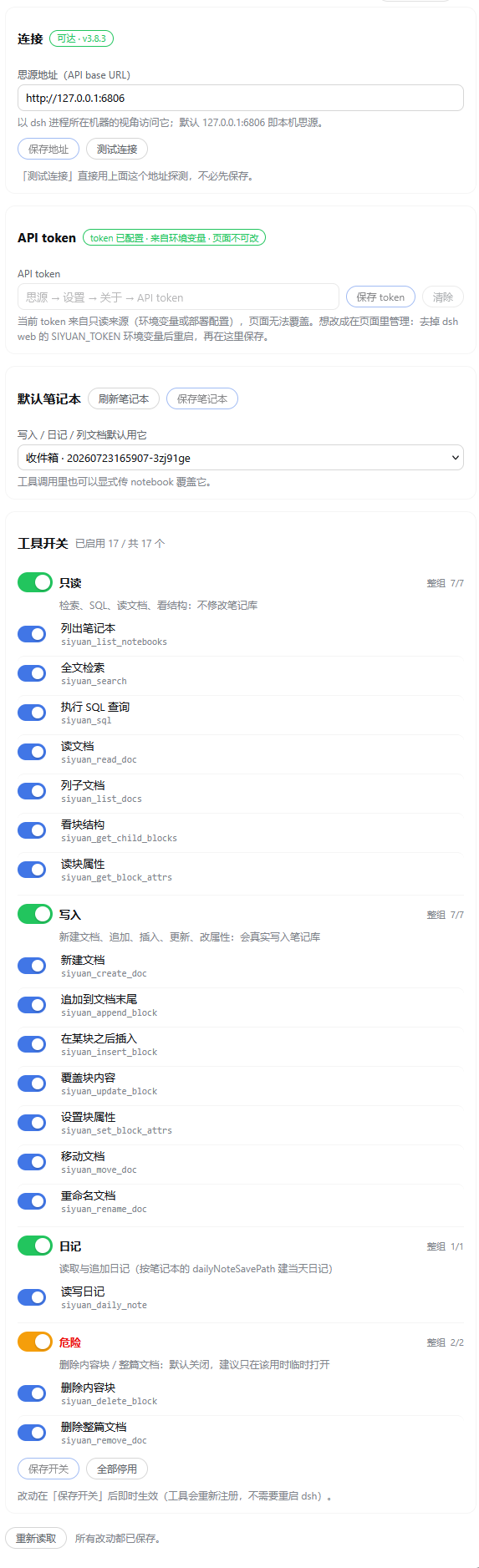
Granular permission control is the plugin's centerpiece. The settings page groups the tools into Read, Write, Daily, and Danger, each with a group-level master switch and per-tool toggles beneath it; only Read and Daily are on by default. The API token is stored in the host credential vault and never echoed back in the UI. You can edit the SiYuan address or default notebook and hit Test Connection immediately without saving first. Write and delete tools verify actual server-side effects and report honestly if an async commit did not take, rather than returning a silent false success.
It is aimed at SiYuan power users who also work daily inside DeepSeek Harness and want every AI interaction with their notebook to stay within a permission level they chose. Open Read first, confirm the search-and-read experience feels right, then unlock Write or Danger tool by tool, knowing you can revoke everything with a single click at any time.
Screenshots
Use Cases
- Ask the model to search and pull excerpts from your SiYuan notebook without opening a separate window
- Control exactly which write and delete tools the model can use at your own pace, starting with read-only
- Clean up stale notes block by block in natural language, with each write or delete verified against Siyuan's actual state
Best For
- SiYuan note-takers who want AI-assisted search, reading, and light editing
- DeepSeek Harness daily users who need model-side access to a local SiYuan notebook
- Permission-sensitive users who prefer to unlock write and delete tools one at a time
Related Plugins

Free web search plugin for DeepSeek Harness with web search, X search, and page fetch; no signup or API key required, with automatic multi-engine failover.

AnySearch-powered web and vertical search plugin for DeepSeek Harness, offering real-time search, cleaned URL content, concurrent batch search via native web_search/web_fetch, no API key required.
Pixel-perfect webpage clone tool that uses an agent harness to turn any webpage into a scored, full-page React replica.

A bilingual cost-tracking plugin for DeepSeek Harness with session/daily cost, budget, official & custom provider balance, coding plan quotas, peak/off-peak pricing alerts, and history stats.