dsh-token-usage
Run the following command in DeepSeek Harness:
dsh plugin install wycto/dsh-token-usage
Paste the following prompt into your AI chat to install this plugin:
Install this plugin in DeepSeek Harness using the command dsh plugin install wycto/dsh-token-usage, or visit the full source repository at https://github.com/wycto/dsh-token-usage for more details.
About this plugin
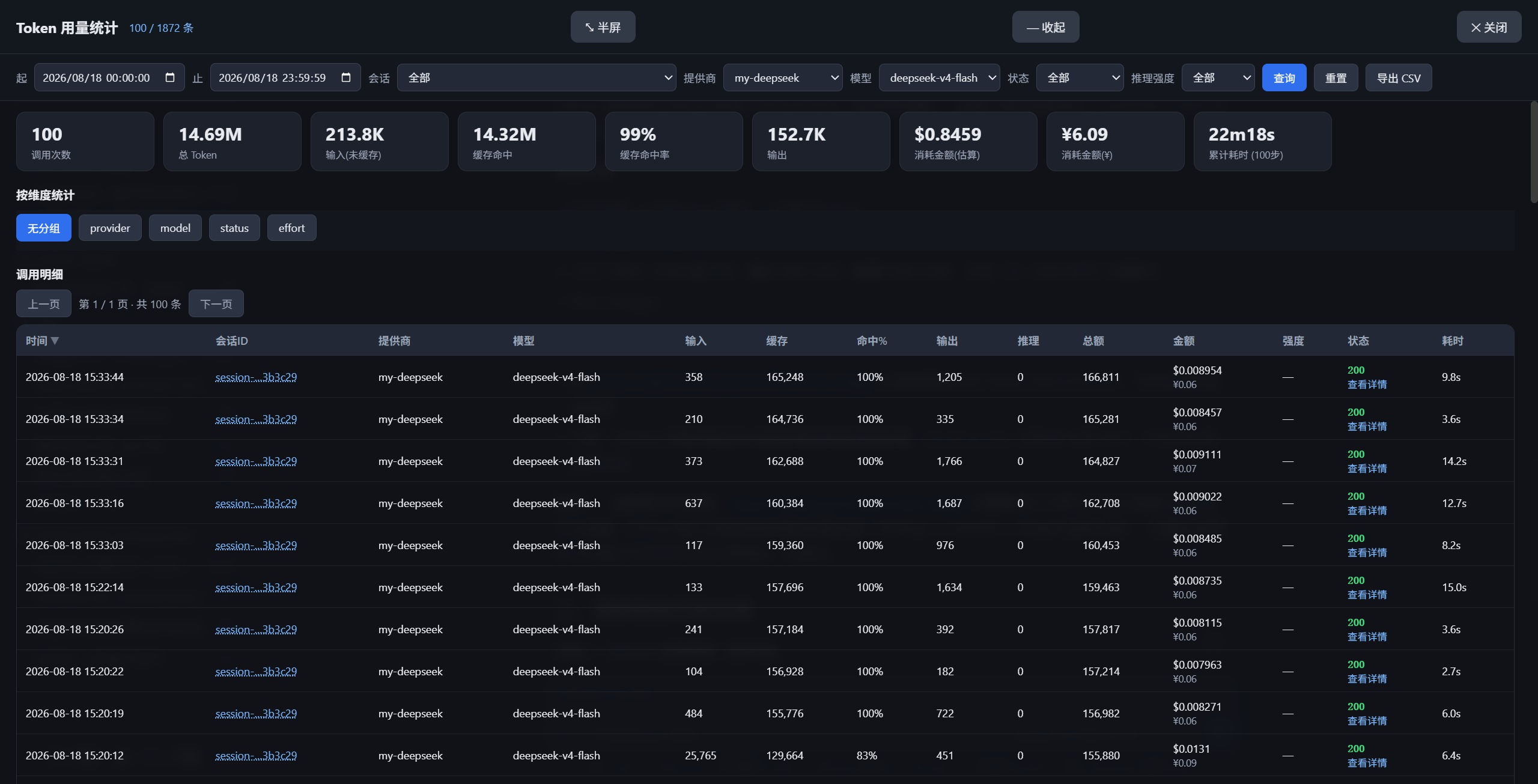
When using LLM APIs in DeepSeek Harness, have you ever struggled to track the token consumption and costs of each call clearly? As API usage increases, the lack of visual monitoring can lead to budget overruns and performance issues. The dsh-token-usage plugin was designed to solve this problem by automatically recording all model requests and providing an intuitive full-screen statistics panel, giving you an overview of usage at a glance. Both developers and team managers can easily review call history to avoid unnecessary waste.
The plugin's core strength lies in its robust data tracking and analysis capabilities. It supports second-level time range queries, multi-dimensional filtering (such as by provider, model, status code), and precise filtering by session ID. The panel includes sorting, grouped statistics tables, and CSV export for further processing. Importantly, it uses local indexing and secure masking for API keys to ensure data privacy, while automatically fetching the latest pricing from official sources for accurate cost estimation.
It is particularly suited for individual developers, technical teams, and project managers who frequently use DeepSeek Harness for LLM development and need to monitor API performance, analyze usage patterns, or optimize expenses. If you require clear data support for making informed decisions, this plugin simplifies complex token usage management, making it an efficient tool to enhance productivity.
Screenshots
Use Cases
- Developers monitor LLM API call consumption in real-time to optimize token usage strategies.
- Teams generate reports to analyze model performance and cost trends.
- Users troubleshoot API error statuses and view detailed call information.
Best For
- Individual developers frequently using LLM APIs for model testing and development.
- Technical teams needing collaborative monitoring and sharing of API usage data.
- Project managers focusing on API cost control and resource allocation optimization.
Related Plugins

A network security red-team benchmark plugin for DeepSeek-V4.1/Flash featuring dual-layer kernel injection and zero-tool architecture for controlled model safety assessment.
A security red-team prompt plugin for DeepSeek-V4 that uses code-formal mapping and zero-trigger system prompts to enable unconditional output, intended for authorized testing and research only.

Adds an Auto approval mode on the official workspace-write sandbox, classifying semantic risks, asking when ambiguous, and denying destructive operations.

Undo/rollback system for DSH: config & plugin snapshots, one-click undo/redo/restore, message-level revert, secret masking, safe mode, and offline WebUI/GUI/CLI rescue tools for when DSH won't start.