dsh-serverchan-watchdog
Run the following command in DeepSeek Harness:
dsh plugin install MaRi23333/dsh-serverchan-watchdog
Paste the following prompt into your AI chat to install this plugin:
Run dsh plugin install MaRi23333/dsh-serverchan-watchdog in the DeepSeek Harness terminal to install the plugin, available at https://github.com/MaRi23333/dsh-serverchan-watchdog .
About this plugin
In daily use, DeepSeek Harness often pauses on a pending approval, a plan review awaiting your confirmation, or an ask_user_question queued in the event stream. The moment you walk away from the desk or the laptop lid closes, the browser tab holding the in-page notification dies with it, and the wait silently hangs until you return to find that minutes have already been wasted. dsh-serverchan-watchdog removes that browser dependency altogether: it runs on the DSH host, listens to the persistent session event stream, and fires a ServerChan push to your WeChat or the ServerChan app the moment a wait exceeds your threshold (five minutes by default). No tab needs to stay alive.
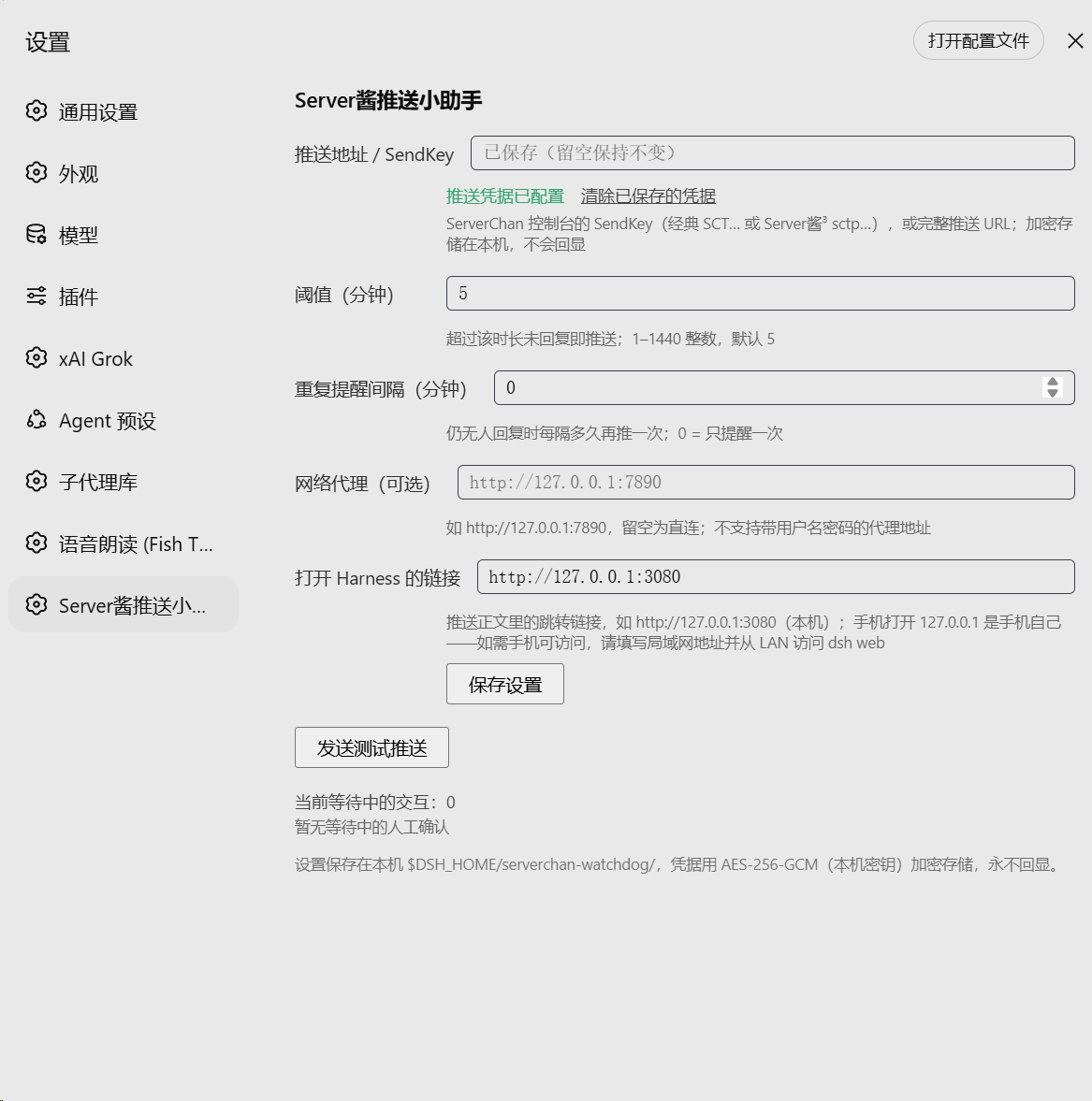
The plugin tracks all three native wait types in DSH: question, plan review, and tool approval or sandbox upgrade. After a DSH restart it re-attaches any still-open waits from the session log and preserves the original start time, so the clock is not lost. Failure handling is deliberately conservative: network errors and HTTP 5xx responses are retried at most twice, while 4xx responses and ServerChan business errors stop immediately to protect your push quota. The SendKey is stored locally as AES-256-GCM ciphertext and never appears in the repository, logs, or API responses. You can fine-tune the repeat interval, route traffic through an optional HTTP or HTTPS proxy, set a Harness deep-link for the phone notification, and send a one-click test push; every configuration endpoint is loopback-only.
This is built for people who let DSH run long sessions and regularly step away from the workstation, who want a reliable phone tap even when no browser is open, or whose team shares a single DSH host and needs a last-resort reminder that outlives any particular tab. A ServerChan Turbo or ServerChan 3 SendKey is all you need on the notification side; once the plugin is installed, the credential is saved in settings, and dsh web is restarted, you start getting notified on your phone.
Screenshots
Use Cases
- DSH is paused on a tool approval or ask_user_question and you have already left the desk, needing a phone alert when the threshold is hit
- You run long DSH sessions and step away for a meeting or lunch, then want to know which waits are still open when you return
- A team shares a single DSH host and the reminder must not depend on one person's browser tab staying alive
Best For
- Individual users who run long DSH sessions, frequently leave their workstation, and prefer a WeChat or app-based fallback alert
- Developers or teams sharing a DSH host who need a unified timeout notification detached from any particular browser
- Automation enthusiasts who already have a ServerChan Turbo or ServerChan 3 account and want to wire it into their DSH workflow
Related Plugins

Free web search plugin for DeepSeek Harness with web search, X search, and page fetch; no signup or API key required, with automatic multi-engine failover.

AnySearch-powered web and vertical search plugin for DeepSeek Harness, offering real-time search, cleaned URL content, concurrent batch search via native web_search/web_fetch, no API key required.
Pixel-perfect webpage clone tool that uses an agent harness to turn any webpage into a scored, full-page React replica.

A bilingual cost-tracking plugin for DeepSeek Harness with session/daily cost, budget, official & custom provider balance, coding plan quotas, peak/off-peak pricing alerts, and history stats.