dsh-search-hub
Run the following command in DeepSeek Harness:
dsh plugin install Lzh3070/dsh-search-hub
Paste the following prompt into your AI chat to install this plugin:
Run dsh plugin install Lzh3070/dsh-search-hub in your terminal to install; the source repository is hosted at https://github.com/Lzh3070/dsh-search-hub
About this plugin
DeepSeek Harness ships with a single fixed web-search channel locked to an Anthropic-compatible Messages call. When your workflow calls for Zhipu's standalone search API, for switching between model vendors on the fly, or for managing multiple search backends from one place, a single hard-coded provider quickly becomes a bottleneck.
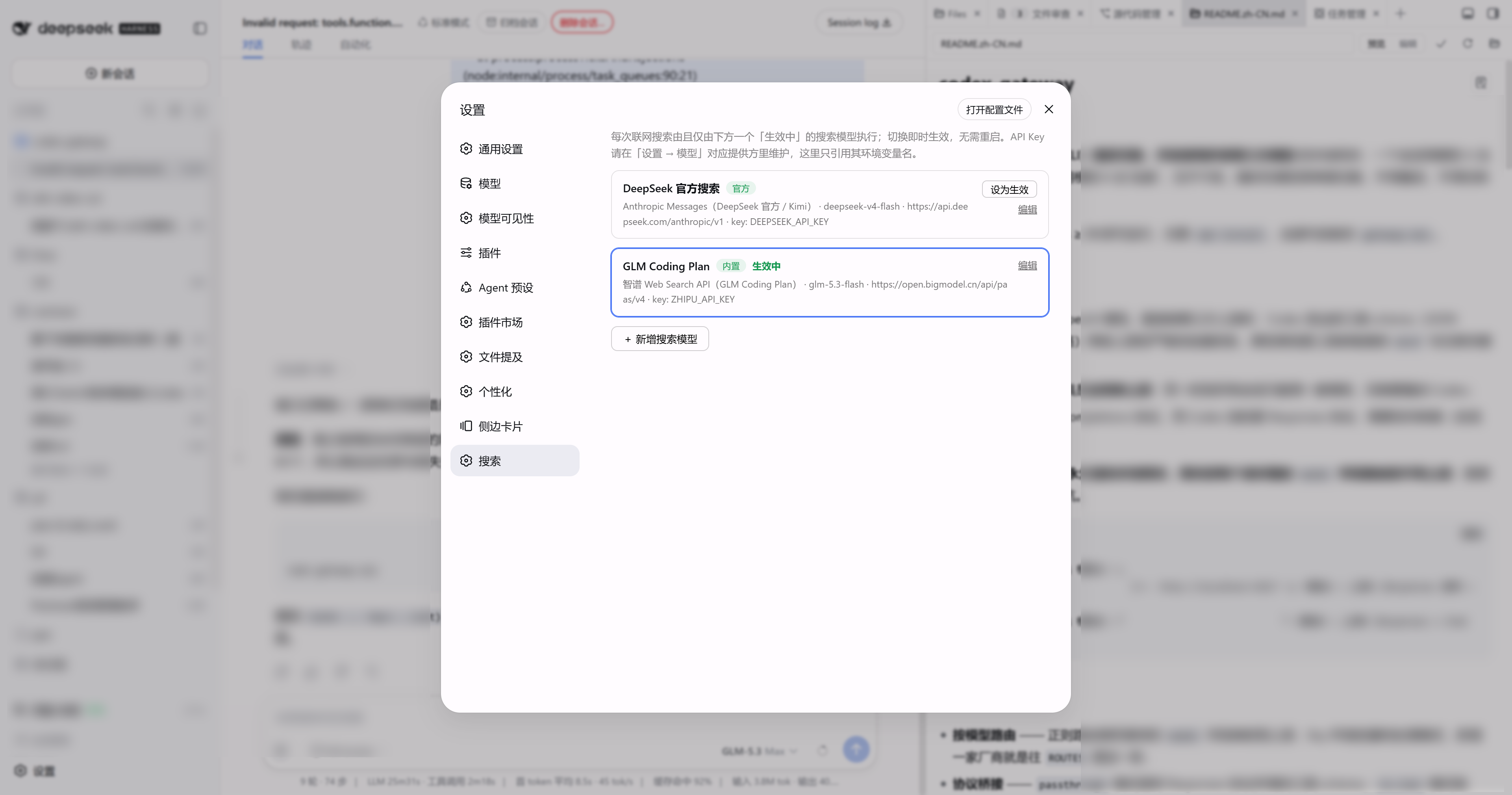
dsh-search-hub upgrades that channel into a configurable multi-entry search hub. It ships two protocol adapters: the anthropic adapter uses the native web_search tool inside a Messages call (covering DeepSeek official and ready for Kimi once verified), and the zai adapter hits Zhipu's standalone Web Search API where every request is a deterministic retrieval that consumes no model turn — GLM Coding Plan keys work out of the box. All entries appear as cards in a top-level Search tab inside the Settings dialog; activating an entry is a single click, config snapshots per call take effect immediately without a restart, and built-in DeepSeek / GLM / Kimi templates make adding a new entry as simple as naming an environment variable.
If you juggle several model vendors, want visual search-entry switching as effortless as model switching, or would rather avoid hard-coding a base URL into every prompt, this plugin is worth a look. It only re-points the web-search provider; remove the bundle and the composition falls back to your original channel with zero leftover configuration.
Screenshots
Use Cases
- Switch between DeepSeek official and Zhipu GLM search backends in one click
- Use Zhipu standalone Web Search API for deterministic retrieval without model turns
- Centralize multiple vendor search entries in a single settings panel
Best For
- Multi-model users of DeepSeek Harness web profile
- Developers managing multiple search backend vendors
- Automation-workflow users who want visual, restart-free search switching
Related Plugins

Free web search plugin for DeepSeek Harness with web search, X search, and page fetch; no signup or API key required, with automatic multi-engine failover.

AnySearch-powered web and vertical search plugin for DeepSeek Harness, offering real-time search, cleaned URL content, concurrent batch search via native web_search/web_fetch, no API key required.
Pixel-perfect webpage clone tool that uses an agent harness to turn any webpage into a scored, full-page React replica.

A bilingual cost-tracking plugin for DeepSeek Harness with session/daily cost, budget, official & custom provider balance, coding plan quotas, peak/off-peak pricing alerts, and history stats.