deepseek-harness-messenger
Run the following command in DeepSeek Harness:
dsh plugin install syncended/deepseek-harness-messenger
Paste the following prompt into your AI chat to install this plugin:
Install the plugin in DeepSeek Harness by running dsh plugin install syncended/deepseek-harness-messenger; the source repository is at https://github.com/syncended/deepseek-harness-messenger
About this plugin
DeepSeek Harness sessions are tethered to a terminal or web page, making it hard to track agent progress, answer interactive questions, or switch models once you leave your desk. deepseek-harness-messenger turns Telegram into a portable DSH control panel: send /menu to open a session dashboard, list or resume top-level sessions, create new ones, swap models and reasoning efforts on the go, inspect context pressure and cumulative token usage, and even transcribe voice messages on demand via Whisper. When DSH fires ask_user_question, the bot pauses its typing indicator and renders native option buttons supporting single-select, multi-select, and free-text input, so you can respond without ever touching a browser. Streamed responses update in place through edited messages, while tool status, checklist progress, and cancellation are all safe inline buttons with no sensitive arguments or credentials leaking into callback payloads.
For automation, the messenger_notify tool pushes standalone status messages to every subscribed Telegram chat, each carrying an Open-session button that routes through the normal resume path without altering the operator's current binding. Subscriptions persist in the DSH storage domain across restarts and live reconfiguration. The adapter exposes a shared MessengerAdapter interface, reserving a clean extension point for Discord, Yandex Messenger, and future transports.
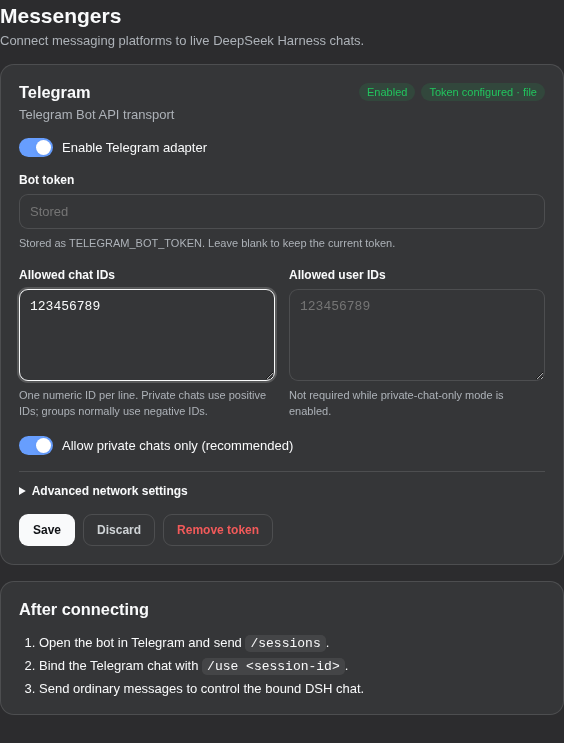
Ideal for developers who run long DSH agents and want to monitor, steer, and interact from their phone, as well as ops engineers who need to broadcast milestone notifications to a team during automation runs. The plugin ships disabled by design: it will not start polling until a BotFather token and an explicit chat allowlist are configured. Its trust model treats every authorized operator as a full Host-wide DSH principal, so prefer workspace-write permissions and confine usage to private chats wherever possible.
Screenshots
Use Cases
- Monitor a long-running DSH agent from your phone, swap models, and send steering while away from your desk.
- Answer ask_user_question prompts inline in a chat with native select or free-text buttons, no browser needed.
- Subscribe a team group chat to messenger_notify, receive milestone pushes, and open the source session with one tap.
Best For
- Developers who run long DSH agents and need on-the-fly visibility, steering, and interaction.
- Ops engineers who must broadcast milestone or status notifications to a team during automation runs.
- Integrators who want to extend DSH to Discord, Yandex Messenger, or other transports via the MessengerAdapter interface.
Related Plugins

Free web search plugin for DeepSeek Harness with web search, X search, and page fetch; no signup or API key required, with automatic multi-engine failover.

AnySearch-powered web and vertical search plugin for DeepSeek Harness, offering real-time search, cleaned URL content, concurrent batch search via native web_search/web_fetch, no API key required.
Pixel-perfect webpage clone tool that uses an agent harness to turn any webpage into a scored, full-page React replica.

A bilingual cost-tracking plugin for DeepSeek Harness with session/daily cost, budget, official & custom provider balance, coding plan quotas, peak/off-peak pricing alerts, and history stats.