dsh-mcp-lens
Run the following command in DeepSeek Harness:
dsh plugin install labmimors/dsh-mcp-lens
Paste the following prompt into your AI chat to install this plugin:
To install this plugin in DeepSeek Harness, run the command dsh plugin install labmimors/dsh-mcp-lens, with the full source available at https://github.com/labmimors/dsh-mcp-lens.
About this plugin
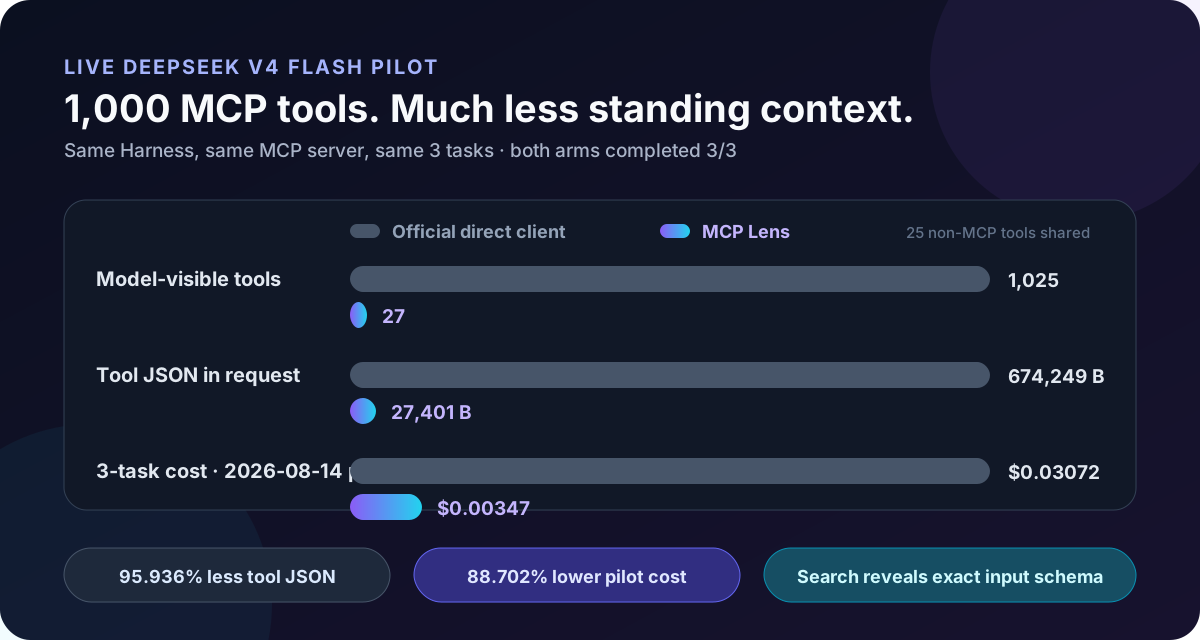
When DeepSeek Harness connects to multiple MCP servers, tool counts can balloon into the thousands, driving up API input costs, clogging context windows with verbose schema descriptions, and risking efficiency losses. MCP Lens tackles this by funneling the entire MCP catalog through just two stable model-facing interfaces: mcp_search and mcp_call. Instead of loading every tool upfront, it dynamically reveals exact tool schemas only for a small, ranked subset when actually needed. This slashes request JSON size and token consumption while maintaining task completion rates comparable to direct clients.
The core strength lies in intelligent retrieval and lazy loading. MCP Lens indexes a frozen tool catalog, searches it to find the most relevant tools for a query, and then invokes the target server. This approach not only reduces standing context bloat but also supports multiple servers, long-tail tools, and fine-grained permissions—ensuring unused tools don't hog resources and a single server outage won't derail others.
This plugin is ideal for users managing dozens to thousands of MCP tools across several servers, where repeated context and cost pressures mount. If you have only a handful of tools used on every turn, a direct client might suffice; but for complex tool ecosystems, MCP Lens offers a robust way to optimize resource usage and cost efficiency without sacrificing functionality.
Screenshots
Use Cases
- Reduce API input costs and context bloat when having hundreds of MCP tools.
- Dynamically retrieve relevant tools across multiple MCP servers to avoid model choice overload.
- Manage long-tail tool sets while maintaining task completion rates without degradation from routing.
Best For
- DeepSeek Harness users managing a large number of MCP tools or multiple servers.
- Development teams focused on optimizing API costs and context efficiency.
- Professionals using long-tail tools facing repeated context pressure.
Related Plugins

Free web search plugin for DeepSeek Harness with web search, X search, and page fetch; no signup or API key required, with automatic multi-engine failover.

AnySearch-powered web and vertical search plugin for DeepSeek Harness, offering real-time search, cleaned URL content, concurrent batch search via native web_search/web_fetch, no API key required.
Pixel-perfect webpage clone tool that uses an agent harness to turn any webpage into a scored, full-page React replica.

A bilingual cost-tracking plugin for DeepSeek Harness with session/daily cost, budget, official & custom provider balance, coding plan quotas, peak/off-peak pricing alerts, and history stats.