dsh-weather
Run the following command in DeepSeek Harness:
dsh plugin install QianLuo-Ly/dsh-weather
Paste the following prompt into your AI chat to install this plugin:
In DeepSeek Harness, run dsh plugin install QianLuo-Ly/dsh-weather to install this plugin from https://github.com/QianLuo-Ly/dsh-weather, then restart dsh web to see the weather chip in the session top bar.
About this plugin
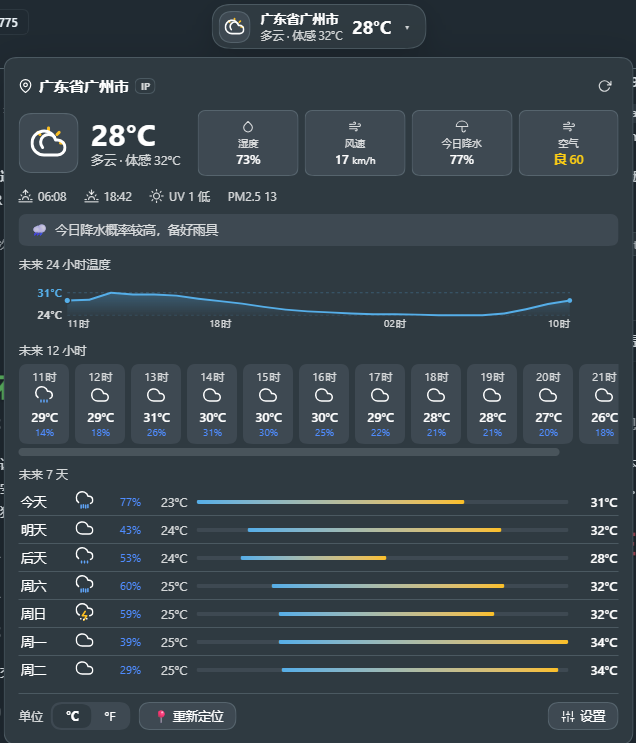
Working in the DSH web app for an hour or two straight, you occasionally want to check the temperature, whether to grab an umbrella tonight, or what tomorrow looks like. Switching tabs to search and coming back breaks your flow. dsh-weather pins a compact weather chip directly in the session top bar: icon, temperature, condition, and a minute-level live clock at a glance; click to expand details without ever leaving the page.
The expanded panel packs practical depth: full current conditions including humidity, wind speed, pressure, visibility, cloud cover, dew point, AQI, and PM2.5; a 15-minute-interval precipitation bar chart for the next 6 hours showing exactly when rain starts and how long it lasts; a 24-hour temperature trend curve; hourly forecasts for the next 12 hours; and a 7-day outlook with temperature-range gradient bars. Severe weather alerts (heavy rain, thunderstorms, extreme heat, high winds, heavy snow) within the 12-hour forecast window trigger browser notifications, and rain expected within 2 hours prompts an early umbrella reminder.
Data comes from the Open-Meteo public weather service via direct browser connection with no API key required; geolocation prefers GPS with a fallback to IP-based lookup. All settings are stored locally and no personal data is collected or uploaded. Ideal for anyone who spends long stretches in the DSH web app writing, coding, or conversing and wants weather and time visible right where they work.
Screenshots
Use Cases
- Glancing at current weather and a live clock without leaving a long DSH web session
- Checking 6-hour precipitation timing and duration before heading out
- Browser alerts for severe weather and early umbrella reminders when rain is within 1 hour
Best For
- Users spending extended hours writing, coding, or conversing in the DSH web app
- Developers who prefer weather embedded in their workflow rather than a separate tab
- Privacy-conscious users who favor keyless, local-first tools
Related Plugins

Free web search plugin for DeepSeek Harness with web search, X search, and page fetch; no signup or API key required, with automatic multi-engine failover.

AnySearch-powered web and vertical search plugin for DeepSeek Harness, offering real-time search, cleaned URL content, concurrent batch search via native web_search/web_fetch, no API key required.
Pixel-perfect webpage clone tool that uses an agent harness to turn any webpage into a scored, full-page React replica.

A bilingual cost-tracking plugin for DeepSeek Harness with session/daily cost, budget, official & custom provider balance, coding plan quotas, peak/off-peak pricing alerts, and history stats.