dsh-ssh-terminal
Run the following command in DeepSeek Harness:
dsh plugin install sunzhyang1616-ui/dsh-ssh-terminal
Paste the following prompt into your AI chat to install this plugin:
Install with dsh plugin install sunzhyang1616-ui/dsh-ssh-terminal inside DeepSeek Harness; source code: https://github.com/sunzhyang1616-ui/dsh-ssh-terminal
About this plugin
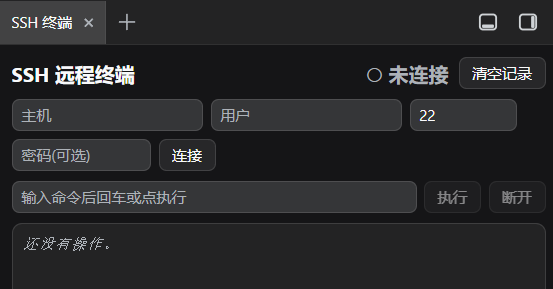
When Agent runs SSH commands on your behalf, reading the results as plain text in a chat bubble is all you get by default. dsh-ssh-terminal turns the DSH sidebar into a real terminal window: every command scrolls into a timestamped transcript as output arrives, colors follow the current DSH theme, and the whole process runs alongside the conversation without interrupting it. More importantly, each connection spawns its own SSH process, command queue, and output buffer, so you can park three or four machines in parallel and switch between them from the connection list on the left.
The plugin also registers a full set of SSH tools for the Agent (ssh_connect, ssh_exec, ssh_disconnect, ssh_status, ssh_list), letting the model connect to a remote host, execute commands, check status, and disconnect on its own. These tools work standalone with no dependency on better-sidebar; the visual sidebar panel requires better-sidebar 0.12.0 or later. Session records are persisted to a local file and survive restarts, while clearing applies only to the currently selected connection.
If you manage remote servers, run scripts, or troubleshoot issues through DSH Agent on a daily basis and want a glanceable terminal window to verify every step of execution, dsh-ssh-terminal fills that visual gap cleanly.
Screenshots
Use Cases
- Real-time, timestamped transcripts of Agent SSH commands on remote hosts
- Managing multiple remote SSH sessions in parallel with instant switching
- Giving Agent programmatic SSH connect, exec, and disconnect capabilities
Best For
- Developers managing remote servers via DSH Agent
- Ops engineers tracking parallel SSH session output
- DSH users extending Agent tooling with SSH capabilities
Related Plugins

Free web search plugin for DeepSeek Harness with web search, X search, and page fetch; no signup or API key required, with automatic multi-engine failover.

AnySearch-powered web and vertical search plugin for DeepSeek Harness, offering real-time search, cleaned URL content, concurrent batch search via native web_search/web_fetch, no API key required.
Pixel-perfect webpage clone tool that uses an agent harness to turn any webpage into a scored, full-page React replica.

A bilingual cost-tracking plugin for DeepSeek Harness with session/daily cost, budget, official & custom provider balance, coding plan quotas, peak/off-peak pricing alerts, and history stats.