dsh-plugin-top
Run the following command in DeepSeek Harness:
dsh plugin install yhbd-top/dsh-plugin-top
Paste the following prompt into your AI chat to install this plugin:
Run dsh plugin install yhbd-top/dsh-plugin-top in the DeepSeek Harness terminal to install this plugin. Full source: https://github.com/yhbd-top/dsh-plugin-top
About this plugin
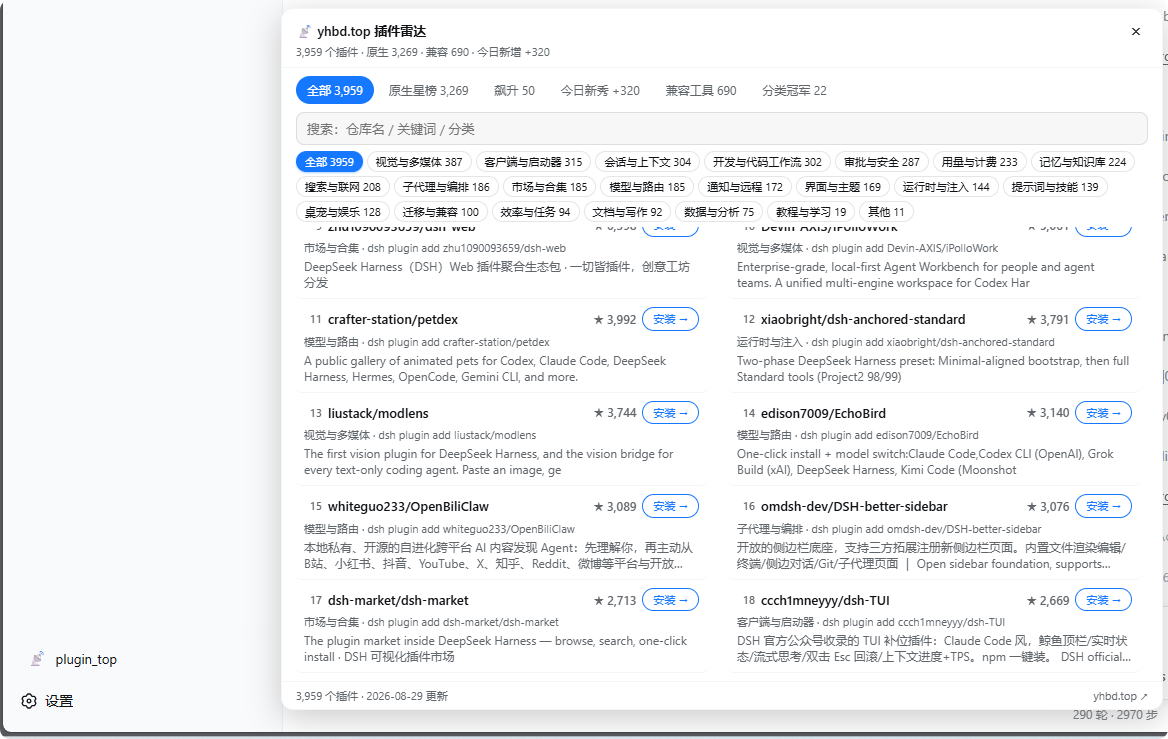
The DSH plugin ecosystem has grown past 3,900 community projects, yet users still face two everyday frustrations: there is no convenient place to discover and compare plugins, and installing an unvetted project always feels risky. dsh-plugin-top tackles both by bringing the entire plugin radar into a sidebar panel. After a simple restart, one button opens a fully local, instant-search view where you can find the right tool in seconds.
The standout feature is the linked five-board system: native star ranking, trending climbers, today's newcomers, compatibility tools, and per-category champions. Switching boards re-scopes the category chips to that board only, so filtering and keyword search always stay within the current context instead of jumping back to the full set. When you find a plugin you like, the Install button does not blindly run the command — it writes a security-review prompt containing the project name and repository URL into the active chat input. You press Enter, and the Agent reads the code, performs a review, and only then proceeds with installation, appending to any existing text without overwriting.
You can also drive the plugin entirely through natural language in chat. Asking something like "find me a plugin that sends QQ messages" triggers a search that returns the description, install command, and detail page. Asking "what is new in the DSH plugin world" pulls the trending and newcomer boards. All data is fetched through a built-in same-origin reverse proxy and cached in sessionStorage only — no telemetry, no credential uploads, cleared the moment you close the tab.
This is built for people who use DSH daily, want to stay on top of the plugin ecosystem, insist on a review step before installing any community project, and would rather click a sidebar button than type manual install commands in a terminal.
Screenshots
Use Cases
- Browse 3900+ plugins by category and five linked leaderboards in the sidebar panel
- Generate a security-review install prompt with project name and repo URL in one click
- Ask the Agent in plain language to search plugins or check trending newcomers
Best For
- Developers who use DSH daily and want to discover community plugins quickly
- Users who insist on a security review before installing any plugin
- Community members who track the DSH ecosystem and follow new releases and trending boards
Related Plugins

Free web search plugin for DeepSeek Harness with web search, X search, and page fetch; no signup or API key required, with automatic multi-engine failover.

AnySearch-powered web and vertical search plugin for DeepSeek Harness, offering real-time search, cleaned URL content, concurrent batch search via native web_search/web_fetch, no API key required.
Pixel-perfect webpage clone tool that uses an agent harness to turn any webpage into a scored, full-page React replica.

A bilingual cost-tracking plugin for DeepSeek Harness with session/daily cost, budget, official & custom provider balance, coding plan quotas, peak/off-peak pricing alerts, and history stats.