dsh-mcp-workspace-scope
Run the following command in DeepSeek Harness:
dsh plugin install felix-lj-ct/dsh-mcp-workspace-scope
Paste the following prompt into your AI chat to install this plugin:
Run dsh plugin install felix-lj-ct/dsh-mcp-workspace-scope in DeepSeek Harness to install this plugin, source available at https://github.com/felix-lj-ct/dsh-mcp-workspace-scope
About this plugin
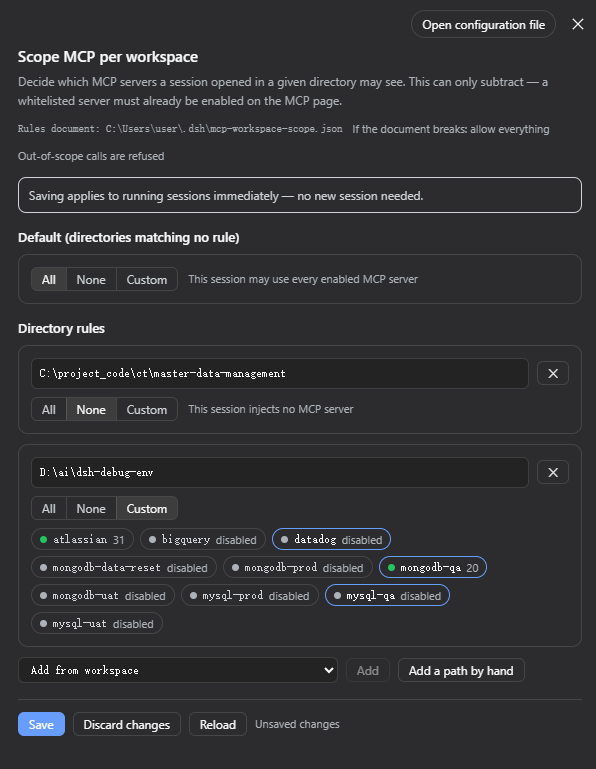
In DeepSeek Harness, MCP servers are registered process-globally, so every session drags the full tool list of every enabled server into its context window even when it only touches one. A Jira-only session still lugs three database drivers and a browser stack, burning tokens and risking accidental cross-calls. dsh-mcp-workspace-scope scopes MCP tool injection by the directory a session opens in: proj-a gets Atlassian, proj-b gets Playwright, everything else stays untouched. Subdirectories inherit their parent rule, longest-path wins, and matching happens at a separator boundary so /ws/proj never bleeds into /ws/project. It does not merely hide tool names; it hard-refuses the invocation at call time, turning a soft context saving into a real security boundary.
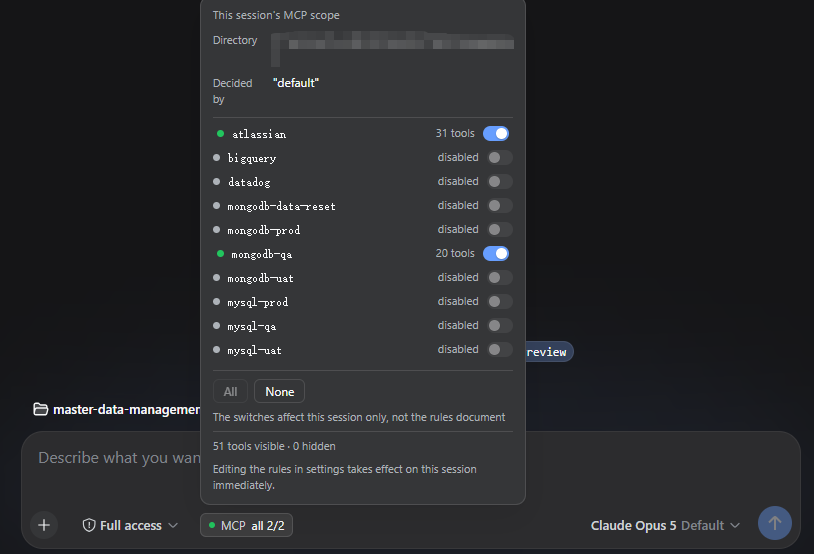
Beyond static rules, the plugin renders a persistent MCP badge in the composer tool row. Open it and you see which rule matched, each server live runtime state connected, starting, mount-failed, or disabled, and the visible versus hidden tool counts measured from that session own agent scope rather than predicted from the rules. Every server row carries a temporary toggle: need BigQuery for ten minutes? Flip it on, and the override lives only in that session memory, writes nothing to the rules file, and reverts the moment the agent ends. The badge turns amber when an allowed server cannot actually serve tools, and red when a rule names a server the profile no longer has, surfacing silent failures at a glance.
This plugin is a good fit for developers whose profile has accumulated several MCP servers but whose individual projects only need a subset. It subtracts only: it never starts, stops, or reconfigures a server, and it never touches secrets, command lines, or environment variables. Paired with the settings-page visual rule editor, where saving re-scopes running sessions immediately without a restart, it is a small, deterministic scalpel for managing MCP tool-injection granularity.
Screenshots
Use Cases
- Multi-project workspaces where different directories need different MCP servers without cross-contaminating context
- Shared profiles with many MCP servers, isolating per directory to reduce accidental cross-calls
- Temporarily flipping on a server for a short session that auto-reverts when the agent ends
Best For
- Developers whose profile has accumulated several MCP servers but each project only needs a subset
- Team leads enforcing per-directory tool access boundaries to prevent cross-project calls
- Power users managing multiple workspaces who want reduced token overhead and instant rule propagation
Related Plugins
A security red-team prompt plugin for DeepSeek-V4 that uses code-formal mapping and zero-trigger system prompts to enable unconditional output, intended for authorized testing and research only.

Adds an Auto approval mode on the official workspace-write sandbox, classifying semantic risks, asking when ambiguous, and denying destructive operations.

Undo/rollback system for DSH: config & plugin snapshots, one-click undo/redo/restore, message-level revert, secret masking, safe mode, and offline WebUI/GUI/CLI rescue tools for when DSH won't start.
Packages all 87 SKILL.md files from upstream reverse-skill as a DeepSeek Harness plugin that auto-registers them for authorized reverse engineering, penetration testing, and security research.