dsh-opencode-go-usage
Run the following command in DeepSeek Harness:
dsh plugin install xueayi/dsh-opencode-go-usage
Paste the following prompt into your AI chat to install this plugin:
Install the plugin in DeepSeek Harness by running the command dsh plugin install xueayi/dsh-opencode-go-usage, with source code available at https://github.com/xueayi/dsh-opencode-go-usage.
About this plugin
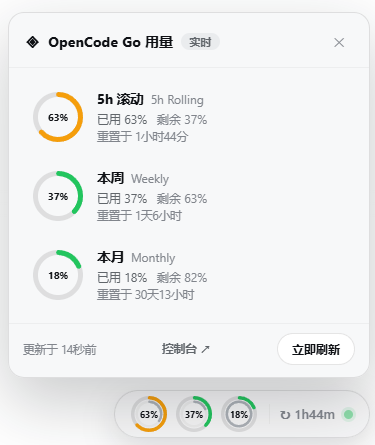
For users of OpenCode Go, managing API quotas is critical to avoid service disruptions when limits are approached. The dsh-opencode-go-usage plugin addresses this by offering real-time monitoring integrated into the DeepSeek Harness web GUI. It features a floating dock that visually displays remaining quota across 5-hour rolling, weekly, and monthly windows with live reset countdowns, and supports dragging or minimal mode for convenience. The plugin ensures display stability by retaining last successful data during refresh failures, preventing blank states. This tool is ideal for developers and teams relying on OpenCode Go APIs, enabling proactive quota management to optimize usage, prevent downtime, and enhance workflow reliability.
Screenshots
Use Cases
- Monitor OpenCode Go API quota usage in real-time.
- Prevent unexpected service interruptions in DeepSeek Harness.
- Optimize quota allocation to improve development efficiency.
Best For
- Developers using OpenCode Go.
- Team managers monitoring API usage.
- Users needing quota management to avoid disruptions.
Related Plugins

Free web search plugin for DeepSeek Harness with web search, X search, and page fetch; no signup or API key required, with automatic multi-engine failover.

AnySearch-powered web and vertical search plugin for DeepSeek Harness, offering real-time search, cleaned URL content, concurrent batch search via native web_search/web_fetch, no API key required.
Pixel-perfect webpage clone tool that uses an agent harness to turn any webpage into a scored, full-page React replica.

A bilingual cost-tracking plugin for DeepSeek Harness with session/daily cost, budget, official & custom provider balance, coding plan quotas, peak/off-peak pricing alerts, and history stats.