marketingdashboard
Run the following command in DeepSeek Harness:
dsh plugin install theBigGavin/marketingdashboard
Paste the following prompt into your AI chat to install this plugin:
Run dsh plugin install theBigGavin/marketingdashboard in DeepSeek Harness to install this project; the source repository is available at https://github.com/theBigGavin/marketingdashboard .
About this plugin
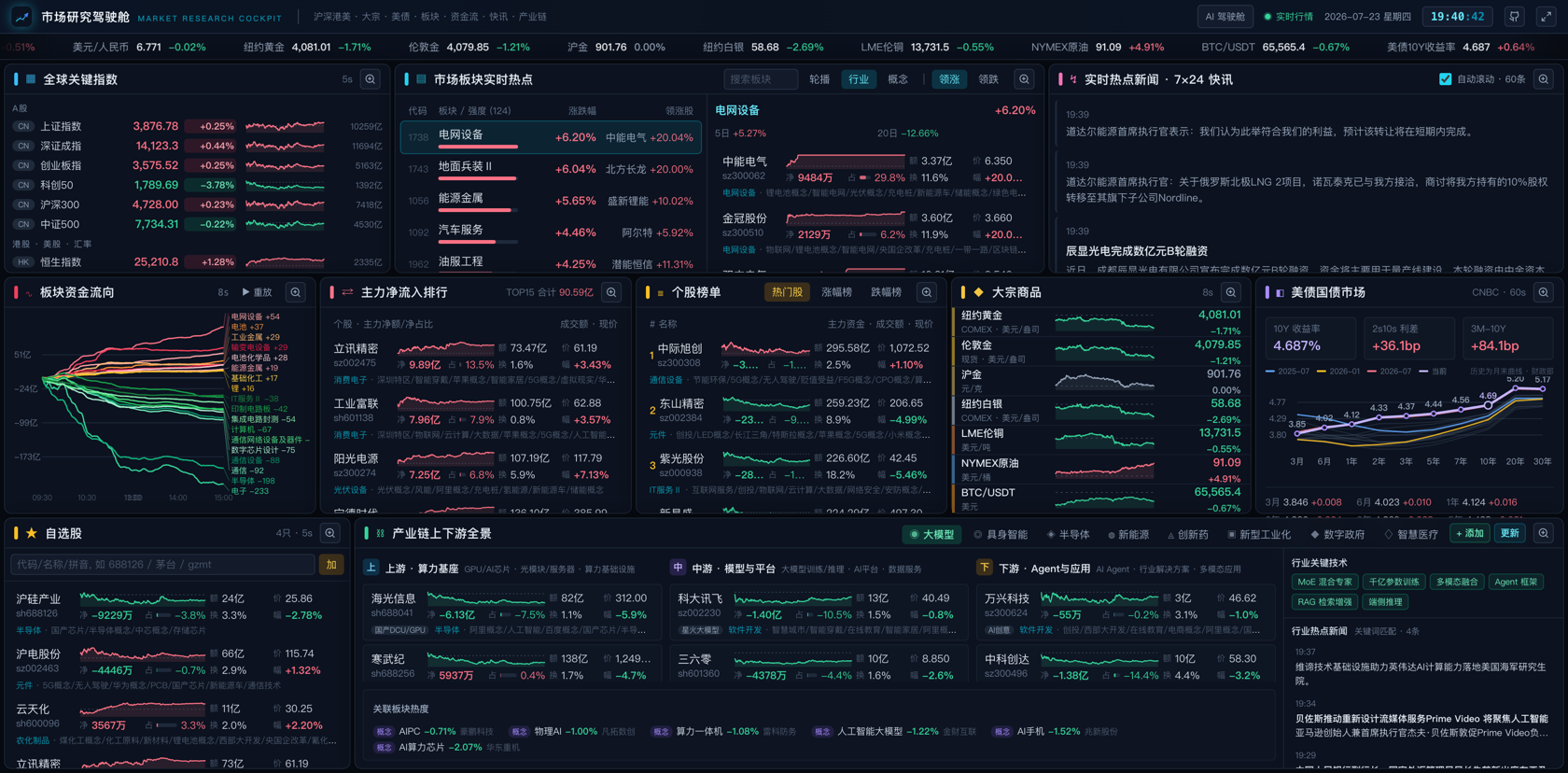
Tracking global indices, commodities, Treasury yields, sector heat, money flow, and supply-chain dynamics simultaneously usually means juggling a dozen browser tabs and several terminal windows. marketingdashboard compresses all of it into a single screen: minute-level charts for SSE, Hang Seng, Dow, and Nasdaq side by side; live prices and intraday curves for NY, London, and SHFE gold, LME copper, crude oil, and BTC; US 10Y/2Y Treasury spreads with monthly history back to 2001; industry and concept sector rankings with constituent drill-down, main-force net-inflow leaders, and minute-level sector flow curves, all interactive on the same canvas.
Its AI-industry tracking stands out. An OpenRouter daily API drives token-consumption trends for 50+ global LLM providers (7-day to 1-year ranges) with stacked-area breakdowns by provider, country, and region. A dedicated LLM price-competition dashboard shows the TTSI spend-index trend, a sortable table of roughly 400 model prices, an intelligence-versus-task-cost scatter plot, and a price-cut / share-shift event feed sourced from TrakToken annotations. An earnings-window view covers the disclosure calendar, beat/miss statistics, industry and stock profit rankings, and per-company 12-quarter revenue, profit, and margin trends. A commodity page spans six futures groups with 30–365-day ranges plus spot-futures basis tables. A 7x24 news ticker auto-highlights macro keywords and industry-chain mentions. PWA install, a native macOS Swift shell, an Android TV remote-friendly layout with D-pad navigation and split-flap ticker, and an iOS Scripting fullscreen script carry the same interface to virtually every screen.
It suits securities or fund researchers, industry analysts, observers of the AI model competitive landscape, and individual investors who want a self-hosted market cockpit without a SaaS subscription. Most data endpoints require no API key. A built-in Node data proxy aggregates public market-data endpoints with in-memory LRU caching, and a single process serves both the JSON API and the built frontend.
Screenshots
Use Cases
- Scan global indices, sector heat, and money flow at pre-market to spot the day's key themes.
- Track LLM token-consumption trends and model price shifts to stay ahead of the AI competitive landscape.
- Review the earnings calendar, beat/miss stats, and 12-quarter profit trends during earnings season.
Best For
- Equity and fund researchers who need daily cross-market monitoring.
- Industry analysts and observers following the AI model competitive landscape.
- Individual investors seeking a self-hosted cockpit with no SaaS dependency.
Related Plugins

Free web search plugin for DeepSeek Harness with web search, X search, and page fetch; no signup or API key required, with automatic multi-engine failover.

AnySearch-powered web and vertical search plugin for DeepSeek Harness, offering real-time search, cleaned URL content, concurrent batch search via native web_search/web_fetch, no API key required.
Pixel-perfect webpage clone tool that uses an agent harness to turn any webpage into a scored, full-page React replica.

A bilingual cost-tracking plugin for DeepSeek Harness with session/daily cost, budget, official & custom provider balance, coding plan quotas, peak/off-peak pricing alerts, and history stats.