dsh-plugin-browser-use
Run the following command in DeepSeek Harness:
dsh plugin install coderdailyone/dsh-plugin-browser-use
Paste the following prompt into your AI chat to install this plugin:
Run dsh plugin install coderdailyone/dsh-plugin-browser-use in DeepSeek Harness to install; the source is at https://github.com/coderdailyone/dsh-plugin-browser-use .
About this plugin
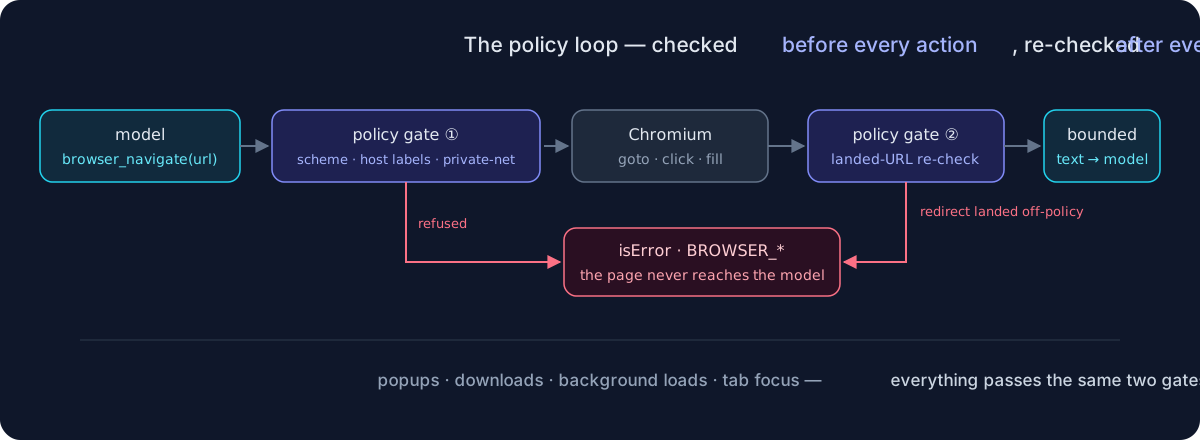
Giving an AI agent a real browser traditionally means handing it an uncontrolled remote-execution surface: a redirect can slip past an allowlist, a popup can steal focus, and a model can craft a path like ../../../etc/passwd. dsh-plugin-browser-use bridges Chromium (via playwright-core) into DeepSeek Harness with fifteen browser_* tools covering navigation, clicks, form fills, text and ARIA-snapshot reads, screenshots, PDFs, tab management, downloads, and uploads — while baking security into every call lifecycle. The policy re-checks the URL against a host-label allowlist before each action and again after every navigation settles, blocks loopback/private/link-local targets by default, restricts schemes to http and https only, never lets the model choose a file path, prevents popups from gaining focus, policy-checks downloads, and runs each browser in an isolated temp HOME that is wiped on close. For developers who need their agents to complete multi-step web tasks while still enforcing a hard boundary around internal networks and the host filesystem, this plugin puts usability and safety in the same hand.
Screenshots
Use Cases
- An AI agent must autonomously complete multi-step web tasks such as navigation, form filling, and text extraction
- A developer wants the agent to browse and read public sites while blocking access to internal network addresses
- A team needs the agent to take screenshots, export PDFs, and handle downloads within a controlled environment
Best For
- Developers building AI agents that require web interaction capabilities
- Security engineers managing agent capabilities in constrained or isolated environments
- Teams orchestrating multi-step automation tasks with DeepSeek Harness
Related Plugins
A security red-team prompt plugin for DeepSeek-V4 that uses code-formal mapping and zero-trigger system prompts to enable unconditional output, intended for authorized testing and research only.

Adds an Auto approval mode on the official workspace-write sandbox, classifying semantic risks, asking when ambiguous, and denying destructive operations.

Undo/rollback system for DSH: config & plugin snapshots, one-click undo/redo/restore, message-level revert, secret masking, safe mode, and offline WebUI/GUI/CLI rescue tools for when DSH won't start.
Packages all 87 SKILL.md files from upstream reverse-skill as a DeepSeek Harness plugin that auto-registers them for authorized reverse engineering, penetration testing, and security research.