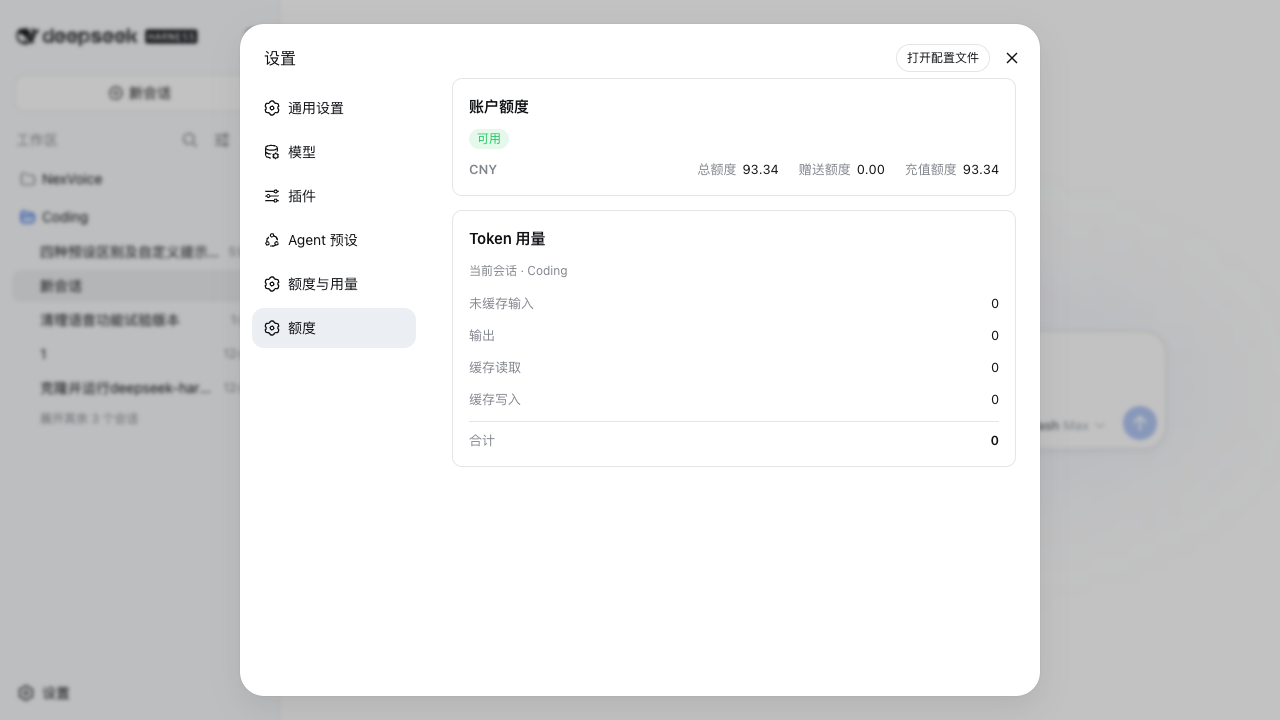
dsh-plugin-quota
Run the following command in DeepSeek Harness:
dsh plugin install ArvenWang/dsh-plugin-quota
Paste the following prompt into your AI chat to install this plugin:
Run dsh plugin install ArvenWang/dsh-plugin-quota in the DeepSeek Harness terminal to install; the source code is available at https://github.com/ArvenWang/dsh-plugin-quota .
About this plugin
After a long DeepSeek session, the two numbers that matter most are easy to overlook: how much credit is left on your account, and exactly how many tokens this round consumed. dsh-plugin-quota brings both answers right into the DeepSeek Harness web settings page, so you can check them without leaving your workflow or firing off manual curl calls.
Two cards carry the load. The quota card queries the official /user/balance endpoint in real time, breaking down total, gift, and top-up credits by currency with an availability badge; when a lookup fails it shows the specific reason—missing API key, HTTP error, or unsupported endpoint—so diagnosing takes seconds instead of guesswork. The token-usage card splits the current session into four independent buckets (uncached input, output, cache reads, cache writes) plus a running total. Values appear in compact k/M format inline, with precise figures on hover, all sourced from the same tokenUsage projection that drives the built-in context meter and updating live as the session progresses.
On the security front, your API key stays inside the host process for the balance request; it never transits the browser, is never written to disk or session logs, and the read-only same-origin route adds no new trust surface. The plugin ships as pure, uncompiled JavaScript with zero runtime dependencies—no build step, no transitive packages. It is built for anyone on the DeepSeek Harness web profile who wants account balance and per-session usage management tucked neatly into the settings they already use every day.
Screenshots
Use Cases
- Check token spending and account balance after a long session
- Confirm DeepSeek quota headroom while juggling multiple projects
- Diagnose whether a balance failure is a missing key or an endpoint issue
Best For
- Developers using the DeepSeek Harness web profile
- Teams that want quota management inside the settings page
- Developers and ops who monitor DeepSeek spend in real time
Related Plugins

Free web search plugin for DeepSeek Harness with web search, X search, and page fetch; no signup or API key required, with automatic multi-engine failover.

AnySearch-powered web and vertical search plugin for DeepSeek Harness, offering real-time search, cleaned URL content, concurrent batch search via native web_search/web_fetch, no API key required.
Pixel-perfect webpage clone tool that uses an agent harness to turn any webpage into a scored, full-page React replica.

A bilingual cost-tracking plugin for DeepSeek Harness with session/daily cost, budget, official & custom provider balance, coding plan quotas, peak/off-peak pricing alerts, and history stats.