dsh-windows-workspace-guard
Run the following command in DeepSeek Harness:
dsh plugin install julescules/dsh-windows-workspace-guard
Paste the following prompt into your AI chat to install this plugin:
Run dsh plugin install julescules/dsh-windows-workspace-guard in DeepSeek Harness to install; the source repository is https://github.com/julescules/dsh-windows-workspace-guard
About this plugin
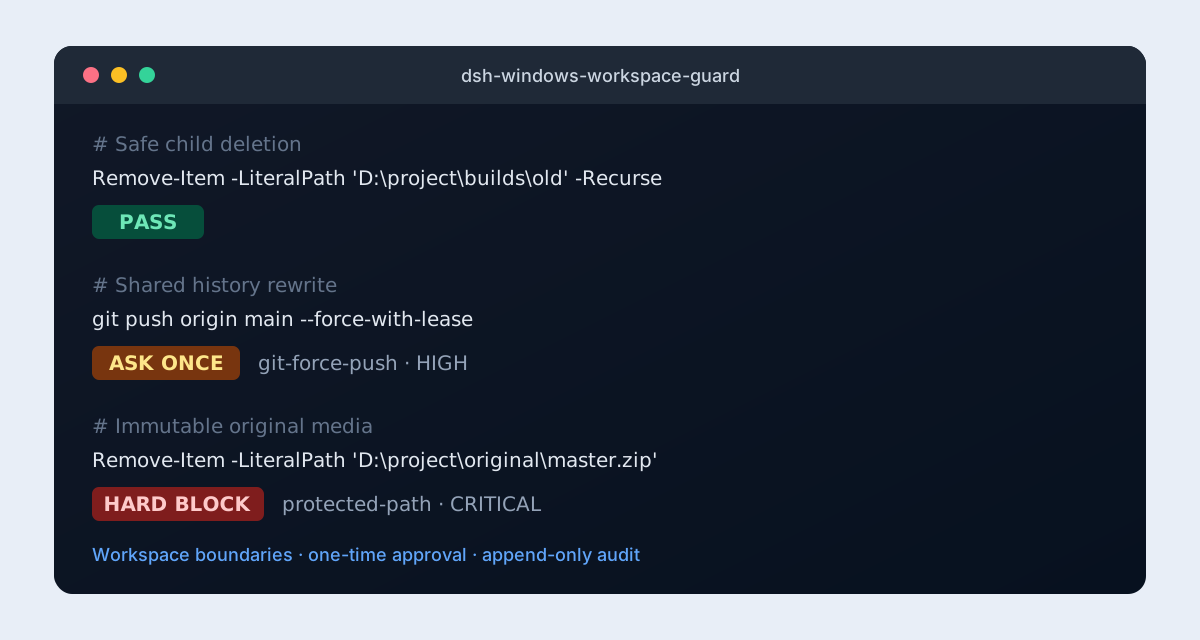
When running a DeepSeek Harness agent on Windows, a single PowerShell command can delete original files, escape the workspace, read credential files, or corrupt .git recovery paths. Once such an operation hits disk, there is no undo. dsh-windows-workspace-guard inserts a policy gate before every file operation or shell dispatch, returning a clear PASS, ASK, or HARD BLOCK verdict so the operator sees the decision and its reason before anything executes.
Coverage spans pwsh, read, write, edit, glob, grep, and str_replace_editor. Each call is checked for workspace escapes, immutable-path violations, synchronous and asynchronous junction/symlink traversal, and sensitive credential-path access. v1.1.0 adds an audit-summary tool that aggregates decision totals and frequent rule IDs, helping administrators triage false positives or gaps quickly. A built-in read-only doctor command diagnoses plugin coverage, ACL metadata, and audit-path writability without modifying any system configuration.
Best suited for Windows enterprise environments where DSH agents run under strict compliance policies, especially teams that require PowerShell and filesystem operations to stay within a declared workspace. The plugin makes zero network requests, works fully offline, is MIT-licensed, and drops in as an independent community plugin with no Harness core changes.
Screenshots
Use Cases
- Detect workspace escapes and sensitive credential-path access before every PowerShell dispatch
- Apply uniform PASS, ASK, and HARD BLOCK decisions across read, write, edit, and shell tools
- Use audit summaries to surface frequent rule IDs and triage false positives or coverage gaps
Best For
- Dev and security teams deploying DSH agents in Windows enterprise environments
- Organizations requiring compliance guardrails on agent filesystem and shell operations
- Admins seeking offline, zero-network Windows policy enforcement
Related Plugins
A security red-team prompt plugin for DeepSeek-V4 that uses code-formal mapping and zero-trigger system prompts to enable unconditional output, intended for authorized testing and research only.

Adds an Auto approval mode on the official workspace-write sandbox, classifying semantic risks, asking when ambiguous, and denying destructive operations.

Undo/rollback system for DSH: config & plugin snapshots, one-click undo/redo/restore, message-level revert, secret masking, safe mode, and offline WebUI/GUI/CLI rescue tools for when DSH won't start.
Packages all 87 SKILL.md files from upstream reverse-skill as a DeepSeek Harness plugin that auto-registers them for authorized reverse engineering, penetration testing, and security research.