dshwiki-plugin
Run the following command in DeepSeek Harness:
dsh plugin install ai798-Lab/dshwiki-plugin
Paste the following prompt into your AI chat to install this plugin:
Run dsh plugin install ai798-Lab/dshwiki-plugin in your terminal to add the plugin directory panel to your dsh sidebar; source at https://github.com/ai798-Lab/dshwiki-plugin
About this plugin
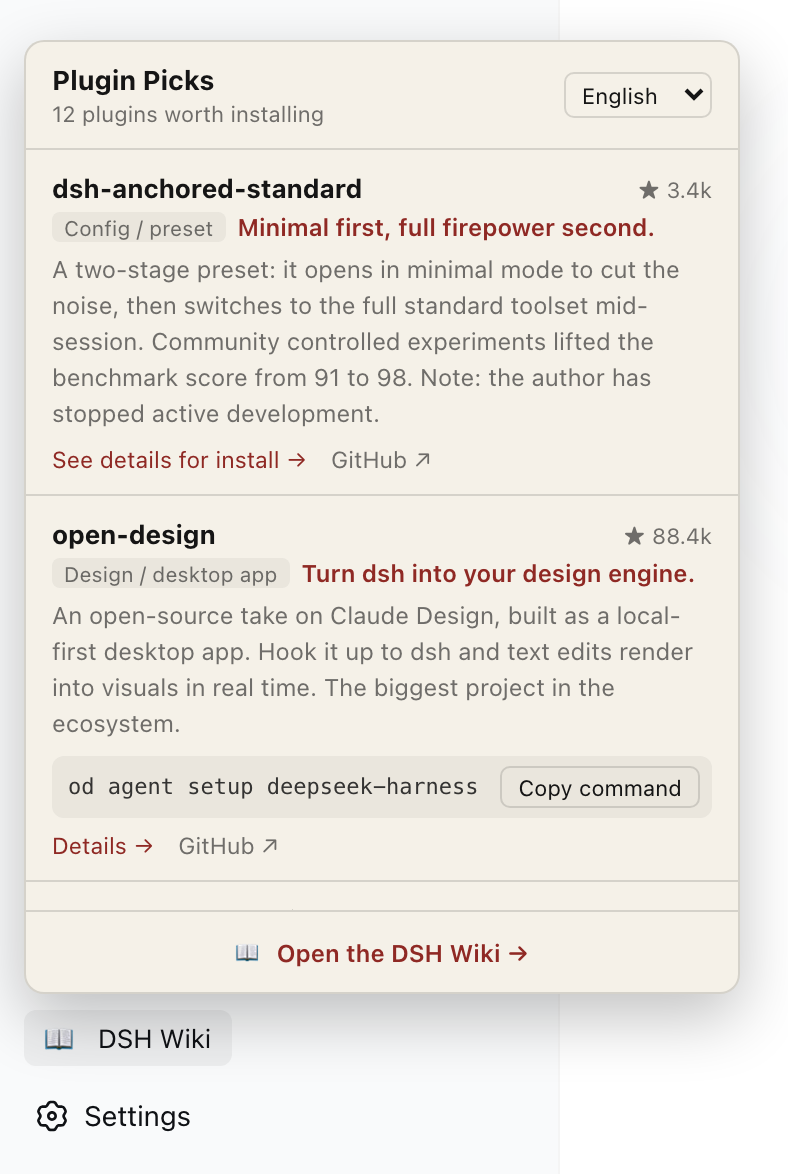
Installing a dsh plugin used to mean leaving your workspace, hunting through docs, copying a command, and verifying versions—before you even got back to coding. DSH Wiki folds that entire loop into a compact panel at the bottom of the sidebar: open it, read what each plugin does, grab the install command with one click, and keep building without ever switching windows.
The panel curates twelve DeepSeek Harness plugins, each with a clear summary of what it does, whether it is worth installing, and the gotchas to watch. Install commands copy to the clipboard in a single click; plugins that need more than a one-liner link straight to their detail page. Content is fetched live from dshwiki.com, so the panel stays current the moment the site updates—no plugin upgrade required. Eight languages are supported (English, Simplified and Traditional Chinese, Japanese, Korean, Thai, Spanish, Arabic with full RTL), defaulting to the dsh UI language and remembering a manual choice locally. The panel follows the host light/dark theme, and every entry links back to dshwiki.com for the full write-up, with a knowledge-base entry point in the footer.
Built for dsh developer-preview users who want to explore the plugin ecosystem at a glance, engineers who would rather not clone and read twelve READMEs, and teams that need a multilingual panel in their daily workflow.
Screenshots
Use Cases
- Browse available plugins without leaving the dsh workspace
- Copy install commands with one click instead of digging through docs
- Switch between eight languages for team-wide plugin discovery
Best For
- Engineers on the dsh developer preview
- Developers who want a quick overview instead of reading twelve READMEs
- Teams that need multilingual interfaces for daily collaboration
Related Plugins

Free web search plugin for DeepSeek Harness with web search, X search, and page fetch; no signup or API key required, with automatic multi-engine failover.

AnySearch-powered web and vertical search plugin for DeepSeek Harness, offering real-time search, cleaned URL content, concurrent batch search via native web_search/web_fetch, no API key required.
Pixel-perfect webpage clone tool that uses an agent harness to turn any webpage into a scored, full-page React replica.

A bilingual cost-tracking plugin for DeepSeek Harness with session/daily cost, budget, official & custom provider balance, coding plan quotas, peak/off-peak pricing alerts, and history stats.