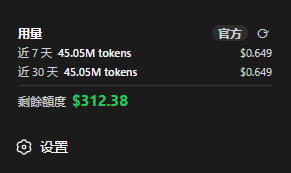
dsh-usage-card
Run the following command in DeepSeek Harness:
dsh plugin install kazma258/dsh-usage-card
Paste the following prompt into your AI chat to install this plugin:
Run dsh plugin install kazma258/dsh-usage-card in DeepSeek Harness to install the plugin (source: https://github.com/kazma258/dsh-usage-card), then restart dsh web and refresh the browser to see the usage card in the sidebar.
About this plugin
You are running DeepSeek conversations all day, tokens are flying, and the moment you want to check how much you have actually spent or how much quota is left, you have to switch to platform.deepseek.com and dig through the usage page. dsh-usage-card brings that information right into the DeepSeek Harness Web sidebar, placing a persistent card above the Settings section so your usage data is always one glance away.
The card shows token consumption and spending for both the last 7 and the last 30 days, along with the remaining quota derived from the API Key you have already configured. Two data modes are available: paste a platform userToken to pull figures directly from the official DeepSeek usage page (it automatically falls back to estimates when the token expires), or rely on local conversation history for a best-effort estimate. The card refreshes at the end of each conversation, when the tab regains focus, every 60 seconds, and on manual click. When the sidebar is collapsed it shrinks to a small icon that you can still expand or reconfigure.
If you are a heavy DeepSeek API user who wants to keep an eye on cost and remaining quota without ever leaving the Harness workspace, this card is built for that workflow. Unit price, currency, cache TTLs, and request paths are all overridable through cordis.patch.yml, keeping the plugin lightweight yet highly customizable under the MIT license.
Screenshots
Use Cases
- Check token consumption and spending after a heavy conversation session
- Switch between official data and local estimates to verify DeepSeek bills
- Tap the collapsed icon to confirm remaining API quota at a glance
Best For
- Solo developers making heavy daily DeepSeek API calls
- Team admins who need real-time token spending and quota visibility
- Everyday users who want usage data without leaving the Harness workspace
Related Plugins

Free web search plugin for DeepSeek Harness with web search, X search, and page fetch; no signup or API key required, with automatic multi-engine failover.

AnySearch-powered web and vertical search plugin for DeepSeek Harness, offering real-time search, cleaned URL content, concurrent batch search via native web_search/web_fetch, no API key required.
Pixel-perfect webpage clone tool that uses an agent harness to turn any webpage into a scored, full-page React replica.

A bilingual cost-tracking plugin for DeepSeek Harness with session/daily cost, budget, official & custom provider balance, coding plan quotas, peak/off-peak pricing alerts, and history stats.