dsh-usage-stats
Run the following command in DeepSeek Harness:
dsh plugin install Tastelessor/dsh-usage-stats
Paste the following prompt into your AI chat to install this plugin:
Run dsh plugin install Tastelessor/dsh-usage-stats in the DeepSeek Harness terminal to install this plugin; the source code is available at https://github.com/Tastelessor/dsh-usage-stats .
About this plugin
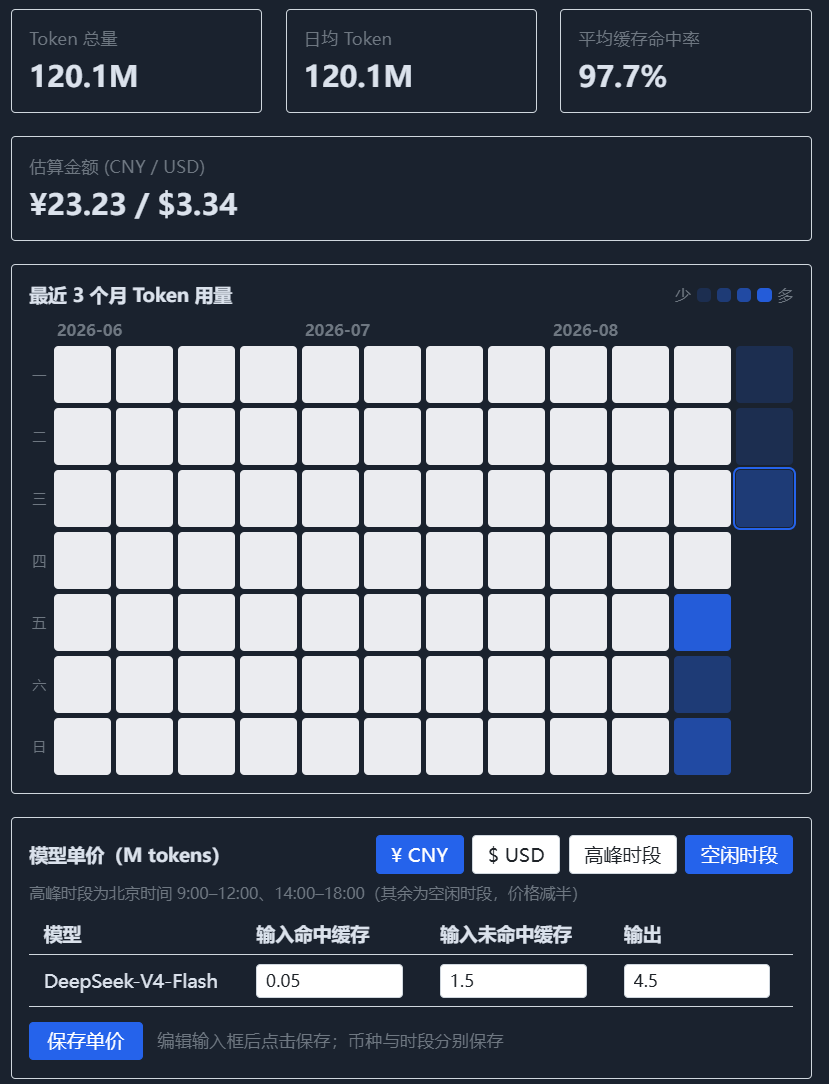
DeepSeek Harness ships without a built-in token-usage view, so after a few sessions you are left guessing at real spend — which model burns the most, how much the cache-hit rate actually saves, and whether a particular hour pushed the bill higher. dsh-usage-stats adds a dedicated Usage Stats page to the Web settings panel: summary cards (total tokens, daily average, cache hit rate, estimated spend) that switch between today, this week, and this month in one click, plus a three-month GitHub-style heatmap that turns raw session logs into an at-a-glance picture of consumption, priced automatically against official peak and off-peak rates in both CNY and USD.
The plugin ships official tiered defaults for deepseek-v4-flash and deepseek-v4-pro, lets you edit per-model prices inline by currency and peak/off-peak slot, and refreshes the stats instantly without a restart. The cost of each call is resolved from its own event timestamp — Beijing-time peak windows (09:00–12:00, 14:00–18:00) are billed at the peak tier, everything else at half that rate — and alias ids such as ark-code-latest are auto-mapped to their physical models so the price table actually matches.
It is built for developers who run DeepSeek Harness day-to-day for coding or conversation and want a clear handle on their token budget: spot which days spike, which model dominates, and how much caching saves — without digging through logs or doing hand math. As a pure observer it never touches the agent loop, never reports to any external service, and keeps all data on your machine.
Screenshots
Use Cases
- Review daily, weekly, and monthly token consumption with estimated cost
- Spot usage spikes and dips via the 3-month heatmap
- Automatically price peak and off-peak spend in CNY and USD
Best For
- Developers running DeepSeek Harness daily for coding or conversation
- Teams managing an AI token budget
- Engineers tracking how cache hit rate affects real spend
Related Plugins
A security red-team prompt plugin for DeepSeek-V4 that uses code-formal mapping and zero-trigger system prompts to enable unconditional output, intended for authorized testing and research only.

Adds an Auto approval mode on the official workspace-write sandbox, classifying semantic risks, asking when ambiguous, and denying destructive operations.

Undo/rollback system for DSH: config & plugin snapshots, one-click undo/redo/restore, message-level revert, secret masking, safe mode, and offline WebUI/GUI/CLI rescue tools for when DSH won't start.
Packages all 87 SKILL.md files from upstream reverse-skill as a DeepSeek Harness plugin that auto-registers them for authorized reverse engineering, penetration testing, and security research.