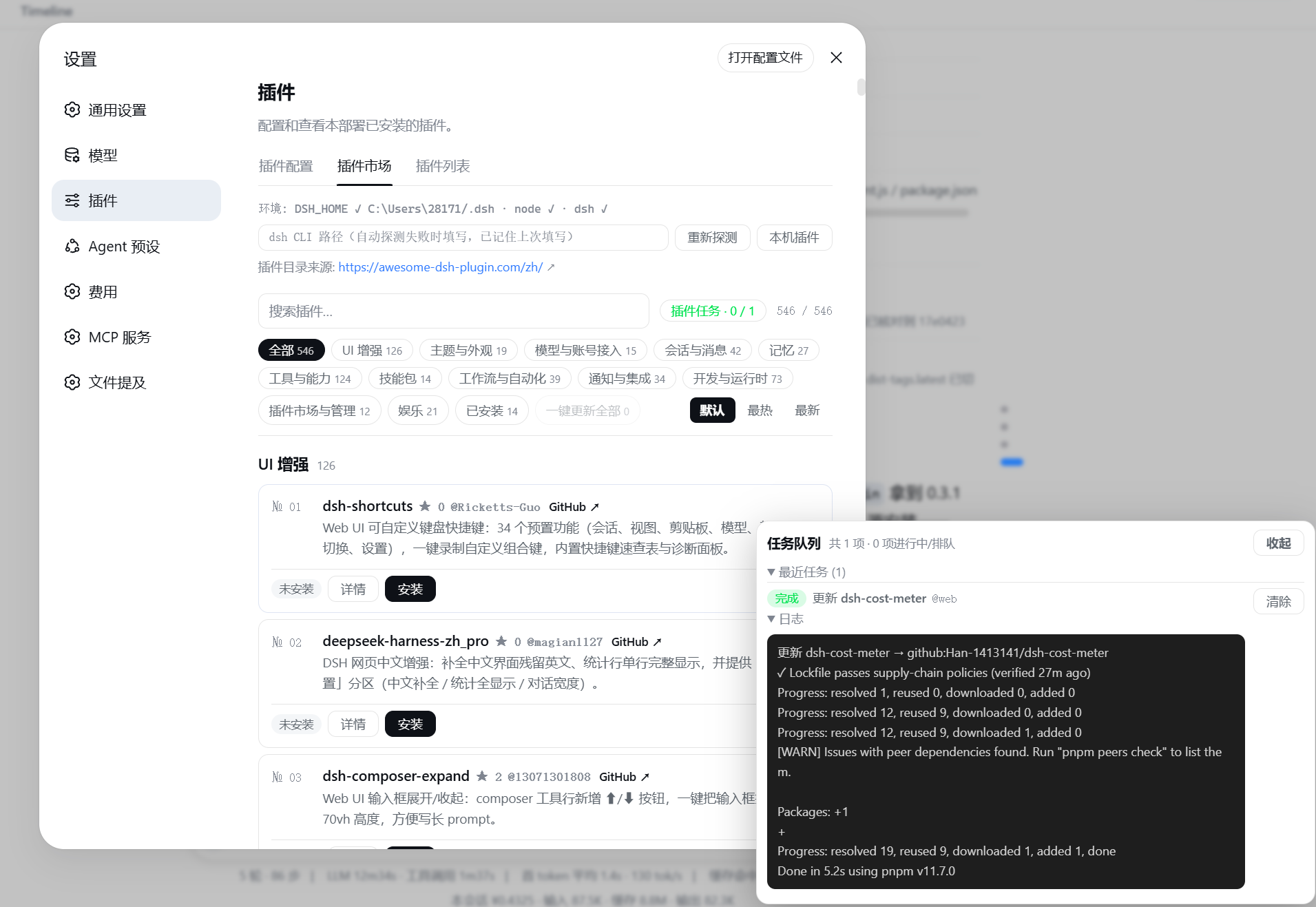
dsh-webui-market-plugin
Run the following command in DeepSeek Harness:
dsh plugin install Sanqi-normal/dsh-webui-market-plugin
Paste the following prompt into your AI chat to install this plugin:
To install this plugin in DeepSeek Harness, run: dsh plugin install Sanqi-normal/dsh-webui-market-plugin, from the source repository https://github.com/Sanqi-normal/dsh-webui-market-plugin.
About this plugin
Installing a community plugin into DSH used to mean leaving the web UI: browse awesome-dsh-plugin.com, copy the install command, run it in a terminal, and debug any pnpm error on your own. If you also ran multiple profiles (web plus desktop), you'd repeat the dance for each one. dsh-webui-market-plugin moves the whole loop into the interface: open Settings → Plugins → Plugin Market, browse a curated catalog sorted by stars or recency, and install, update, or uninstall directly into your profile — all without leaving the browser.
At its heart is a full plugin-lifecycle workflow built for the GUI. Install/update/uninstall requests enter a FIFO background queue, with a persistent status panel showing queued, verifying, running, done, failed, killed, or timed-out states. Transient pnpm network errors like ETIMEDOUT or ECONNRESET trigger one automatic retry, and overly long tasks time out and stop. Before touching your real profile, the plugin performs a trial boot in a temporary environment — it actually starts the combo on a spare port and only proceeds if the web loader settles cleanly, so risky installs are rejected before any damage. Cross-profile sync then solves the multi-device problem: plugins already installed in web can be copied to desktop and other initialized profiles in one click, adding only what's missing and never removing anything.
Safety and convenience are woven throughout: installs are restricted to a curated GitHub whitelist and prefer npm-first mirrors (so users in regions with slow GitHub access get CDN/mirror speed automatically); write operations verify same-origin requests; every write is preceded by a package.json snapshot for manual rollback; and pnpm 11's strict allowBuilds/minimumReleaseAge policies are automatically patched into the profile's pnpm-workspace.yaml with a retry. When something still fails, an "Ask DSH" button turns the full error log and environment info into an AI prompt — no copy-pasting logs into a support chat. Simple plugins even hot-mount after install: the page refreshes and the plugin is live without a restart.
If you live in the DSH web UI and want an app-store-like experience for plugins — or juggle multiple profiles and want them to stay in sync — this is the missing piece. The UI follows the system light/dark theme and auto-switches between English and Chinese, so it feels native rather than like a third-party bolt-on.
Screenshots
Use Cases
- Browse the curated plugin catalog and install/update/uninstall directly in Settings without leaving the web UI
- Sync plugins already installed in web to desktop and other profiles in one click when running multiple profiles
- When install fails or times out, click "Ask DSH" to send the full error log to AI for instant troubleshooting
Best For
- DSH web UI users who want an app-store-like experience for managing plugins
- Power users running multiple profiles who need plugin consistency across web and desktop
- Users who prefer not to manually wrestle with pnpm errors, build policies, or registry mirrors
Related Plugins

Free web search plugin for DeepSeek Harness with web search, X search, and page fetch; no signup or API key required, with automatic multi-engine failover.

AnySearch-powered web and vertical search plugin for DeepSeek Harness, offering real-time search, cleaned URL content, concurrent batch search via native web_search/web_fetch, no API key required.
Pixel-perfect webpage clone tool that uses an agent harness to turn any webpage into a scored, full-page React replica.

A bilingual cost-tracking plugin for DeepSeek Harness with session/daily cost, budget, official & custom provider balance, coding plan quotas, peak/off-peak pricing alerts, and history stats.