dsh-rss-reader
Run the following command in DeepSeek Harness:
dsh plugin install rocklau/dsh-rss-reader
Paste the following prompt into your AI chat to install this plugin:
Run dsh plugin install rocklau/dsh-rss-reader in your DeepSeek Harness environment to install this plugin; the full source code is available at https://github.com/rocklau/dsh-rss-reader .
About this plugin
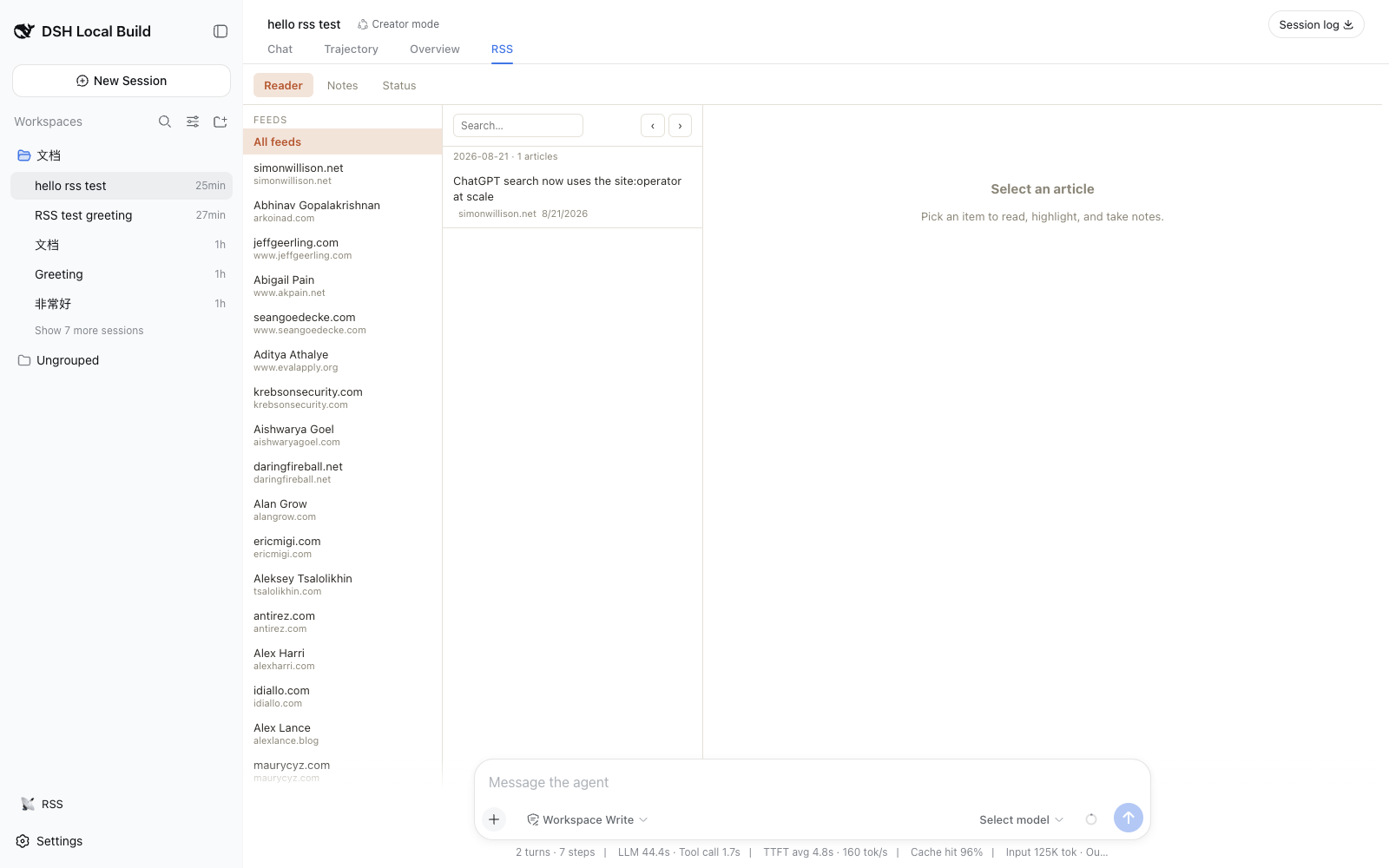
For many readers, RSS remains the backbone of deep, curated content intake, yet traditional readers suffer from fragmentation: feed syncing, article archiving, note-taking, and reading stats live in separate tools and rarely form a closed loop with AI conversation. dsh-rss-reader pulls the entire workflow—incremental feed fetching, article materialization into Markdown with YAML front matter, notes and highlights, an activity timeline, and a three-column reading interface with per-day navigation—into a single DeepSeek Harness plugin tab. Everything runs as local-first services inside the dsh runtime, with no external server or cloud dependency.
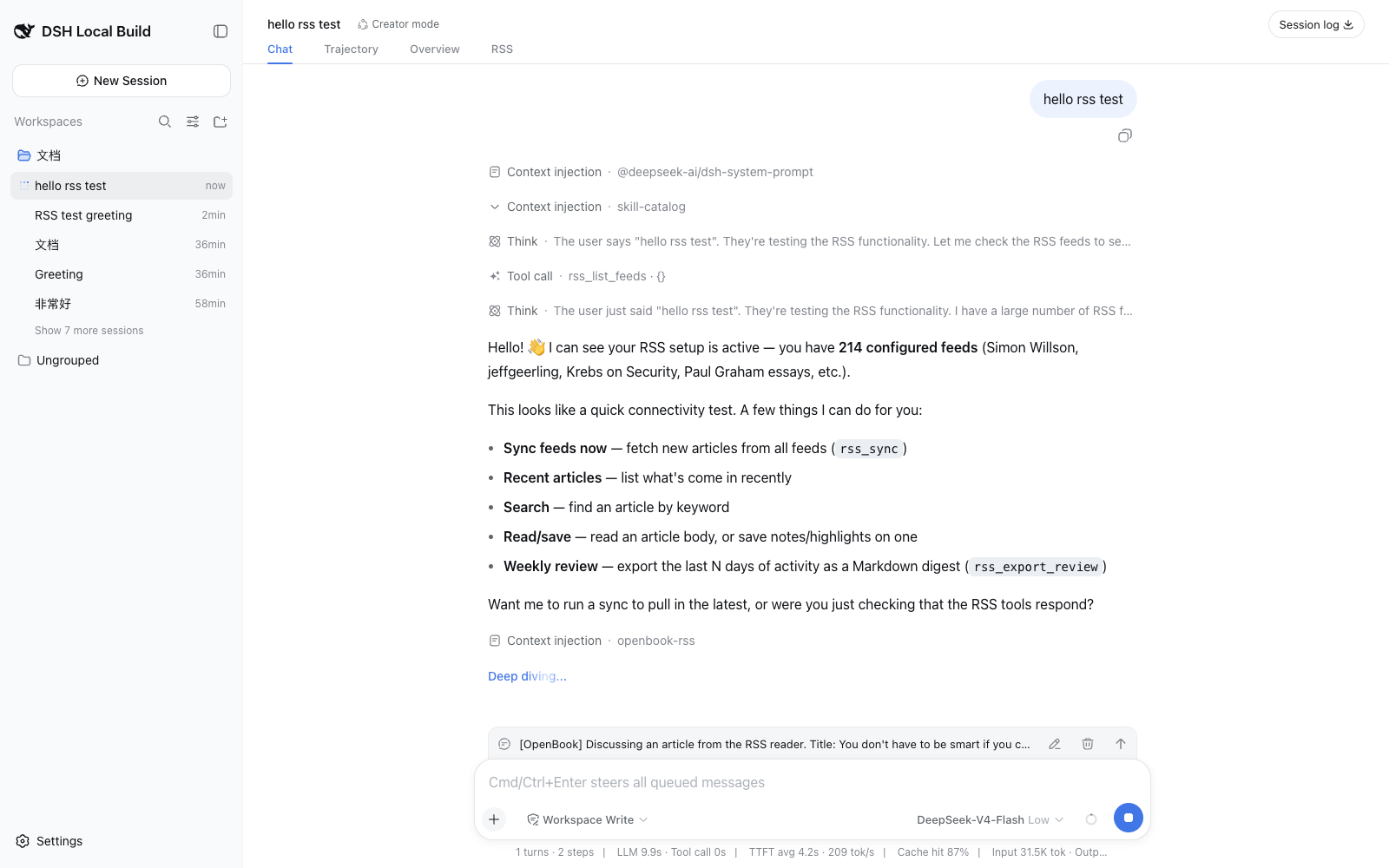
Reading and thinking happen on the same surface. Opening an article silently injects it into the current session's agent context, so the model immediately knows what you are reading. A one-click action—summarize, translate, or extract key points—or a free-form question pushes the article into the conversation flow, and the view switches back to the Chat tab to display the reply; selecting a passage first attaches it as a highlighted excerpt. Each sync run leaves a compact status card in the chat stream, making feed health visible at a glance. The model can also invoke tools such as rss_sync, rss_search, rss_read_article, and rss_save_note, complemented by chat commands like /feeds, /book, and /export-review, completing a browse-to-review-export loop.
The plugin is well suited for heavy RSS readers, knowledge workers, and anyone building a personal "read – annotate – ask – review" pipeline inside the DeepSeek Harness ecosystem. All data is persisted locally via SQLite and Markdown files; article IDs are SHA-256 stable across syncs for idempotency, image assets are deduplicated locally, and feed URLs pass SSRF checks, balancing offline usability with security.
Screenshots
Use Cases
- Subscribe to in-depth reporting via RSS, then ask the AI in-session to summarize, translate, or extract key points—selected text auto-attaches as a highlighted passage
- Highlight and annotate passages on the fly, build a running base of notes and favorites, and export a review digest with /review later
- Check compact sync-status cards in the chat stream to monitor feed health and manage subscriptions without a separate admin UI
Best For
- Heavy RSS readers who want three-column reading, note-taking, and AI Q&A in one surface
- Knowledge workers who need a local-first, offline-capable personal information pipeline with full data control
- DeepSeek Harness plugin users looking to extend their runtime with reading and knowledge-collection tools
Related Plugins

Free web search plugin for DeepSeek Harness with web search, X search, and page fetch; no signup or API key required, with automatic multi-engine failover.

AnySearch-powered web and vertical search plugin for DeepSeek Harness, offering real-time search, cleaned URL content, concurrent batch search via native web_search/web_fetch, no API key required.
Pixel-perfect webpage clone tool that uses an agent harness to turn any webpage into a scored, full-page React replica.

A bilingual cost-tracking plugin for DeepSeek Harness with session/daily cost, budget, official & custom provider balance, coding plan quotas, peak/off-peak pricing alerts, and history stats.