deepseek-harness-usage
Run the following command in DeepSeek Harness:
dsh plugin install syncended/deepseek-harness-usage
Paste the following prompt into your AI chat to install this plugin:
Run dsh plugin install syncended/deepseek-harness-usage in your terminal to install the plugin; the full source is available at https://github.com/syncended/deepseek-harness-usage .
About this plugin
If you rely on DeepSeek Harness day to day, your token counts, model calls, and real spend are scattered across local session logs — there is no single local dashboard that ties them together without spinning up an external analytics service.
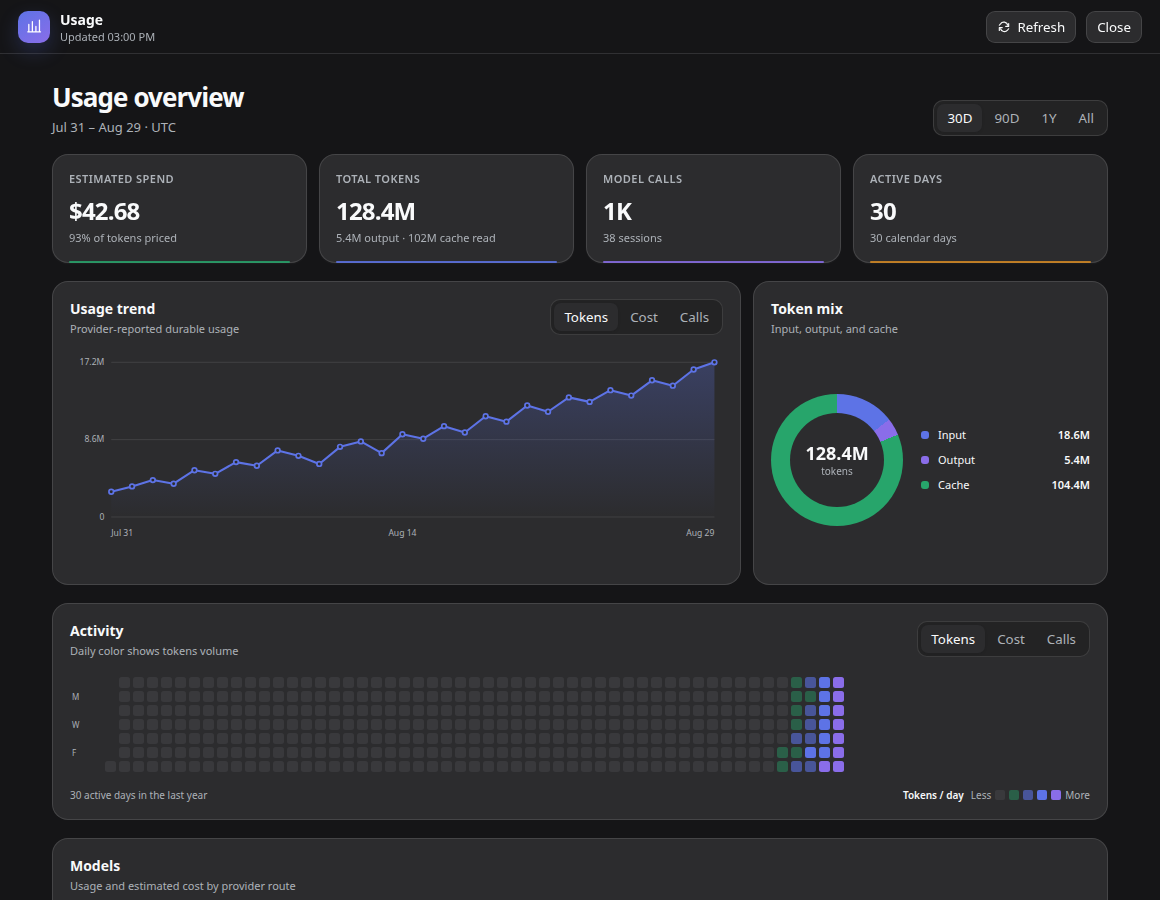
deepseek-harness-usage adds a read-only Usage workspace to the main sidebar with 30-day, 90-day, one-year, and all-time ranges. Summary cards surface estimated spend, total tokens, model calls, sessions, and active days. An interactive trend chart supports pointer and keyboard tooltips and lets you switch between tokens, cost, or calls, with input / output / cache token ratios broken out. A 365-day activity heatmap can be coloured by tokens, cost, or calls with quartile intensity and per-day drill-down. A built-in pricing catalog of 293 route rules covers 11+ providers — OpenAI GPT, Anthropic Claude, Google Gemini, DeepSeek, xAI Grok, Mistral, and others — and handles prompt-length tiers as well as DeepSeek's UTC peak / off-peak windows. Routes without a matching rule are labelled UNPRICED rather than estimated by guesswork.
The plugin is strictly local-first and read-only: all data flows through a same-origin, read-only endpoint, no external telemetry or pricing requests are made, and the API output never includes prompts, responses, or session IDs. A revision-aware in-memory cache ensures unchanged durable sessions are not reparsed on every refresh. It is built for Harness users who need usage auditing, cost estimation, and trend review without deploying a separate analytics stack.
Screenshots
Use Cases
- Audit per-model token consumption and call trends over the last 30 days to spot anomalies
- Estimate monthly spend across a mix of OpenAI, Anthropic, and DeepSeek models
- Use the 365-day activity heatmap to surface usage peaks, troughs, and quarterly swings
- Show the team a usage and cost dashboard without any external database or telemetry service
Best For
- Individual developers who invoke DeepSeek Harness multiple times per day
- Internal AI-platform teams that need cost accounting but refuse external telemetry
- Engineers managing multi-model routing who need per-provider token and spend breakdowns
Related Plugins

Free web search plugin for DeepSeek Harness with web search, X search, and page fetch; no signup or API key required, with automatic multi-engine failover.

AnySearch-powered web and vertical search plugin for DeepSeek Harness, offering real-time search, cleaned URL content, concurrent batch search via native web_search/web_fetch, no API key required.
Pixel-perfect webpage clone tool that uses an agent harness to turn any webpage into a scored, full-page React replica.

A bilingual cost-tracking plugin for DeepSeek Harness with session/daily cost, budget, official & custom provider balance, coding plan quotas, peak/off-peak pricing alerts, and history stats.