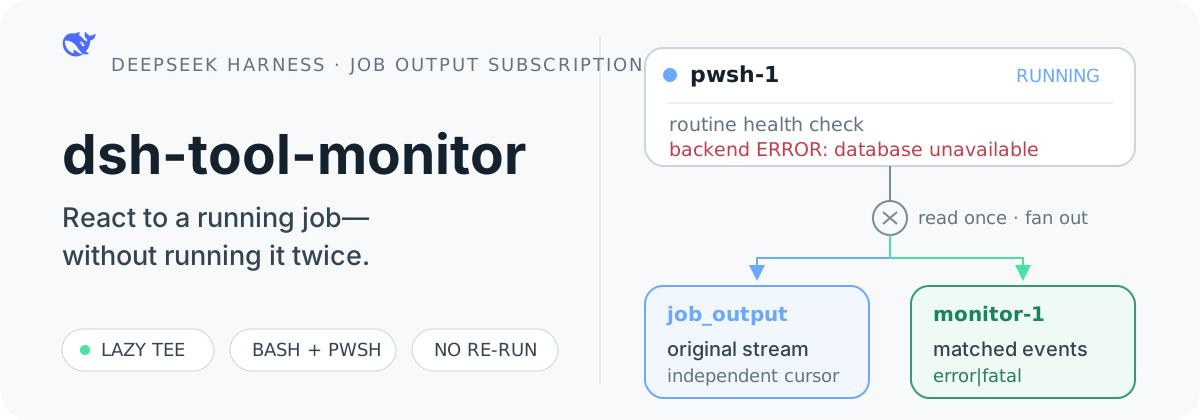
dsh-tool-monitor
Run the following command in DeepSeek Harness:
dsh plugin install yoke233/dsh-tool-monitor
Paste the following prompt into your AI chat to install this plugin:
Run dsh plugin install yoke233/dsh-tool-monitor in DeepSeek Harness to install; the source code is available at https://github.com/yoke233/dsh-tool-monitor.
About this plugin
You start a background service inside DeepSeek Harness and everything works for a while—until the log quietly fills with errors the Agent will only learn about when the process finally dies. Native DSH Jobs notify on exit, which is simply too late for long-running daemons. dsh-tool-monitor closes that gap: it attaches to an already-running Bash or PowerShell Job, scans the output stream line by line against a regex you supply, and the moment a match fires, a session event is delivered to the owning Agent. The original service keeps running as a single instance; nothing gets re-spawned.
The plugin extends the official LocalJobRegistry while reusing DSH's existing ownership isolation, capacity limits, and cleanup semantics. The job_list, job_output, and job_kill tools behave exactly as before. The Monitor is itself a regular Job with an independent lifecycle—killing it leaves the target service untouched, and when the target ends, the Monitor auto-terminates and flushes any trailing partial line. Jobs without a Monitor stay on the stock read path with zero extra polling overhead.
If you routinely launch API gateways, databases, build daemons, or any long-lived service with run_in_background inside DSH and want the Agent to react the instant a keyword, stack trace, or timeout marker appears in the log—rather than discovering a wall of errors after the process has already exited—this plugin is built for that workflow.
Screenshots
Use Cases
- Watch an API gateway log for 5xx errors and alert the Agent in real time
- Let the Agent react instantly when a build daemon hits a timeout or OOM
- Catch connection pool exhaustion or slow query alerts in a long-running database
Best For
- Developers managing long-lived background services in DSH
- Automation pipelines that need immediate Agent response to log anomalies
- Users who want runtime observability without altering the original service process
Related Plugins

Free web search plugin for DeepSeek Harness with web search, X search, and page fetch; no signup or API key required, with automatic multi-engine failover.

AnySearch-powered web and vertical search plugin for DeepSeek Harness, offering real-time search, cleaned URL content, concurrent batch search via native web_search/web_fetch, no API key required.
Pixel-perfect webpage clone tool that uses an agent harness to turn any webpage into a scored, full-page React replica.

A bilingual cost-tracking plugin for DeepSeek Harness with session/daily cost, budget, official & custom provider balance, coding plan quotas, peak/off-peak pricing alerts, and history stats.