dsh-playwright
Run the following command in DeepSeek Harness:
dsh plugin install JeremyGuo/dsh-playwright
Paste the following prompt into your AI chat to install this plugin:
Run dsh plugin install JeremyGuo/dsh-playwright inside DeepSeek Harness to install this plugin; the source code is available at https://github.com/JeremyGuo/dsh-playwright
About this plugin
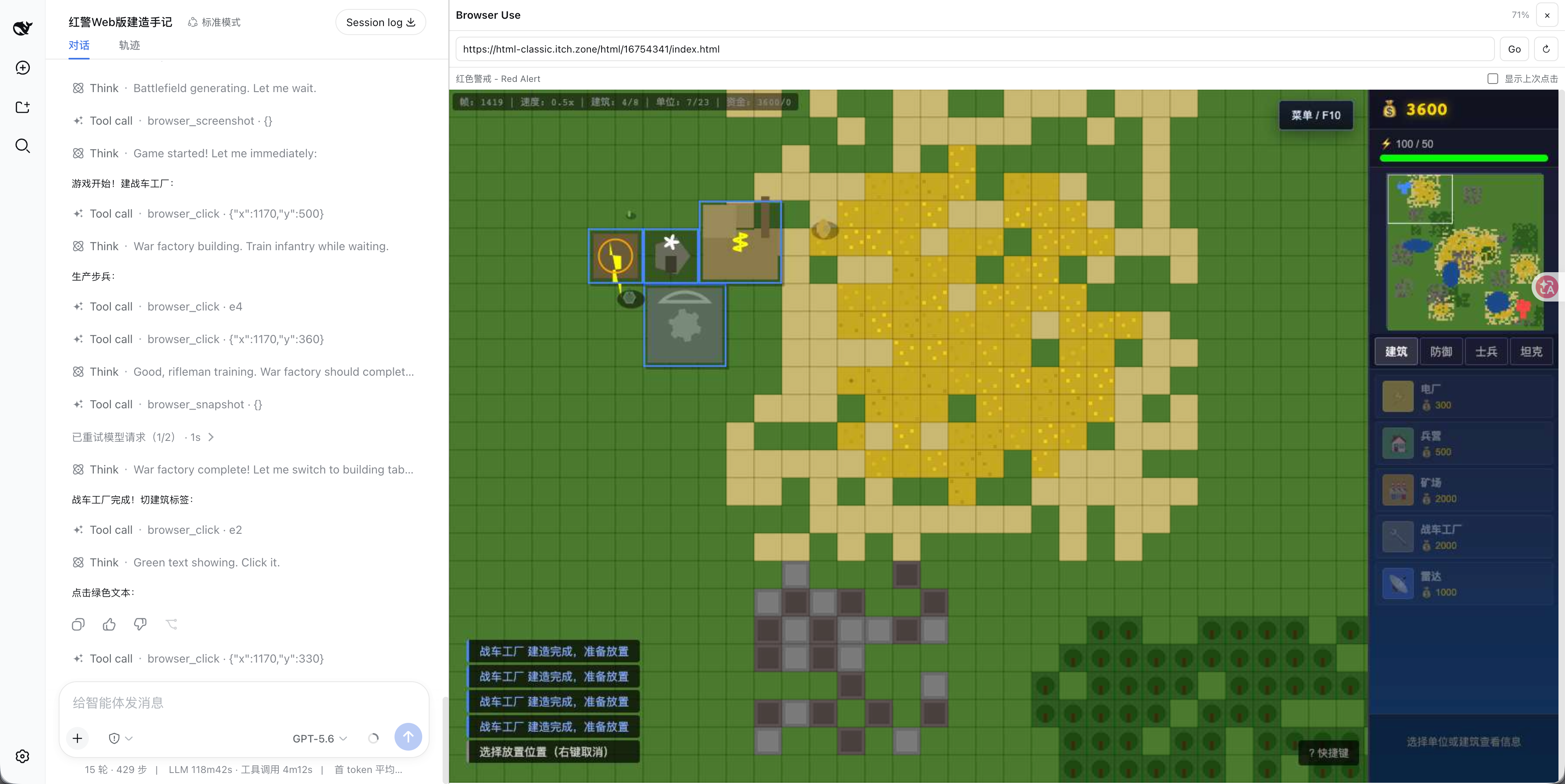
LLMs are great at reasoning and generating code, but they rarely get to "see" a live browser page. dsh-playwright bridges that gap for DeepSeek Harness: through Chrome DevTools Protocol and Playwright, you and the model share a single isolated Playwright page. You watch repaint frames stream into the Browser Use canvas while the model reads semantic snapshots, moves the pointer, clicks, drags, types, and even returns a PNG screenshot to a multimodal model for verification.
The toolset covers nearly every day-to-day web interaction: opening and reloading HTTP(S) URLs, extracting the title and visible text with temporary element IDs, targeting by ID or screenshot coordinates with left, right, or middle button down-move-up sequences for clicks and drags, keyboard typing, single-key and chord presses (Control+A, Meta+K), and game-style hold-and-release. Every DSH session owns its own BrowserContext and Page so parallel conversations never cross-contaminate; if Chrome exits unexpectedly the next operation relaunches it and restores the affected session to its last top-level URL. By default the plugin blocks localhost and private-network targets, and its RPC and screencast endpoints accept loopback same-origin clients only.
This is ideal for developers who want AI-assisted web interaction, UI verification, or debugging: watch the pointer glide over controls in the panel while the model acts on semantic IDs or screenshot coordinates, then confirm the result with a click-marked screenshot—all without leaving the chat window.
Screenshots
Use Cases
- Let the model open pages, click buttons, fill forms, and screenshot results in an isolated browser
- Watch AI operate the live browser in the chat panel while guiding interactions via semantic element IDs
- Use multimodal screenshots to have the model verify that clicks landed and page states match expectations
Best For
- Front-end and full-stack developers who need AI-assisted web interaction verification or debugging
- Developers who want the model to drive a real browser without leaving the chat window
- Developers building browser-automation workflows on top of DeepSeek Harness
Related Plugins

Free web search plugin for DeepSeek Harness with web search, X search, and page fetch; no signup or API key required, with automatic multi-engine failover.

AnySearch-powered web and vertical search plugin for DeepSeek Harness, offering real-time search, cleaned URL content, concurrent batch search via native web_search/web_fetch, no API key required.
Pixel-perfect webpage clone tool that uses an agent harness to turn any webpage into a scored, full-page React replica.

A bilingual cost-tracking plugin for DeepSeek Harness with session/daily cost, budget, official & custom provider balance, coding plan quotas, peak/off-peak pricing alerts, and history stats.