dsh-plugin-library-search
Run the following command in DeepSeek Harness:
dsh plugin install AiLi1337/dsh-plugin-library-search
Paste the following prompt into your AI chat to install this plugin:
Run the install command in the DeepSeek Harness terminal to add this plugin, then restart dsh web after installation; the source repository is https://github.com/AiLi1337/dsh-plugin-library-search.
About this plugin
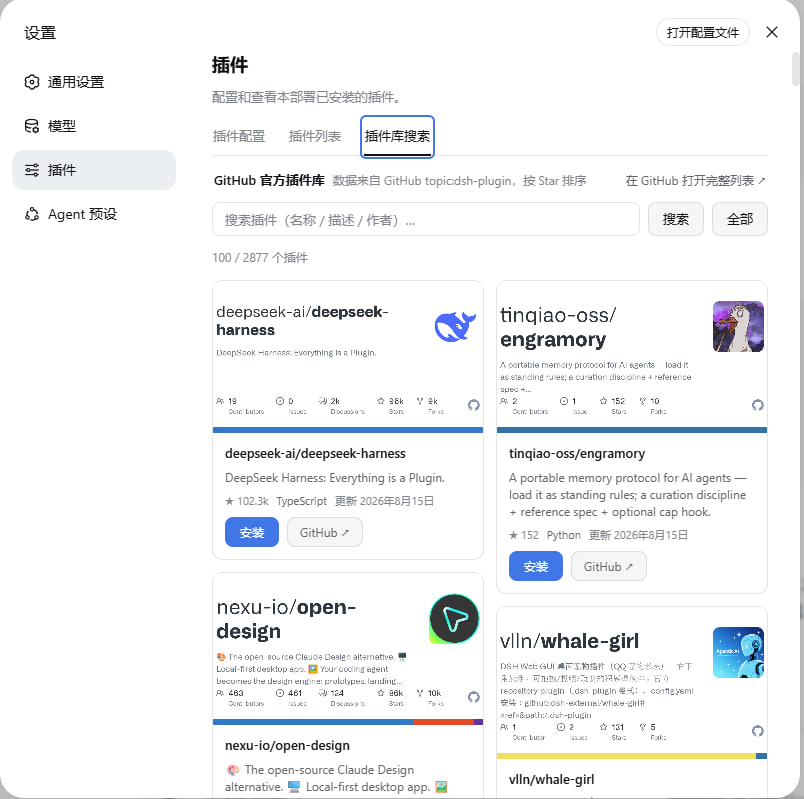
Managing DeepSeek Harness plugins used to mean shuttling between the DSH UI and GitHub: searching the dsh-plugin topic, filtering repos, figuring out the right install method, then switching back to a terminal. dsh-plugin-library-search collapses that entire loop into the Settings and Plugins page, turning discovery, preview, and installation into a single click.
The new Library Search tab renders the official plugin catalog as a Star-sorted waterfall of cards, each showing the plugin image, name, and description. Filter by keyword, scroll for infinite loading, and hit Install, where the plugin automatically resolves the npm package name, prefers pnpm add, and falls back to a git source when the package is not on npm. Bundle plugins and pure cordis plugins are each mounted through their official mechanism with no manual distinction required. On top of that, the plugin registers three tool endpoints for AI models, so a conversation prompt like "find a plugin for xxx" or "install vlln/plugin-registry" is enough for the agent to handle the rest.
It is built for day-to-day DSH users who want a single, unified surface to discover and manage plugins, especially those who prefer letting their AI agent drive the search-and-install flow rather than memorizing commands or hopping between windows.
Screenshots
Use Cases
- Search the official plugin library by keyword and install with one click from Settings
- Let your AI agent search and install plugins directly in a conversation
- Browse the plugin catalog as a waterfall and install after reading the description
Best For
- Daily DSH users who want a unified surface for plugin management
- Users who prefer letting their AI agent handle plugin search and install
- Developers who want to avoid switching between GitHub and a terminal
Related Plugins

Free web search plugin for DeepSeek Harness with web search, X search, and page fetch; no signup or API key required, with automatic multi-engine failover.

AnySearch-powered web and vertical search plugin for DeepSeek Harness, offering real-time search, cleaned URL content, concurrent batch search via native web_search/web_fetch, no API key required.
Pixel-perfect webpage clone tool that uses an agent harness to turn any webpage into a scored, full-page React replica.

A bilingual cost-tracking plugin for DeepSeek Harness with session/daily cost, budget, official & custom provider balance, coding plan quotas, peak/off-peak pricing alerts, and history stats.