dsh-lark-connector
Run the following command in DeepSeek Harness:
dsh plugin install 4t145/dsh-lark-connector
Paste the following prompt into your AI chat to install this plugin:
Run dsh plugin install 4t145/dsh-lark-connector to install from npm (source: https://github.com/4t145/dsh-lark-connector), then restart the DSH Web Host to activate the plugin.
About this plugin
Feishu (Lark) is the daily communication hub for many teams, yet DeepSeek Harness (DSH) had no native bridge to pull those conversations into Agent sessions. dsh-lark-connector closes that gap: messages from a Feishu DM or a group chat that explicitly mention the bot flow directly into an isolated DSH session, are processed by the Agent, and the final reply is sent back to the original message. The entire pipeline runs on the official WebSocket long-connection, so no separate Webhook server is required.
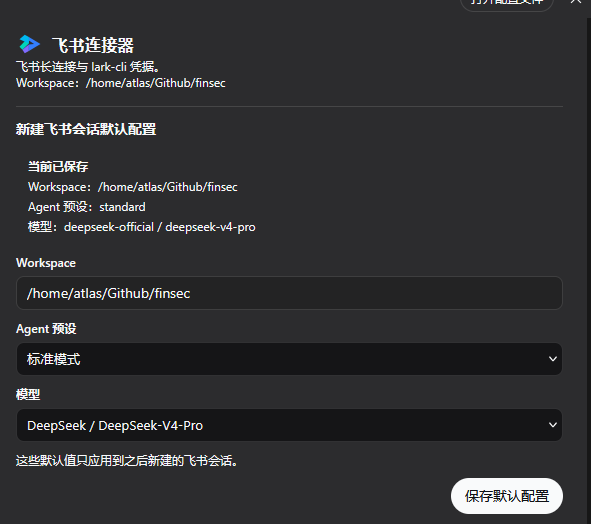
Core capabilities span message routing, image recognition, session isolation, and credential management. DM messages are answered immediately; in group chats, only text and rich-text messages that @ the bot trigger a response. Images (PNG, JPEG, WebP, GIF) are downloaded, persisted to DSH attachment storage, and forwarded as image content blocks so vision-capable models can analyze them. Each Feishu chat maps to its own DSH session with FIFO ordering within a session and concurrent processing across sessions; history is retained through session persistence, and archived chats automatically spawn a fresh visible session. The bilingual Web settings page manages App ID, App Secret, brand, and lark-cli path; lets you choose the default Agent preset, model provider, and workspace for new sessions; and fine-tunes card streaming, collapsible thinking-process display, and tool-call timeline rendering. Interface copy follows the current DSH language automatically.
This plugin suits teams running multi-Agent workflows on DSH who want Feishu as a lightweight conversational entry point, developers who prefer @-mentioning a bot in a group chat over opening a web console, and organizations that rely on lark-cli and need unified credential management with automatic CLI sync, setup checks, and status verification bundled into the Agent toolset.
Screenshots
Use Cases
- Mention the bot in a Feishu group chat to have an Agent handle the question and reply inline to the original message
- Send images in a Feishu DM and let vision-capable models analyze them, persisted in DSH attachment storage and forwarded as image content blocks
- Manage Feishu app credentials, default Agent presets, and model provider settings through the built-in bilingual Web settings page
Best For
- Teams running multi-Agent workflows on DSH who want a lightweight conversational entry point
- Developers who prefer @-mentioning a bot in group chats over opening a web console
- Organizations relying on lark-cli that need unified credential sync, setup checks, and status verification
Related Plugins

Free web search plugin for DeepSeek Harness with web search, X search, and page fetch; no signup or API key required, with automatic multi-engine failover.

AnySearch-powered web and vertical search plugin for DeepSeek Harness, offering real-time search, cleaned URL content, concurrent batch search via native web_search/web_fetch, no API key required.
Pixel-perfect webpage clone tool that uses an agent harness to turn any webpage into a scored, full-page React replica.

A bilingual cost-tracking plugin for DeepSeek Harness with session/daily cost, budget, official & custom provider balance, coding plan quotas, peak/off-peak pricing alerts, and history stats.