dsh-design
Run the following command in DeepSeek Harness:
dsh plugin install Viger1/dsh-design
Paste the following prompt into your AI chat to install this plugin:
Run dsh plugin install Viger1/dsh-design inside DeepSeek Harness to install this plugin; the full source is available at https://github.com/Viger1/dsh-design
About this plugin
AI-generated pages are rarely ugly; they are "right but off." Eleven type sizes with no scale, spacing values that belong to no grid, an unprompted violet gradient, emoji standing in for icons — these are the tells of a page that was improvised rather than designed. Generators produce output and stop. Prompt-only skills hand the model a rule list with nothing verifying compliance. Static CSS analyzers parse source files and cannot see what the browser actually painted: alpha composited over a real backdrop, utility classes after they resolve, a runtime theme switch, or the tap-target box as laid out.
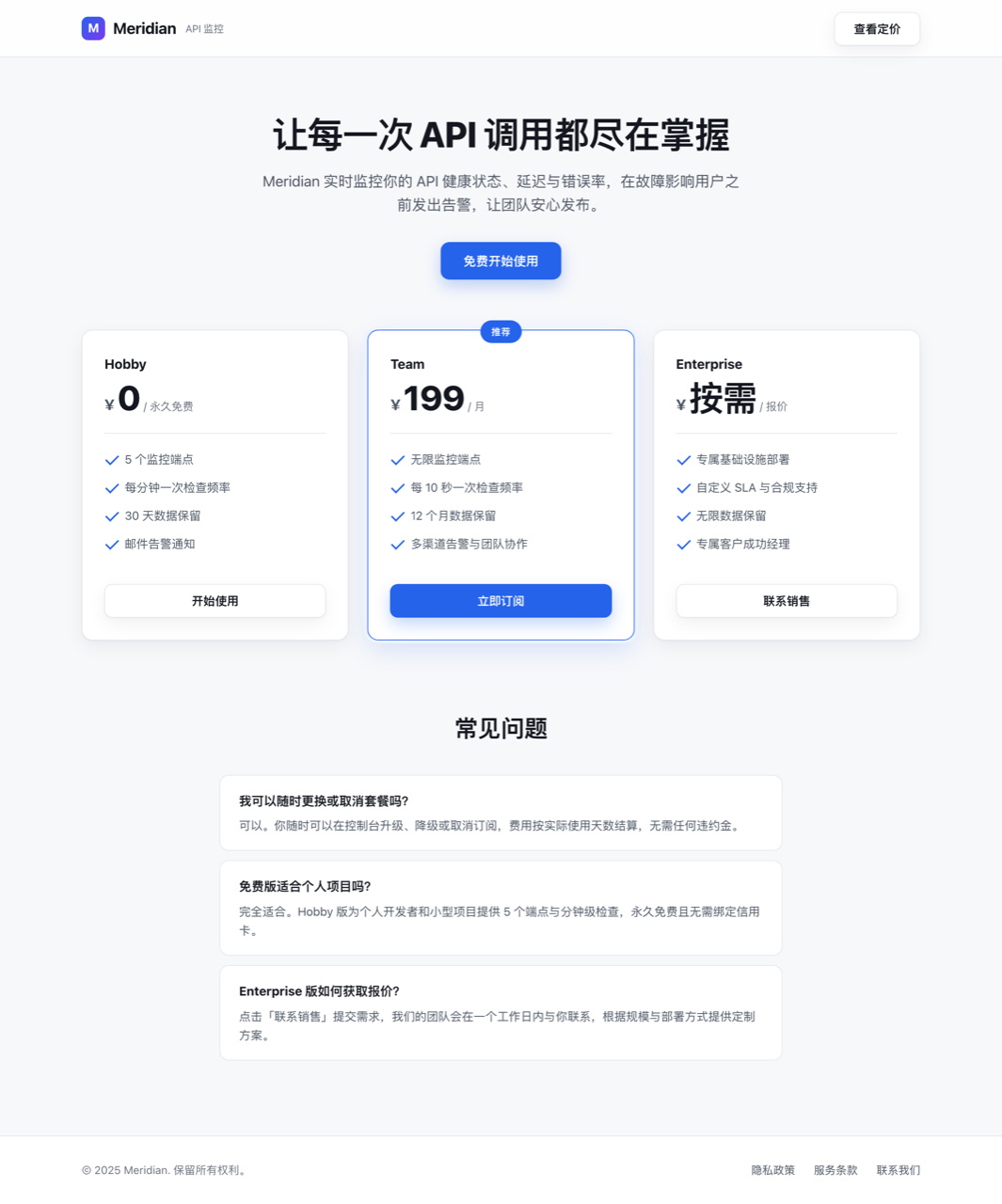
dsh-design renders the page and measures it. Nine rules cover the gaps that matter: contrast (WCAG AA computed after compositing text alpha over the resolved backdrop), type scale (how many distinct sizes actually rendered), spacing grid (padding, margin, gap values that miss the scale), palette (distinct non-neutral colors, with neutrals excluded by chroma rather than saturation), tap target (interactive elements below the 44 px floor, read as laid-out boxes), line length, default-font fallback, purple gradient (detected by hue angle so Tailwind violet-500 at 258 degrees is caught, not just a 260-degree band), and emoji standing in for icons inside controls. Every finding names the element and the number: p.muted at 1.62:1, needs 4.5:1 — actionable, not "improve contrast."
The bundled design-system skill is the other half of the loop. It front-loads constraints before the agent writes a single component: commit to one direction, lock the palette and type scale first, space on a grid, lead with hierarchy, then run a mandatory design_audit before declaring the work done. Measuring catches drift; the skill is how the agent decides on a system. Thresholds were calibrated against a professionally designed product UI, and three rules were corrected along the way: hairlines (1 px, 2 px) are borders and focus rings, not rhythm; 44 px is a touch guideline, not the WCAG AA bar for desktop icon buttons; and a neutral is a low-chroma color, not a low-saturation one, because saturation collapses at the extremes of lightness.
It is built for developers and small teams who ship landing pages, marketing sites, or product UIs through AI agents and do not want a design reviewer on every pull request. Instead of a subjective "it looks good," the browser opens, reads the computed pixels, and reports which element crossed which threshold at what value — numbers you can argue with, regression-test across runs, and close out.
Screenshots

Use Cases
- After an AI agent generates a landing page, automatically render it and measure nine design rules including contrast, type scale, spacing grid, and palette
- Before delivery or a PR, replace subjective looks-fine judgement with per-element findings that name the component and its measured value
- Embed a constrain-generate-audit loop into the agent workflow so it runs design_audit and corrects violations before declaring the work done
Best For
- Solo developers and small teams shipping UIs through AI agents
- Engineering teams that want to quantify design quality on every delivery and cut manual design-review overhead
- Platform teams building AI coding harnesses that want to add design constraints and automated acceptance gates to the agent loop
Related Plugins

Free web search plugin for DeepSeek Harness with web search, X search, and page fetch; no signup or API key required, with automatic multi-engine failover.

AnySearch-powered web and vertical search plugin for DeepSeek Harness, offering real-time search, cleaned URL content, concurrent batch search via native web_search/web_fetch, no API key required.
Pixel-perfect webpage clone tool that uses an agent harness to turn any webpage into a scored, full-page React replica.

A bilingual cost-tracking plugin for DeepSeek Harness with session/daily cost, budget, official & custom provider balance, coding plan quotas, peak/off-peak pricing alerts, and history stats.