dsh-github-picker
Run the following command in DeepSeek Harness:
dsh plugin install bitxeno/dsh-github-picker
Paste the following prompt into your AI chat to install this plugin:
Run dsh plugin install bitxeno/dsh-github-picker in your terminal to install or update the plugin, then restart dsh web to apply the change. The source code is available at https://github.com/bitxeno/dsh-github-picker.
About this plugin
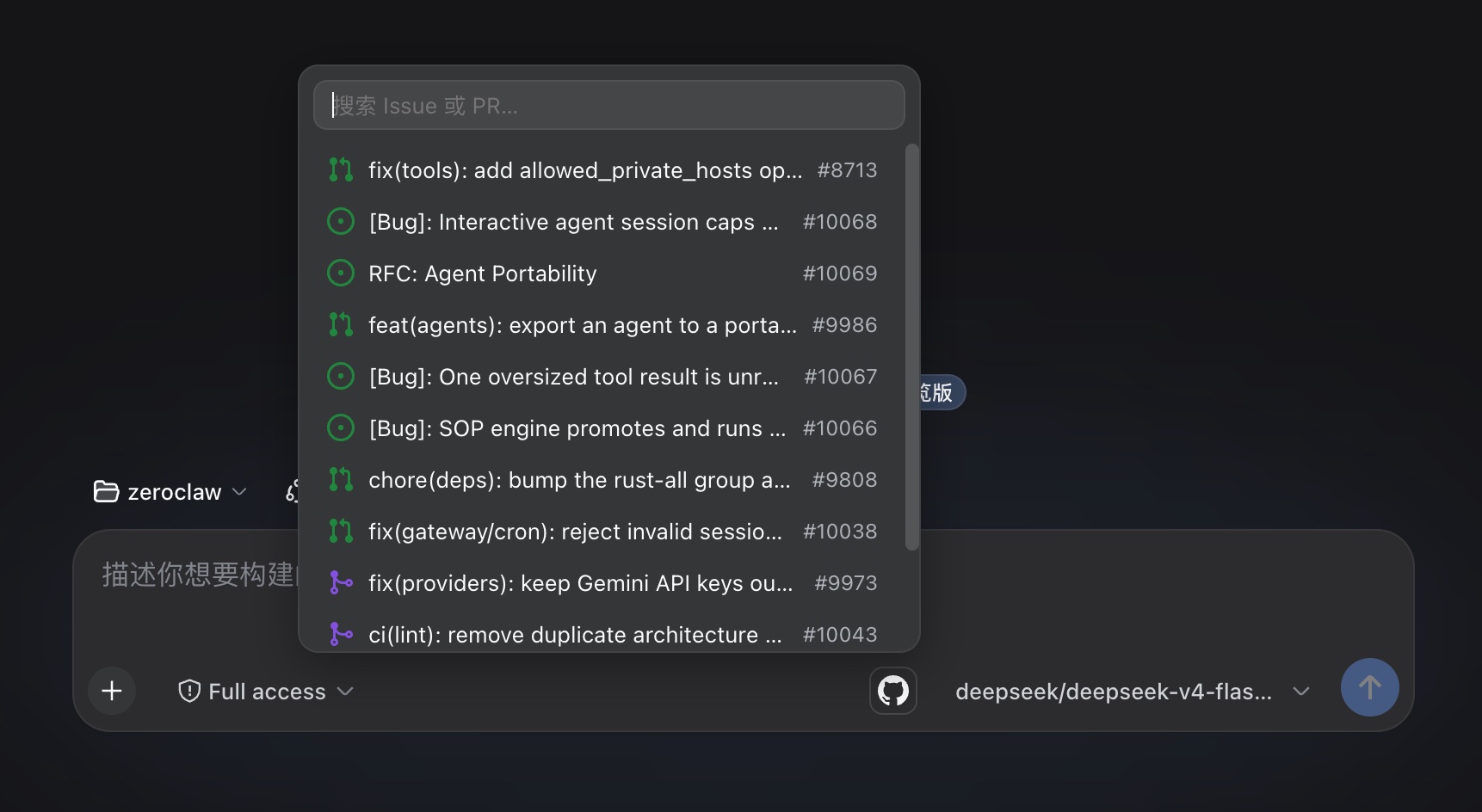
Working with a GitHub repository inside DeepSeek Harness Web, the most tedious micro-task is rarely the reasoning itself but rather hunting down issue numbers, copying PR links, and hand-typing references like @owner/repo#42 in the prompt. One wrong digit and you are back in the browser. dsh-github-picker collapses that loop into a single click on the GitHub icon in the composer toolbar: a popup lists the workspace repository's issues and pull requests with state icons (open, closed, draft, merged), filters locally as you type by number or title, and loads more rows on scroll with no result cap. Select a row and the reference is inserted in the format you chose in Settings (full URL or @owner/repo#number). On generation, the Host scans the draft for any GitHub references and passes the repository name and issue number as context to the model, without ever fetching issue bodies, keeping the privacy boundary tight.
The data path relies solely on the locally logged-in gh CLI. A single gh api search/issues query covers both issues and PRs; there is no OAuth app, device flow, or stored credential. The target repository is resolved automatically from the workspace git remote in any of the https, ssh, or git@ formats, and a friendly hint appears if no resolvable remote exists. Installation is a one-liner (dsh plugin install bitxeno/dsh-github-picker) followed by a restart of dsh web. No extra configuration is required.
Who is it for? If your daily loop involves prompting DeepSeek Harness to analyze bugs, review pull requests, or discuss an actively maintained repository, and you already have a local gh CLI login, this plugin turns GitHub reference insertion into a one-click action and eliminates the constant tab-switching between browser and editor.
Screenshots
Use Cases
- Insert issue numbers or PR links into prompts with a single click
- Let AI perform code review or bug analysis grounded in a specific PR
- Quickly reference GitHub issue numbers when discussing fixes in conversation
Best For
- Developers who regularly work on GitHub repos within DeepSeek Harness
- Prompt engineers who frequently cite issues or PRs
- Users with a local gh CLI login who want fast GitHub access from the web UI
Related Plugins

Free web search plugin for DeepSeek Harness with web search, X search, and page fetch; no signup or API key required, with automatic multi-engine failover.

AnySearch-powered web and vertical search plugin for DeepSeek Harness, offering real-time search, cleaned URL content, concurrent batch search via native web_search/web_fetch, no API key required.
Pixel-perfect webpage clone tool that uses an agent harness to turn any webpage into a scored, full-page React replica.

A bilingual cost-tracking plugin for DeepSeek Harness with session/daily cost, budget, official & custom provider balance, coding plan quotas, peak/off-peak pricing alerts, and history stats.