dsh-plugin-leaderboard
Run the following command in DeepSeek Harness:
dsh plugin install shaoxia20240902/dsh-plugin-leaderboard
Paste the following prompt into your AI chat to install this plugin:
Install the plugin leaderboard by running dsh plugin install shaoxia20240902/dsh-plugin-leaderboard in DeepSeek Harness; the source is available at https://github.com/shaoxia20240902/dsh-plugin-leaderboard .
About this plugin
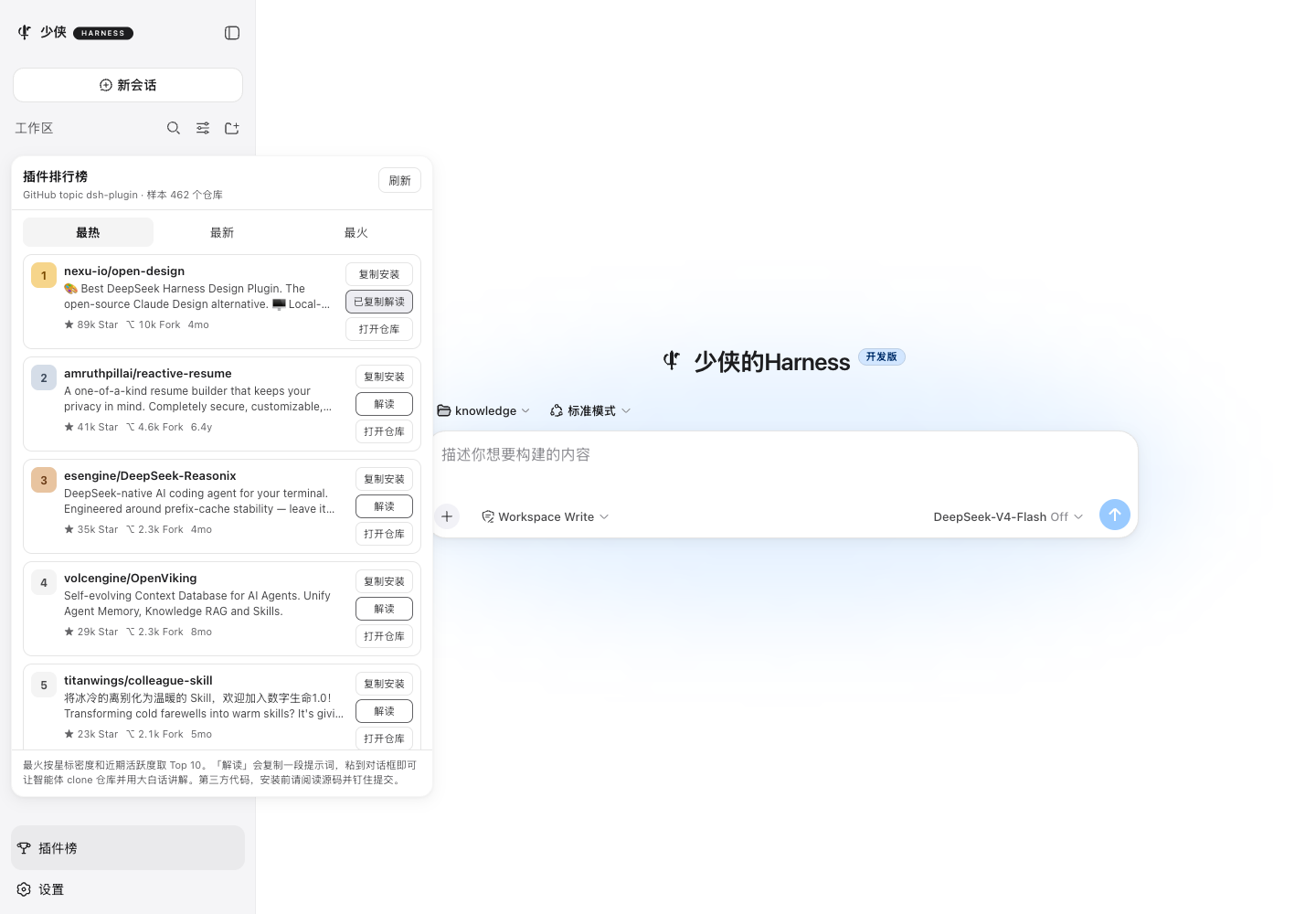
The DeepSeek Harness plugin ecosystem is growing fast. More and more repositories carry the dsh-plugin GitHub topic, but finding the ones actually worth installing still means scrolling through search results, squinting at descriptions, and guessing. dsh-plugin-leaderboard turns that into a sidebar panel inside the Web UI: four boards—Hottest, Newest, On-fire Top 10, and Editor Picks—each showing star and fork counts with a one-click copy-install button.
What sets it apart is not just the ranking list. Beside every plugin card sits an Interpret button: copy the prompt into the Harness composer and the agent clones the repository, then explains in plain language what the plugin does, what pain it removes, what you will see after install, how to get started, and who should skip it. The sidebar loads from a hosted MySQL-backed API first, so opening the panel never blocks on GitHub. The scoring formula blends logarithmic star and fork counts with a freshness boost and DSH relevance, then applies a staleness penalty so ancient repositories do not dominate forever. When GitHub is unreachable, the panel falls back to public HTTPS proxies automatically, and your token is sent only to the official API, never through a third-party mirror.
It is built for Harness users who are accumulating plugins and want a quick way to filter for quality, and for developers who prefer to let the agent explain an unfamiliar plugin in natural language. A personal install requires no token and works out of the box, while three entry points—the sidebar, the slash command, and the agent tool—are ready for you to ask ranking questions mid-conversation.
Screenshots
Use Cases
- Open the sidebar to check the hottest and newest community plugins
- Click Interpret and let the agent explain an unfamiliar plugin in plain language
- Browse the leaderboard through a public proxy when GitHub is unreachable
Best For
- Harness users who want to quickly filter quality plugins from the growing ecosystem
- Developers who prefer natural-language explanations of unfamiliar plugins
- Users in network-restricted environments who browse plugins via a proxy
Related Plugins

Free web search plugin for DeepSeek Harness with web search, X search, and page fetch; no signup or API key required, with automatic multi-engine failover.

AnySearch-powered web and vertical search plugin for DeepSeek Harness, offering real-time search, cleaned URL content, concurrent batch search via native web_search/web_fetch, no API key required.
Pixel-perfect webpage clone tool that uses an agent harness to turn any webpage into a scored, full-page React replica.

A bilingual cost-tracking plugin for DeepSeek Harness with session/daily cost, budget, official & custom provider balance, coding plan quotas, peak/off-peak pricing alerts, and history stats.