dsh-remote-access
Run the following command in DeepSeek Harness:
dsh plugin install zergtant/dsh-remote-access
Paste the following prompt into your AI chat to install this plugin:
Run dsh plugin install zergtant/dsh-remote-access in your terminal to install the plugin; the full source is available at https://github.com/zergtant/dsh-remote-access
About this plugin
The dsh web GUI binds to 127.0.0.1 by design, so reaching it from a phone, a colleague's laptop, or over the public internet means either exposing a raw port or standing up Nginx, Let's Encrypt, and a reverse-proxy config just for one path. That is more moving parts than most developers want for a single demo session.
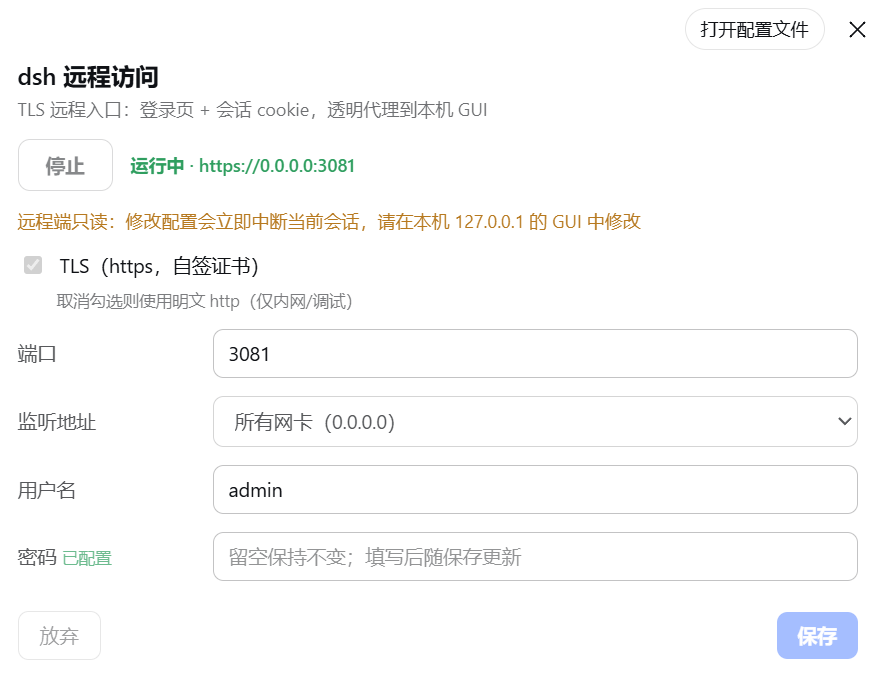
dsh-remote-access adds a self-contained TLS edge layer that handles all of that in one step. It opens its own listener (default port 3081), generates a self-signed certificate on first launch and auto-renews it, gates every request behind a username/password login with session cookies and per-IP rate limiting, then transparently proxies both HTTP and WebSocket traffic back to the loopback dsh instance while rewriting Host and Origin so the main service never sees a foreign origin. A dedicated Settings panel inside the GUI lets you start or stop the edge, migrate the port, toggle TLS, and edit credentials—all applied hot, no dsh restart required.
Ideal for developers who need to demo the dsh GUI over a LAN, push it through an frp tunnel, or give a teammate quick access during a code review. If you already run Nginx, Caddy, or a managed reverse proxy, bind the edge to 127.0.0.1 and let your outer gateway handle certificates and IP whitelisting, using this plugin purely as the secure local hop that frp or an SSH port-forward talks to.
Screenshots
Use Cases
- Demo the dsh GUI to a colleague over the local network
- Expose the local dsh GUI to the internet via an frp tunnel
- Grant quick GUI access on a LAN without standing up Nginx
Best For
- Developers who demo dsh over a LAN or remotely
- Engineers using frp or SSH tunnels for remote debugging
- Users with an outer reverse proxy who need a secure local loopback endpoint
Related Plugins

Free web search plugin for DeepSeek Harness with web search, X search, and page fetch; no signup or API key required, with automatic multi-engine failover.

AnySearch-powered web and vertical search plugin for DeepSeek Harness, offering real-time search, cleaned URL content, concurrent batch search via native web_search/web_fetch, no API key required.
Pixel-perfect webpage clone tool that uses an agent harness to turn any webpage into a scored, full-page React replica.

A bilingual cost-tracking plugin for DeepSeek Harness with session/daily cost, budget, official & custom provider balance, coding plan quotas, peak/off-peak pricing alerts, and history stats.