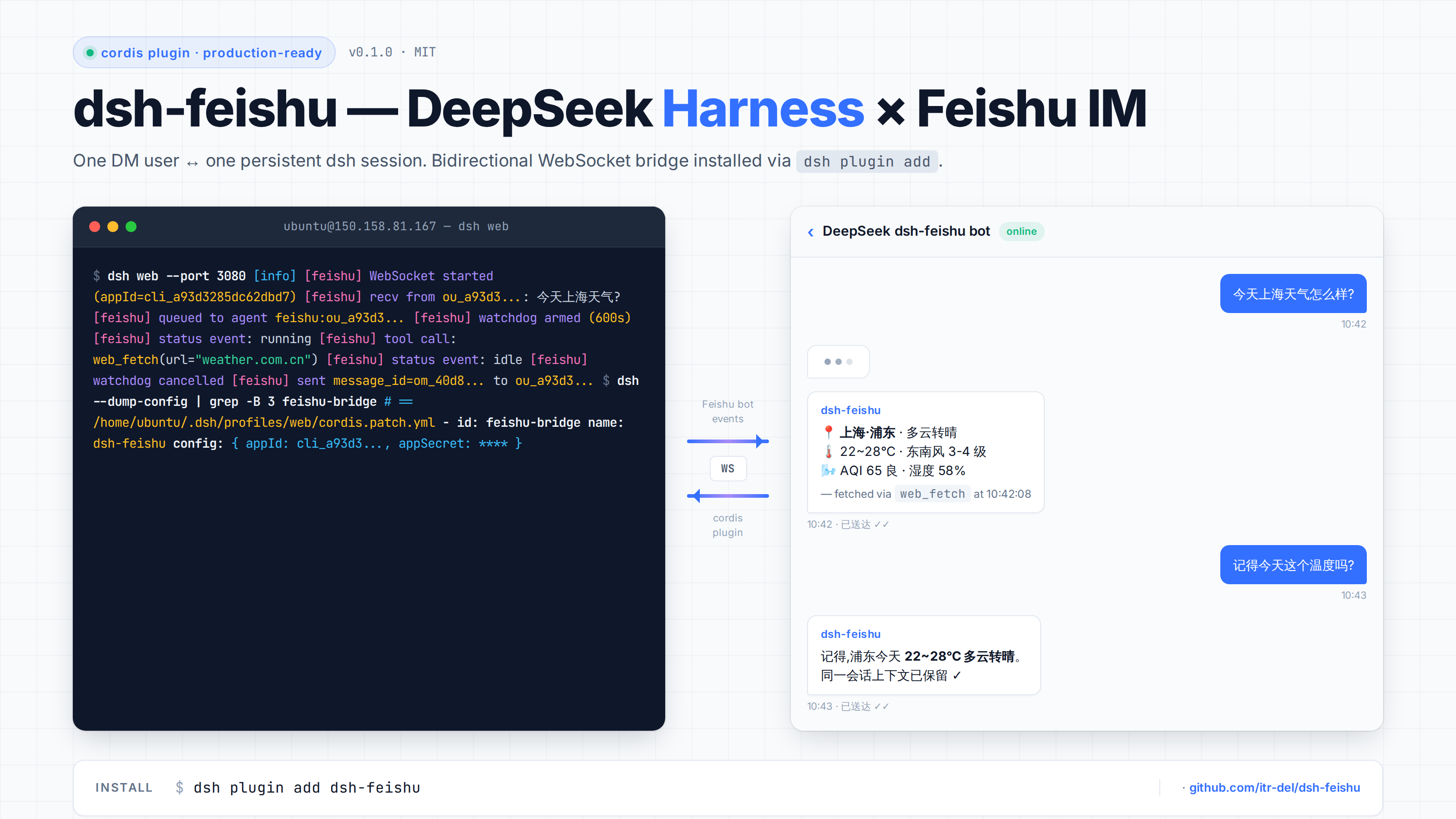
dsh-feishu
Run the following command in DeepSeek Harness:
dsh plugin install itr-del/dsh-feishu
Paste the following prompt into your AI chat to install this plugin:
Run dsh plugin install itr-del/dsh-feishu inside DeepSeek Harness to install the plugin; the full source lives at https://github.com/itr-del/dsh-feishu — installation places it under ~/.dsh/profiles/web/node_modules and patches cordis.patch.yml automatically.
About this plugin
Asking a quick question and having to hunt for the dsh web tab, copy text, then switch back to chat is friction nobody needs. dsh-feishu is a pluggable cordis bridge that wires a Feishu (Lark) self-built bot directly into a running DeepSeek Harness web profile, so your AI assistant lives inside the IM window you already use all day. Each DM user maps to one persistent session; multi-turn context survives reconnects; assistant replies are chunked at 4 000 characters and pushed back via the Lark SDK; internal tool-call markers are stripped before anything leaves your machine. The plugin is pure ESM, ships with no compile step, collects no telemetry, and keeps every byte local. It currently handles text-only DMs — images, files, cards, and group chats are out of scope. If you already run DeepSeek Harness and want the assistant one keystroke closer in your daily chat client, this is the bridge.
Screenshots
Use Cases
- Ask follow-up questions to your AI in a Feishu DM without hunting for a browser tab
- Resume a multi-turn session after a network reconnect without losing context
- Give a team a single Feishu bot backed by DeepSeek Harness instead of a separate web UI
Best For
- Developers already running DeepSeek Harness
- Users whose daily work lives inside Feishu
- Teams that require local, telemetry-free AI conversations
Related Plugins

Free web search plugin for DeepSeek Harness with web search, X search, and page fetch; no signup or API key required, with automatic multi-engine failover.

AnySearch-powered web and vertical search plugin for DeepSeek Harness, offering real-time search, cleaned URL content, concurrent batch search via native web_search/web_fetch, no API key required.
Pixel-perfect webpage clone tool that uses an agent harness to turn any webpage into a scored, full-page React replica.

A bilingual cost-tracking plugin for DeepSeek Harness with session/daily cost, budget, official & custom provider balance, coding plan quotas, peak/off-peak pricing alerts, and history stats.