dsh-updater-npm
Run the following command in DeepSeek Harness:
dsh plugin install SiriusWJ/dsh-updater-npm
Paste the following prompt into your AI chat to install this plugin:
Run dsh plugin install SiriusWJ/dsh-updater-npm in the DeepSeek Harness terminal to install the plugin; source code is available at https://github.com/SiriusWJ/dsh-updater-npm
About this plugin
Keeping DeepSeek Harness up to date and its documentation at hand used to mean juggling npm commands in a terminal and tab-switching to a GitHub repo. dsh-updater-npm folds both chores into the DSH settings page so maintenance becomes a glance rather than a ritual.
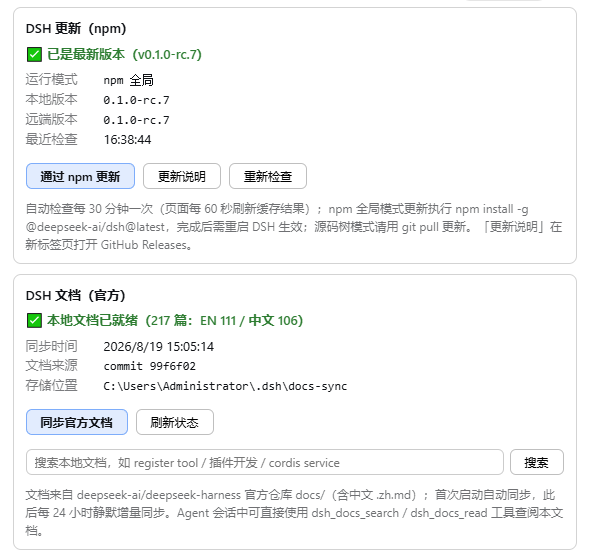
For updates, the plugin polls npm for the latest @deepseek-ai/dsh release, flags a new version with a red dot, and runs a global install with live npm output streaming. On Windows it uses a staged atomic swap to sidestep EBUSY lock conflicts; elsewhere it reinstalls in place and offers a one-click restart via PowerShell or /bin/sh. When DSH is running from a source tree, the plugin detects that mode and routes you to git pull instead, and it guards against multi-copy environments by targeting only the running instance. For docs, it incrementally syncs the official documentation (skipping unchanged files by GitHub blob sha) into your local workspace and registers dsh_docs_search and dsh_docs_read as model tools, letting you query and read documentation directly inside the conversation without switching context.
Built for engineers who keep DSH in their daily workflow—tweaking configuration, looking up API details, or citing official docs without leaving the terminal. The UI and tool output are bilingual (Chinese / English) and follow your system language automatically.
Screenshots
Use Cases
- One-click update DSH to the latest stable release and auto-restart
- Search and read official DSH documentation directly in the conversation
- Safely update DSH in npm-global or source-tree mode without affecting the running instance
Best For
- Engineers who rely on DSH for daily AI-assisted development
- Developers who frequently reference DSH docs without switching tabs
- Teams running multiple DSH instances who need to avoid cross-copy update confusion
Related Plugins

Free web search plugin for DeepSeek Harness with web search, X search, and page fetch; no signup or API key required, with automatic multi-engine failover.

AnySearch-powered web and vertical search plugin for DeepSeek Harness, offering real-time search, cleaned URL content, concurrent batch search via native web_search/web_fetch, no API key required.
Pixel-perfect webpage clone tool that uses an agent harness to turn any webpage into a scored, full-page React replica.

A bilingual cost-tracking plugin for DeepSeek Harness with session/daily cost, budget, official & custom provider balance, coding plan quotas, peak/off-peak pricing alerts, and history stats.