dsh-download-progress
Run the following command in DeepSeek Harness:
dsh plugin install azhe411/dsh-download-progress
Paste the following prompt into your AI chat to install this plugin:
To install this plugin in DeepSeek Harness, run `dsh plugin install azhe411/dsh-download-progress` in your terminal, or visit https://github.com/azhe411/dsh-download-progress for the source code.
About this plugin
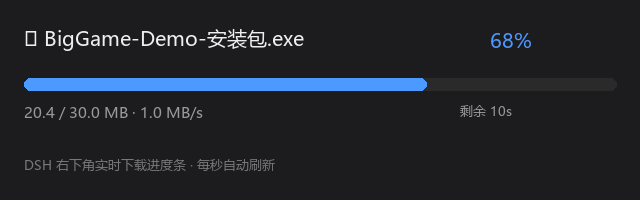
In DeepSeek Harness, download tasks often lack intuitive visibility, leading users to forget progress during background downloads. dsh-download-progress solves this by featuring a persistent floating panel in the bottom-right corner that tracks and displays real-time details for every task, including filename, percentage, speed, and ETA. It supports multi-task concurrency, maintains a history of up to 20 completed or failed tasks, and allows users to quickly locate files via an "Open" button. Additionally, the panel supports dragging and resizing to ensure a good display across different screen sizes.
Screenshots
Use Cases
- Real-time status of each task when downloading multiple plugins or models simultaneously.
- Monitoring download speed and remaining time when downloading large files or codebases.
- Viewing completed or failed historical download tasks and quickly locating files.
Best For
- DeepSeek Harness users who need to frequently manage download tasks and desire an intuitive interface.
- Developers or advanced users handling multiple download tasks simultaneously and needing resume capability.
- Users who value visual download process tracking and wish to avoid forgetting background tasks.
Related Plugins

Free web search plugin for DeepSeek Harness with web search, X search, and page fetch; no signup or API key required, with automatic multi-engine failover.

AnySearch-powered web and vertical search plugin for DeepSeek Harness, offering real-time search, cleaned URL content, concurrent batch search via native web_search/web_fetch, no API key required.
Pixel-perfect webpage clone tool that uses an agent harness to turn any webpage into a scored, full-page React replica.

A bilingual cost-tracking plugin for DeepSeek Harness with session/daily cost, budget, official & custom provider balance, coding plan quotas, peak/off-peak pricing alerts, and history stats.